
The Website Migration Playbook: A Three-Phase SEO Strategy to Preserve Rankings and Authority
A client of mine migrated their e-commerce site to a new CMS on a Friday afternoon. By Monday, 40% of their organic traffic had vanished. The redirect map they'd built covered only their top 50 pages. The other 3,200 pages? All returning 404 errors.
The Website Migration Playbook: A Three-Phase SEO Strategy to Preserve Rankings and Authority
A client of mine migrated their e-commerce site to a new CMS on a Friday afternoon. By Monday, 40% of their organic traffic had vanished. The redirect map they'd built covered only their top 50 pages. The other 3,200 pages? All returning 404 errors. It took them eleven months to recover, and some of those rankings never came back. That experience permanently changed how I approach every migration, and it's the reason I now follow a rigid three-phase process that leaves nothing to chance.
Website migrations are one of the highest-risk activities in SEO. Whether you're changing domain names, switching from HTTP to HTTPS, moving to a new CMS, or restructuring your entire URL architecture, the potential for catastrophic traffic loss is real. According to analysis of large-scale domain migrations, the average recovery time to regain original organic traffic is over 500 days, and roughly 17% of migrations never fully recover.
But here's the thing: migrations don't have to be disasters. When you follow a disciplined website migration SEO checklist and execute each phase methodically, you can preserve the vast majority of your rankings and even use the migration as an opportunity to strengthen your site's authority.
Pre-Migration: The SEO Audit That Protects Your Rankings
This is where most teams cut corners, and it's exactly where you can't afford to. The pre-migration SEO audit is your insurance policy. Skip it, and you're flying blind.
Benchmark Everything Before You Touch Anything
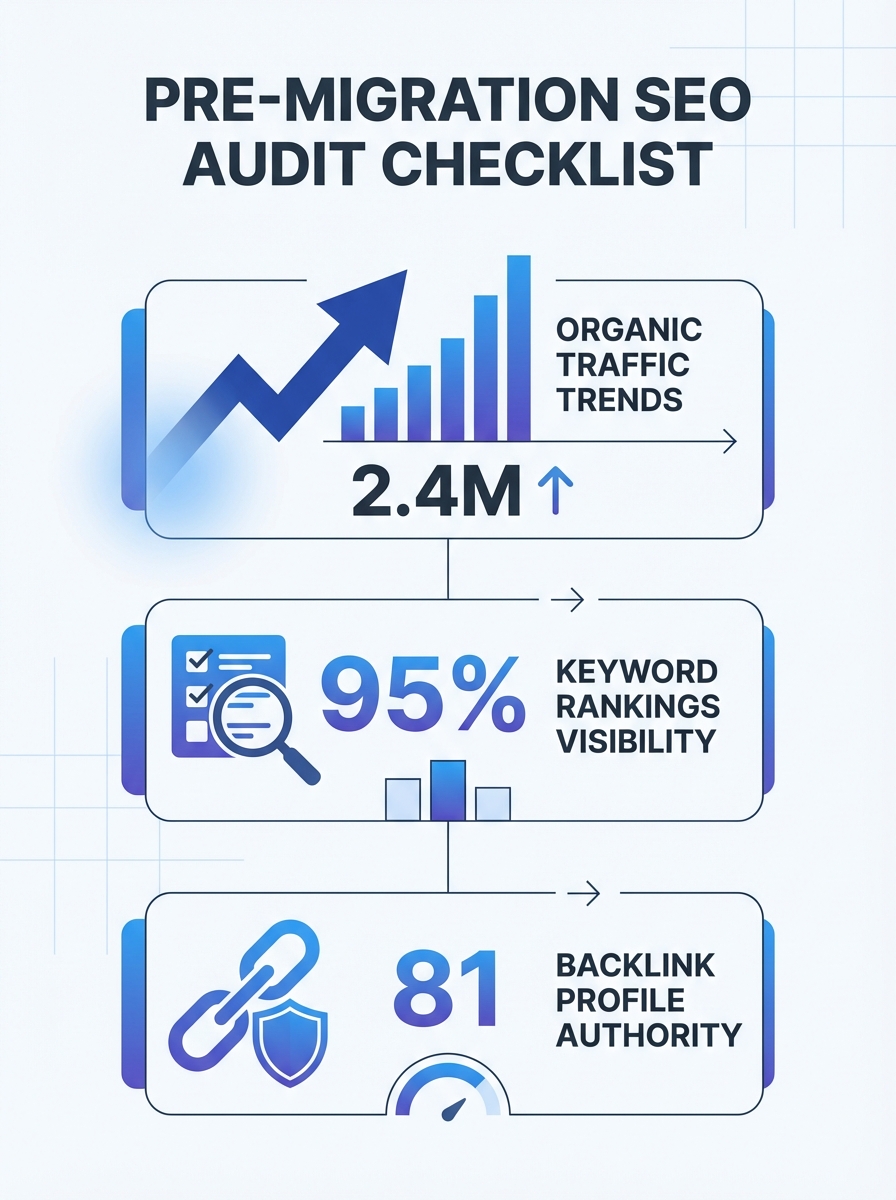
Before a single URL changes, you need a complete snapshot of your site's current SEO performance. I'm talking about a thorough audit of every metric that matters, not just a quick glance at your Google Analytics dashboard. If you've ever worked through finding hidden errors in your marketing data, you know how easy it is to miss critical signals when you're not looking at the full picture.
Here's what your benchmark should capture:
Organic traffic by URL, not just sitewide totals
Keyword rankings for every page driving meaningful traffic
Total indexed pages and current crawl errors
Your complete backlink profile, both external and internal links
Core Web Vitals and page speed scores
Conversion rates per landing page
This data becomes your baseline for measuring success after the migration. Without it, you'll have no way to identify what broke or what improved.
Inventory Your Content and Decide What Migrates
Not every page deserves to make the trip. This is your opportunity to prune. Look at your analytics and identify pages with zero traffic, thin content, or duplicate topics. Two blog posts covering "email marketing best practices" and "email marketing tips" probably don't both need to exist in the new structure.
Consolidate weak pages into stronger ones. Redirect the URLs you're eliminating to the most relevant surviving page. This decluttering actually helps your SEO because, as the team at Outpace SEO notes, rebuilding your internal linking architecture into tight topic clusters signals deep topical authority to search engines and accelerates ranking for your new URLs.
Set Up a Staging Environment
Copy your new site to a staging subdomain and lock it down. Either password-protect it or apply noindex directives to prevent search engines from crawling and indexing it prematurely. I've seen staging sites get indexed and compete with the live site for rankings. It's an ugly problem to fix.
As Semrush's migration checklist recommends, the typical process involves copying your site's files to a new subdomain like staging.example.com. Crawl the staging environment with your preferred auditing tool and check for broken links, missing meta data, and rendering issues before anything goes live.
Isolate Your Variables
This is advice I wish someone had drilled into my head years ago. Don't change everything at once. A domain change plus a CMS switch plus a full URL restructure plus a design overhaul is a recipe for chaos. When traffic drops (and it will dip, at least temporarily), you won't know which change caused the problem.
One SaaS company I worked with avoided a traffic collapse by spreading their rebrand, platform switch, and URL restructuring over six months instead of shipping it all in a single release. Boring? Yes. Effective? Absolutely.
Technical Implementation and Your 301 Redirect Strategy
This is the phase where your 301 redirect strategy domain migration plan either saves you or sinks you. Every technical decision here has direct ranking consequences.
Build Your 301 Redirect Map
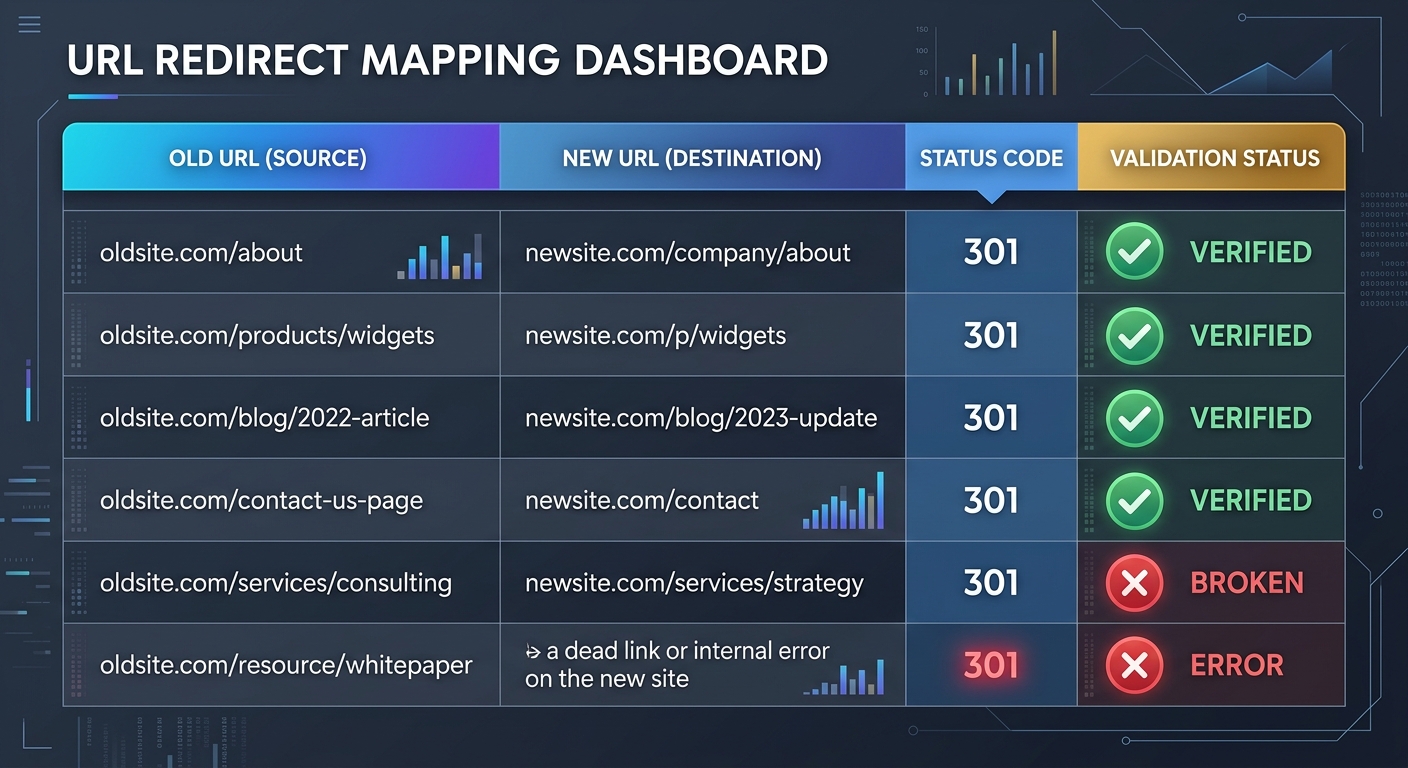
I cannot overstate this: your redirect map is the single most important deliverable in the entire migration. Every old URL needs a one-to-one mapping to its most relevant new URL. Not the homepage. Not a category page. The actual equivalent page.
Marcel Digital's migration guide puts it clearly: create a full 301 redirect map and implement it on your website. This guarantees that old URLs redirect properly to their new destinations and that internal links redirect correctly too.
Build your map in a spreadsheet with four columns: old URL, new URL, redirect type (301 for permanent changes), and a flag for whether structured data needs updating. For a site with thousands of pages, yes, this is tedious work. Do it anyway.
A few hard rules for your redirects:
Never create redirect chains. A redirect that points to another redirect wastes crawl budget and dilutes link equity. Every old URL should land on the final destination in a single hop.
Avoid redirecting everything to the homepage. This is a soft 404 in Google's eyes, and you'll lose the ranking power of every affected page.
Implement redirects at the server level, not through JavaScript or meta refreshes. Server-level redirects pass the most link equity, as confirmed by Moz's redirect documentation.
Update Internal Links Directly
Don't rely on your redirects to handle internal linking. Go through your new site and update every internal link to point directly to the new URL. Redirects are a safety net for external links and bookmarks you can't control. Your own internal links should be clean from day one.
This is also when you should rebuild your internal linking strategy around topic clusters. Group related content together and link them deliberately. If you're tracking keyword rankings for specific topic areas, strong internal linking helps search engines understand which pages are your authority hubs.
Preserve Your Structured Data
Schema markup often gets lost in migrations, especially when you're changing CMS platforms. Audit your staging site to confirm that Product, Article, FAQ, Organization, and any other schema types are intact and accurately reflecting the new URLs. Google uses structured data to generate rich results, and losing those rich snippets can crater your click-through rates even if your ranking position stays the same.
While you're checking metadata, make sure your meta descriptions are optimized for the new URL structure. A migration is a natural opportunity to refresh stale meta descriptions, especially for your highest-traffic pages.
Handle the Switchover Carefully
When you're ready to flip the switch, use a 503 HTTP status code during the brief maintenance window. This tells search engines the downtime is temporary and they should come back later, rather than deindexing your pages. Keep your old host active until DNS propagation is complete, which can take up to 48 hours.
If you're doing a domain migration specifically, use Google Search Console's "Change of Address" tool to formally notify Google. This step is surprisingly often skipped, and it meaningfully speeds up the transition.
Monitoring and Recovering Your Rankings
Your site is live. The redirects are in place. Now begins the most nerve-wracking part: waiting and watching.
Submit and Monitor Immediately
Within the first hour of launch:
Submit your updated XML sitemap to Google Search Console and Bing Webmaster Tools
Request indexing for your most important pages
Run a full crawl of the live site to catch any broken links or redirect errors that slipped through
Verify that your robots.txt isn't accidentally blocking crawlers from the new URLs
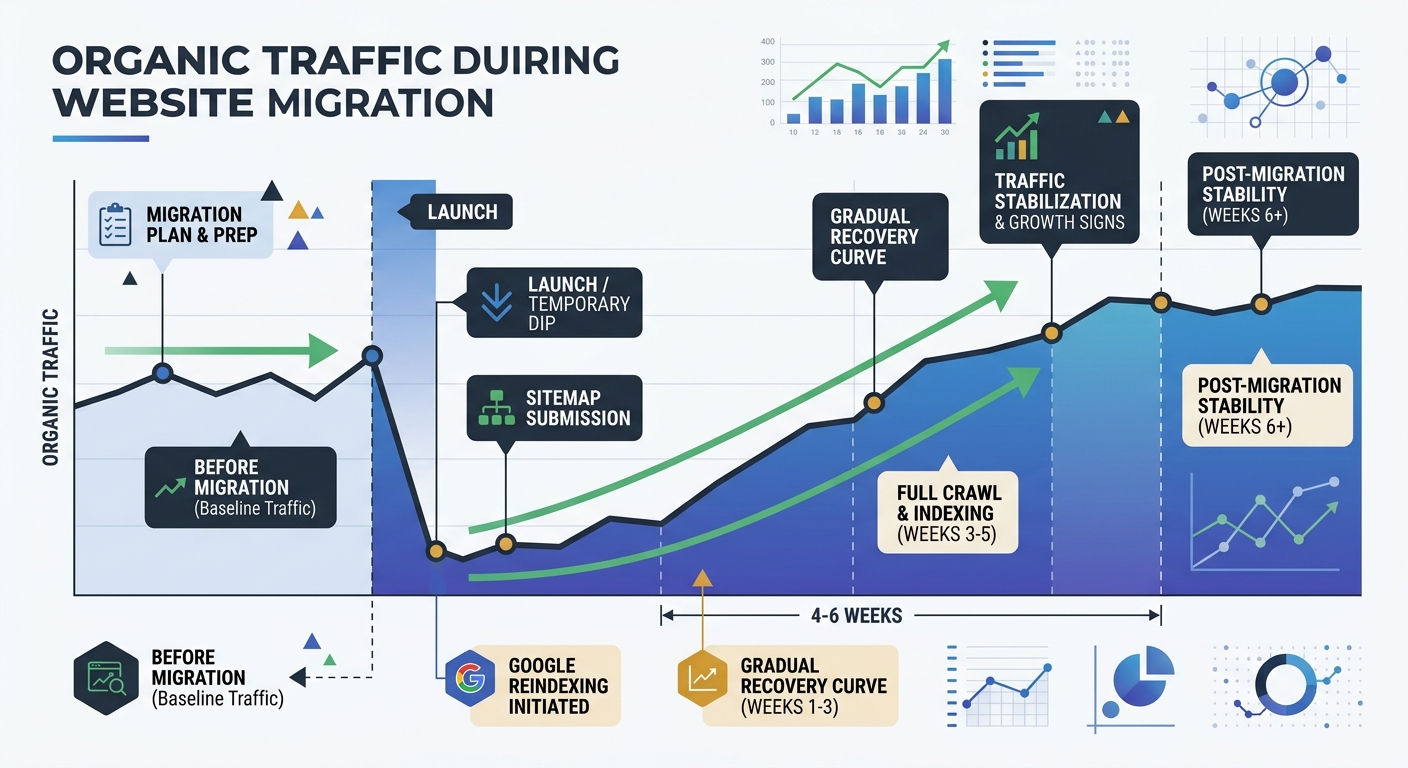
Organic traffic typically takes four to six weeks to normalize after a migration, with ranking instability sometimes lasting two to three months. Don't panic at the initial dip. Do panic if you see 404 errors stacking up in Search Console.
Watch for Silent Decay
Here's something that catches experienced SEOs off guard: your core pages might look fine while your long-tail keywords quietly erode. I call this silent decay, and it happens when the semantic relationships between your content pages get disrupted during restructuring.
For example, if your content about "project management software" was internally linked to articles about "team collaboration" and "workflow automation" on the old site, but those connections are missing on the new site, you'll lose topical authority gradually. The drop shows up in conversions before it shows up in traffic dashboards.
This is why your site performance metrics need to go beyond simple traffic counts. Monitor conversion rates, engagement metrics, and rankings at the individual URL level. If you're seeing unexplained ranking drops, correlate them with your redirect map to identify pages where link equity might not have transferred correctly.
Set Recovery Benchmarks
Your post-migration ranking recovery targets should be specific and time-bound. Reasonable goals for a well-executed migration:
90% of previous organic traffic restored within 60 days
Zero unresolved 404 errors from redirected URLs within 7 days
Core Web Vitals meeting or exceeding pre-migration scores within 30 days
All priority pages indexed within 14 days
If you're falling short on any of these, escalate immediately. The longer redirect issues or indexing problems persist, the harder recovery becomes.
The Migration Mindset Shift
The biggest mistake I see teams make isn't a technical one. It's treating a migration as a project with an end date. The reality is that post-migration monitoring should continue for at least 90 days, and some recovery patterns don't become visible for six months.
But here's the encouraging flip side: a well-executed migration can actually improve your SEO. You're cleaning up technical debt, consolidating weak content, improving site speed, and rebuilding your architecture with intentionality. TransferWise's migration to Wise.com initially saw traffic drop from 32 million to 12.9 million monthly visits. Through disciplined SEO strategy and careful execution, they eventually scaled to 205 million visits.
The difference between a migration that tanks your site and one that propels it forward comes down to preparation, precision, and patience. Follow the three phases. Build the redirect map. Benchmark before you start. And monitor relentlessly after you launch. Your future self (and your traffic numbers) will thank you.

Sarah Chen
SEO strategist and web analytics expert with over 10 years of experience helping businesses improve their organic search visibility. Sarah covers keyword tracking, site audits, and data-driven growth strategies.
Frequently Asked Questions
- How long does it take to recover organic traffic after a website migration?
- According to analysis of large-scale domain migrations, the average recovery time to regain original organic traffic is over 500 days. Organic traffic typically takes four to six weeks to normalize after a migration, with ranking instability sometimes lasting two to three months.
- What should you include in a pre-migration SEO audit?
- A pre-migration SEO audit should capture organic traffic by URL, keyword rankings for every page, total indexed pages and crawl errors, your complete backlink profile, Core Web Vitals and page speed scores, and conversion rates per landing page. This data becomes your baseline for measuring success after the migration.
- What is the most important part of a website migration for SEO?
- The 301 redirect map is the single most important deliverable in the entire migration. Every old URL needs a one-to-one mapping to its most relevant new URL, implemented at the server level rather than through JavaScript or meta refreshes, to ensure old URLs redirect properly and preserve link equity.
- Should you set up a staging environment before migrating your website?
- Yes, you should copy your new site to a staging subdomain and lock it down with password protection or noindex directives to prevent search engines from indexing it prematurely. You can then crawl the staging environment to check for broken links, missing metadata, rendering issues, and JavaScript compatibility before the site goes live.
- What should you do immediately after launching a migrated website?
- Within the first hour of launch, submit your updated XML sitemap to Google Search Console and Bing Webmaster Tools, request indexing for your most important pages, run a full crawl to catch broken links, and verify that your robots.txt isn't blocking crawlers. For domain migrations, use Google Search Console's "Change of Address" tool to formally notify Google.
- How many pages should you include in your redirect map?
- Every old URL needs a one-to-one mapping in your redirect map, not just your top pages. One case study showed that redirecting only the top 50 pages while leaving 3,200 other pages returning 404 errors resulted in 40% organic traffic loss and an eleven-month recovery period.
- What are common mistakes to avoid when setting up redirects during a migration?
- Avoid creating redirect chains (which waste crawl budget), redirecting everything to the homepage (which loses ranking power), and implementing redirects through JavaScript or meta refreshes instead of at the server level. Each old URL should land on its final destination in a single hop using 301 redirects.
- What recovery benchmarks should you set for a website migration?
- Reasonable post-migration recovery targets include 90% of previous organic traffic restored within 60 days, zero unresolved 404 errors within 7 days, Core Web Vitals meeting or exceeding pre-migration scores within 30 days, and all priority pages indexed within 14 days.
Explore more topics