
The Analytics Tag Audit: Debugging Silent Data Loss in GA4 Before It Tanks Your 2026 Performance Reports
Paramark's analysis of GA4 implementations across mid-market companies found that organizations relying solely on GA4 misallocated an average of 18% of their digital marketing budgets due to data gaps, with paid social channels absorbing the worst distortion because ad blockers disproportionately su

The Analytics Tag Audit: Debugging Silent Data Loss in GA4 Before It Tanks Your 2026 Social Media Performance Reports
Paramark's analysis of GA4 implementations across mid-market companies found that organizations relying solely on GA4 misallocated an average of 18% of their digital marketing budgets due to data gaps, with paid social channels absorbing the worst distortion because ad blockers disproportionately suppress traffic from platforms like Facebook, Instagram, and LinkedIn.
That 18% figure becomes catastrophic when you consider what it means for social media campaign reporting. If your Q1 paid social campaign appears to generate 400 conversions in GA4 but the actual number is closer to 520, every decision you make about scaling, pausing, or reallocating budget for that channel starts from a flawed premise. You aren't just underperforming — you're misreading which social platforms actually work for your business, then doubling down on the wrong ones.
I've audited GA4 setups for dozens of organizations over the past three years, and the pattern is consistent: social media traffic suffers the highest rate of silent data loss of any channel. GA4 won't send you an alert when events stop firing. It won't flag that your Instagram campaign conversions dropped to zero because someone changed a button class on the landing page. The data just quietly disappears, and your monthly social performance report tells a story that never happened.
Why Social Traffic Is Disproportionately Vulnerable to GA4 Data Loss
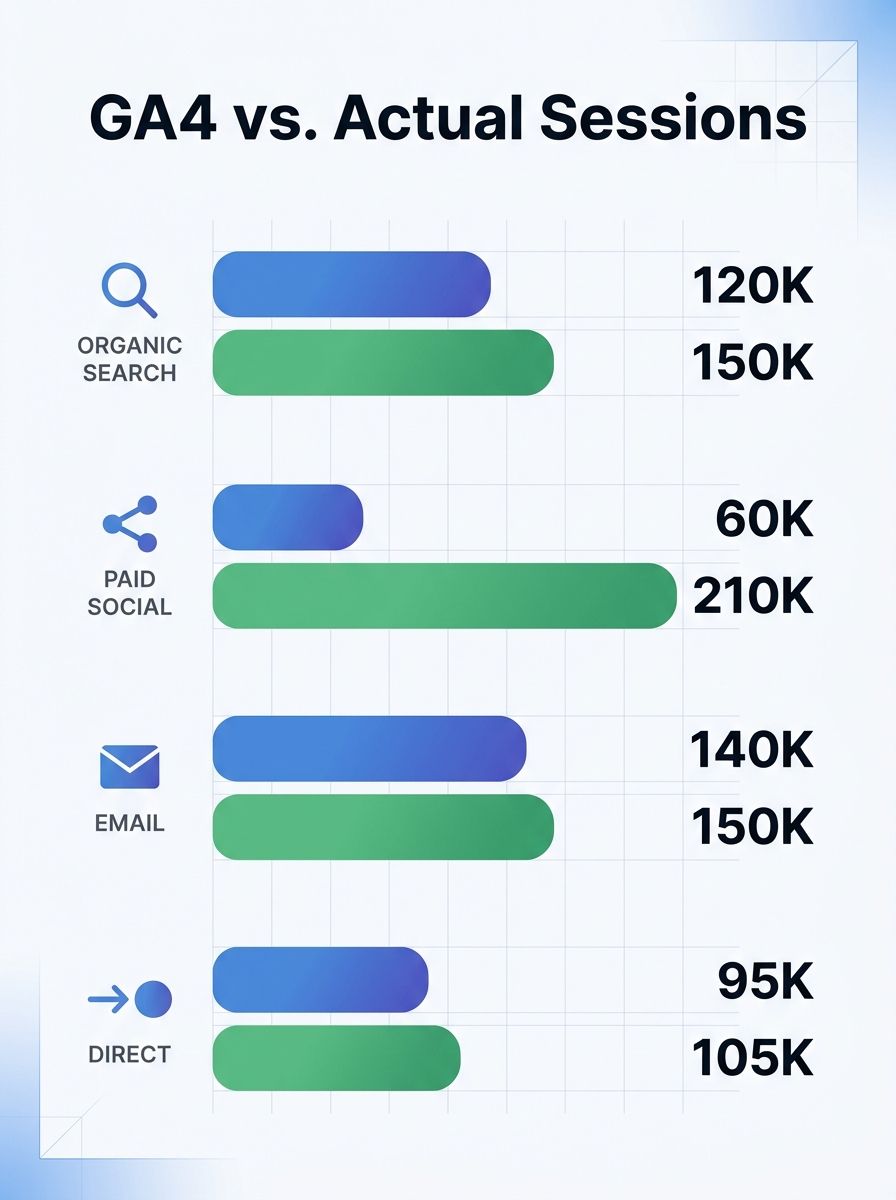
Ad blockers affect an estimated 15–30% of web traffic, but that suppression isn't evenly distributed across channels. Users arriving from social media platforms tend to skew younger and more technically savvy — demographics with significantly higher ad blocker adoption rates. When an ad blocker intercepts the GA4 tag, the visit still happens but GA4 never records it. Your social media manager sees 10,000 clicks in Meta Ads Manager, but GA4 reports 7,200 sessions. The 2,800 missing visits carried real engagement and real conversions that vanish from your reports.
This creates a specific problem for social media teams: their channel consistently looks worse in GA4 than it actually performs, while organic search (where ad blocker rates are lower) looks comparatively better. Budget allocation meetings then shift spend away from social based on data that's structurally biased against it.
The KISSmetrics audit framework recommends running parallel tracking with a person-level analytics tool to measure the gap between GA4's reported social traffic and actual social traffic. In my experience, the delta for paid social specifically ranges from 12% to 35% depending on the audience demographic.
The Five-Point Social Campaign Tag Audit
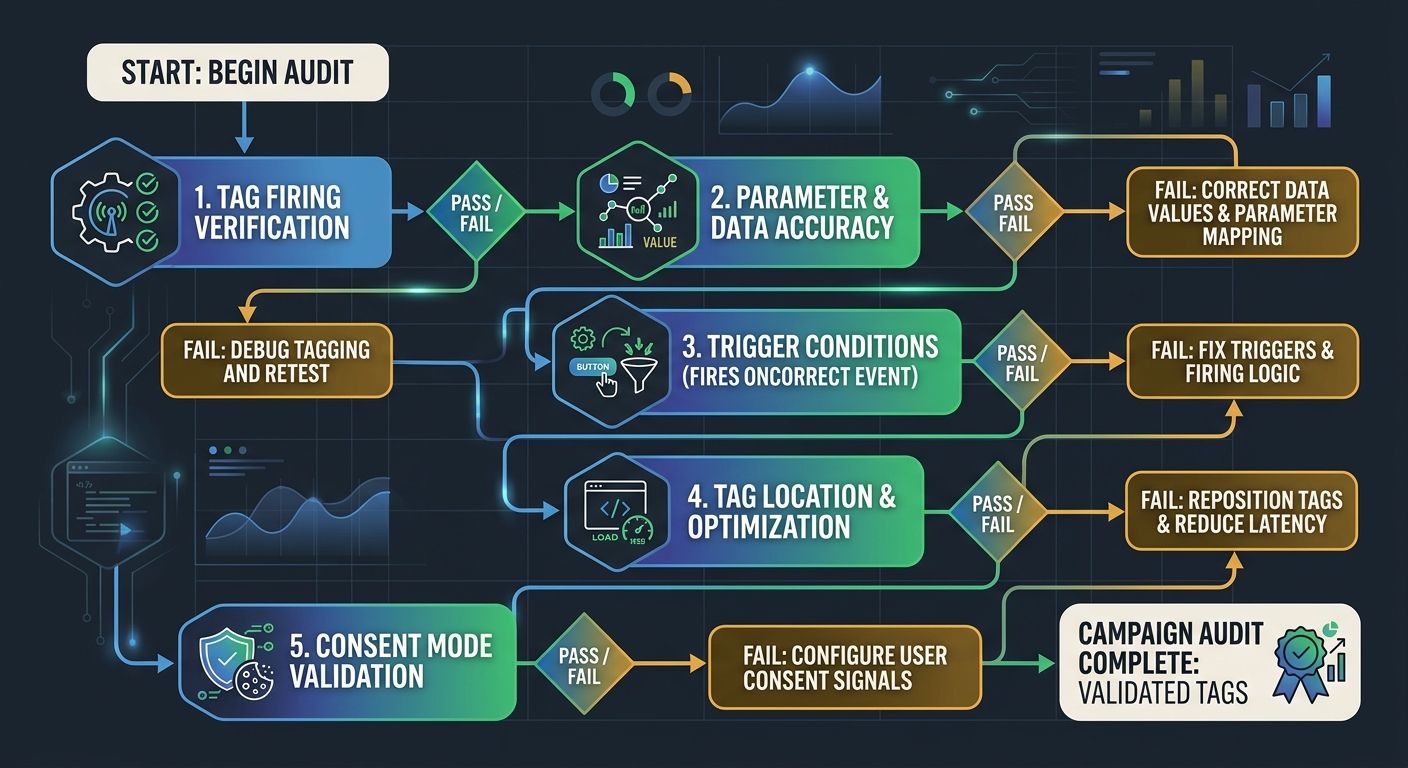
A full Google Analytics tag audit covers every event and page on your site, but if your immediate concern is social media measurement accuracy, these five checks catch the issues I see most often.
1. Verify Tag Firing on Every Social Landing Page
Social campaigns often point to dedicated landing pages, seasonal URLs, or pages with dynamic content that loads differently than your main site. Tags can fire perfectly on your homepage while completely failing on a campaign-specific landing page built in a different page builder or subdomain.
Open Google Tag Manager's Preview mode and navigate to each URL used in active social campaigns. Confirm that the GA4 Configuration tag fires on page load and that any conversion events (form submissions, add-to-cart actions, video plays) trigger correctly. As BlackTruck Media's audit guide warns, broken triggers or missing tags cause valuable conversion and engagement data to be lost — and social landing pages are the most common blind spot because they're created fast, tested visually, and rarely validated for analytics.
2. Validate UTM Parameter Persistence
Social platforms append UTM parameters to URLs, and those parameters are how GA4 attributes traffic to specific campaigns, ad sets, and creatives. But UTM parameters break more often than most marketers realize. Redirects strip them. Link shorteners sometimes drop them. Single-page application routing can lose them during client-side navigation.
Test every link format your social team uses: the raw URL, the shortened version, the version with a tracking pixel wrapper. Confirm that GA4 records the correct source, medium, and campaign name for each variation. If parameters get stripped, your social traffic gets bucketed as "direct" — inflating direct traffic numbers while making social campaigns look underperforming.
3. Check Enhanced Measurement Conflicts
GA4's Enhanced Measurement automatically tracks events like outbound clicks, scroll depth, and video engagement. This sounds helpful until you realize that your manually configured events might conflict with these automatic ones, creating duplicate event counts. A social media landing page with an embedded TikTok or YouTube video might fire both the Enhanced Measurement video event and your custom video engagement event, doubling the recorded interactions and inflating engagement metrics for that campaign.
4. Audit Cross-Domain Session Continuity
If your social ads drive users from your marketing site to a separate checkout domain, booking platform, or lead form hosted on a third-party tool, cross-domain tracking configuration determines whether GA4 treats that as one continuous session or two separate ones. Without proper setup, the conversion gets attributed to a referral from your own marketing domain rather than to the social campaign that initiated it. This is one of the most common sources of analytics discrepancies between what case studies show and what your reports say.
5. Confirm Consent Mode v2 Behavioral Modeling
With privacy regulations tightening globally, many social media users opt out of tracking when they arrive on your site. Advanced Consent Mode allows GA4 to use behavioral modeling to estimate conversions from non-consenting users, but only if it's correctly configured. Misconfiguration can produce "ghost traffic" — modeled sessions that don't map to real behavior — or it can fail to model at all, leaving a massive hole in your social conversion data.
DebugView Implementation Errors That Hide in Production
GA4's DebugView is the primary tool for validating that events fire correctly, but it has a well-documented blind spot that catches social media teams constantly. Events that work perfectly in DebugView and GTM Preview mode can fail completely in production.
A widely-discussed Stack Overflow thread documents this exact scenario: ecommerce conversion tracking working flawlessly in DebugView while recording zero live conversions. The root cause varies — sometimes it's a trigger condition that only matches in debug mode, sometimes it's a race condition where the page redirects before the tag has time to fire, and sometimes it's a consent management platform blocking the tag for non-debug visitors.
The critical lesson for social campaign tracking: never assume your DebugView validation means production works. After confirming events in DebugView, wait 24-48 hours and compare the expected conversion count against what GA4's standard reports show. If your social landing page received 500 visits and your expected conversion rate is 3%, you should see approximately 15 conversions. If you see zero or two, something is breaking between debug and production.
As Trackingplan's conversion tracking validation guide emphasizes, you can't rely on a single tool to answer every question about GA4 data loss troubleshooting. GTM Preview won't show you whether the CRM received the lead. GA4 DebugView won't tell you whether your Google Ads import mapped the conversion correctly. You need to reconcile the front-end event against the CRM record, the ad platform report, and the actual business outcome.
Server-Side Tagging as a Social Data Recovery Strategy
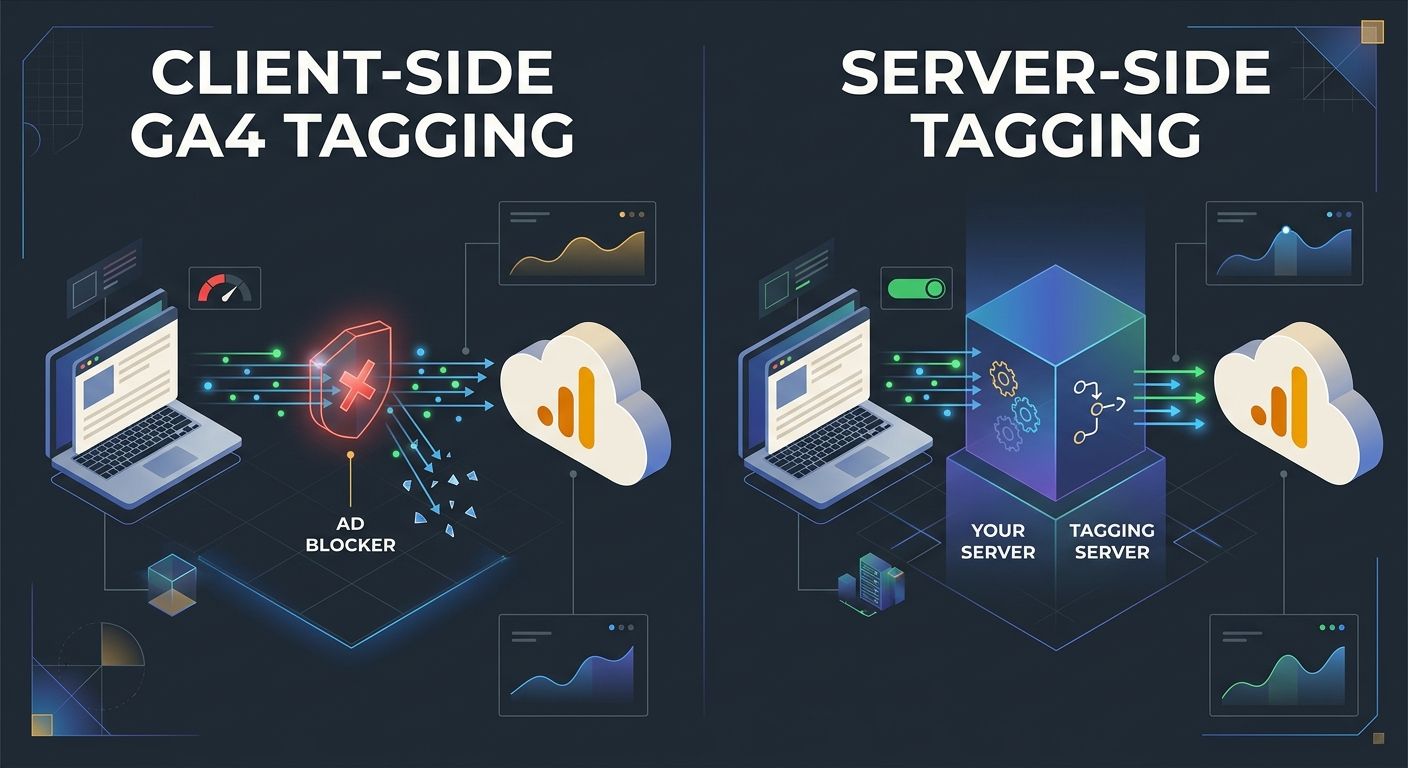
For organizations where social media is a primary revenue channel, server-side tagging has become the most effective defense against ad blocker-driven data loss. Instead of loading the GA4 tag directly in the user's browser (where ad blockers can intercept it), server-side tagging routes the data through a controlled server endpoint first. The browser sends data to your server, which then forwards it to GA4.
This approach recovers a substantial portion of the social traffic that ad blockers would otherwise suppress. It also gives you a controlled environment where you can validate data quality before it reaches GA4, catching malformed events, missing parameters, and duplicate hits at the server level rather than discovering them weeks later in a broken report.
The tradeoff is complexity. Server-side tagging requires infrastructure setup, ongoing maintenance, and careful configuration to avoid introducing its own data quality issues. Google's own troubleshooting documentation notes that server-side events can go missing when measurement IDs or client IDs are misconfigured — and debugging server-side issues requires different tools than debugging client-side problems.
For teams already building their analytics tool stack around multiple data sources, adding server-side tagging fits naturally into an architecture designed for cross-validation. For teams still relying entirely on client-side GA4, the jump is significant and warrants a phased rollout starting with your highest-value social landing pages.
Building a Quarterly Audit Cadence for Social Analytics Integrity
Silent data loss compounds over time. A small tracking break in January becomes a distorted Q1 trend line, which becomes a misleading year-over-year comparison that shapes your entire 2026 social strategy. The fix is a structured audit cadence — quarterly full audits and monthly spot checks focused on your highest-traffic social campaigns.
The quarterly audit should cover conversion tracking validation across all active social campaigns, cross-domain session continuity testing, consent mode configuration review, and a reconciliation between GA4 conversion counts and your CRM's lead records for social-attributed conversions. If you're already running a repeatable sprint system for SEO execution, fold the analytics audit into that cadence rather than treating it as a separate workstream.
Monthly spot checks are simpler: compare the social traffic reported in GA4 against what the social platforms report in their native dashboards. A 10–15% gap is normal due to attribution differences and ad blocker suppression. A gap above 25% signals something is broken. Track that gap over time — if it widens between audit cycles, you've got a new tracking failure to investigate.
The organizations I've seen maintain the strongest analytics data integrity treat their GA4 setup like they treat their website's crawlability: something that requires continuous monitoring, not a one-time configuration. Websites change constantly — new landing pages get built, forms get redesigned, consent banners get updated, GTM containers get edited by multiple team members. Every one of those changes is an opportunity for a tag to break silently.
What Still Isn't Settled
Several significant questions remain open for social media analytics in GA4 that no audit can fully resolve right now.
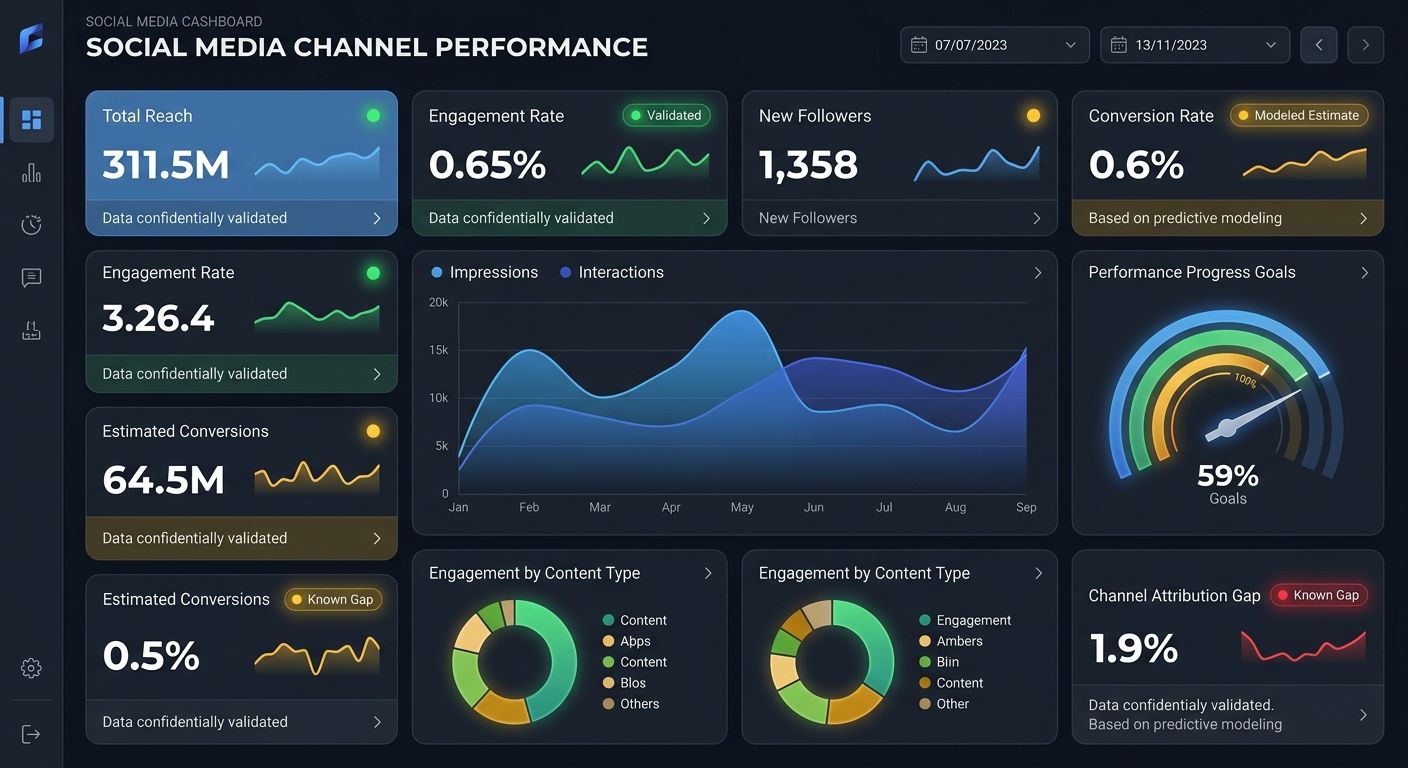
First, Google's behavioral modeling in Consent Mode v2 remains a black box. When GA4 reports modeled conversions for non-consenting social traffic, there's no way to independently verify the accuracy of those estimates. You're trusting Google's model, and the margin of error is unknown. For organizations in highly regulated industries, that uncertainty might make modeled conversions unusable for budget decisions.
Second, the interaction between GA4 and social platform conversion APIs is still evolving. Meta's Conversions API, TikTok's Events API, and LinkedIn's Conversions API all send conversion data from your server directly to the platform, bypassing the browser entirely. But when you compare those server-side conversion counts against what GA4 records for the same events, discrepancies are common and sometimes large. Which number is right? In most cases, neither system is lying — they're counting differently, using different attribution windows and deduplication logic.
Third, the question of how much data loss is acceptable doesn't have an industry consensus. If your GA4 setup captures 80% of social conversions accurately and you know the gap exists, you can adjust your reporting accordingly. But "adjusting accordingly" means applying a correction factor based on sampled data, which introduces its own uncertainty. Some analytics teams I've worked with have accepted a 15% known gap and model around it. Others find that unacceptable and have invested heavily in server-side tagging and parallel tracking to close it.
The most honest answer is that GA4, in its current form, will never give you a perfectly accurate picture of social media performance. The goal of a rigorous tag audit isn't perfection — it's knowing exactly where your data is incomplete, by how much, and ensuring that the data you do collect is structurally sound. That knowledge, uncomfortable as it is, protects your 2026 social strategy from decisions built on numbers that were quietly wrong from the start.

Sarah Chen
SEO strategist and web analytics expert with over 10 years of experience helping businesses improve their organic search visibility. Sarah covers keyword tracking, site audits, and data-driven growth strategies.
Explore more topics