
The Developer's Content Crawlability Audit: Diagnosing Why Google Can't Index Your Pages Like You Think It Can
Analysis of Google's leaked API documentation by iPullRank in 2024 confirmed that Google maintains multiple index tiers internally labeled Base, Zeppelins, and Landfills.

The Developer's Content Crawlability Audit: Diagnosing Why Google Can't Index Your Pages Like You Think It Can
Analysis of Google's leaked API documentation by iPullRank in 2024 confirmed that Google maintains multiple index tiers internally labeled Base, Zeppelins, and Landfills. A page marked as "indexed" in Search Console may still sit in the Landfills tier, functionally invisible for competitive local queries. For multi-location businesses running JavaScript-heavy site builders, this means the developer SEO audit can't stop at checking whether Googlebot found your pages. You need to understand how it found them, what it rendered when it arrived, and whether it deemed the result worth surfacing.
I've audited local business sites where owners were convinced their 47 city-specific landing pages were fully indexed. Search Console told a different story: 31 of those pages carried the status "Crawled – currently not indexed." The pages existed. Google had visited them. But something about what Googlebot saw when it got there wasn't good enough to warrant inclusion in the active index.
That gap between developer expectations and Google's actual behavior is where this audit lives.
How Googlebot Processes a Local Business Page
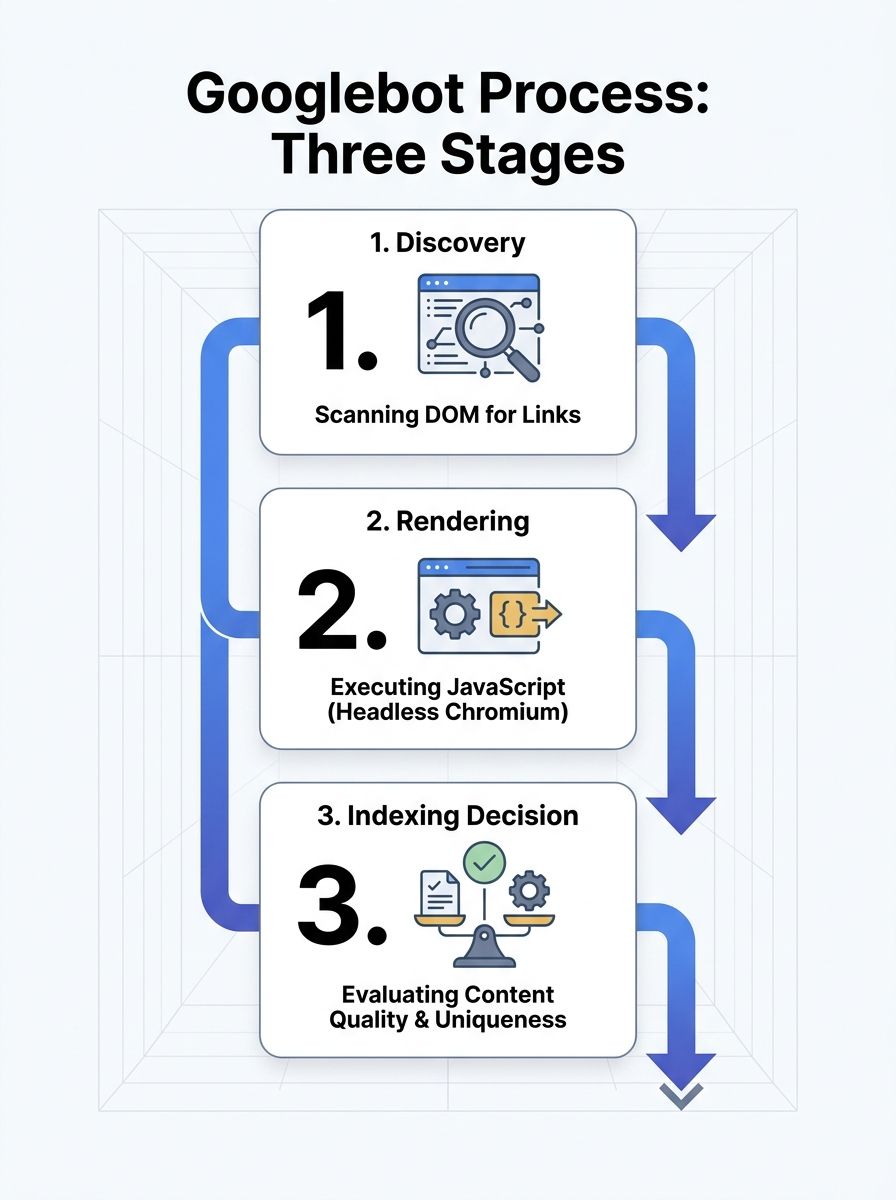
The crawling pipeline runs in stages, and each stage introduces a potential failure point for your local pages.
First, Googlebot discovers your URL. It finds URLs by scanning the rendered DOM for anchor elements with href attributes. According to a Webmasters Stack Exchange analysis of Googlebot's behavior, Googlebot doesn't click on anything. If your location page links are generated by JavaScript click handlers without corresponding href attributes in the HTML, Googlebot never discovers those URLs at all. Your navigation might look perfect in Chrome. Googlebot sees a dead end.
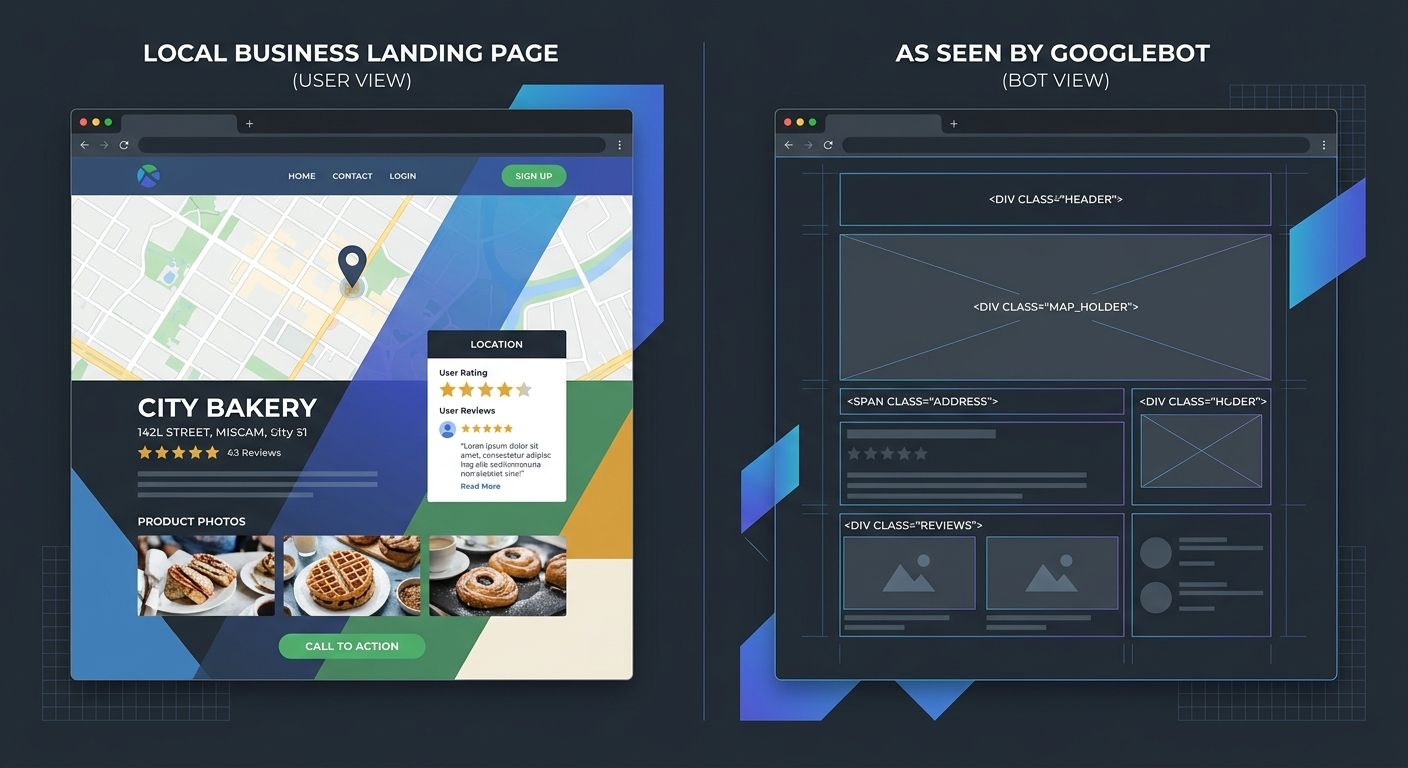
Second, Googlebot renders the page. This is where JavaScript rendering SEO becomes critical for local sites. Google must execute your JavaScript to see dynamically loaded content like location addresses, service descriptions, embedded maps, and review widgets. That rendering step happens in a separate queue from the initial crawl, and it runs on a version of Chromium that processes the page without user interaction.
Third, Google decides whether the rendered result deserves indexing. If the page loads slowly, returns thin content after rendering, or duplicates another location page with only a city name swapped out, it may be crawled but never promoted to the active index.
JavaScript Frameworks Are Breaking Local Landing Pages Silently
Here's the scenario I see repeatedly in Google crawlability testing engagements: a local services company hires a development agency to build a modern site using React, Angular, or Vue. The agency delivers a polished single-page application. Every location page loads beautifully in a browser. And roughly half of those pages never make it into Google's index.
The technical reasons stack up quickly. Heavy JavaScript bundles slow page execution and waste crawl budget, meaning Google allocates fewer resources to crawling the rest of your site. Resources blocked in robots.txt prevent Google from assembling the full rendered page. And SPAs that handle routing entirely in JavaScript often return HTTP 200 status codes for URLs that actually display error states or empty containers to Googlebot.
That last point deserves emphasis. A soft 404 occurs when your server responds with a 200 OK status but the visible content is effectively empty or broken. For a local business with 20 city pages, if the JavaScript that populates each page's unique content fails to execute during Googlebot's render pass, Google sees 20 identical shell templates. It indexes one (maybe) and discards the rest as duplicates.
This connects directly to the foundational work covered in auditing your site when Google can't crawl it. The developer's mental model of "the page works" and Google's assessment of "the page has indexable content" are often two completely different evaluations.
Five Crawlability Failures That Kill Local Page Indexing
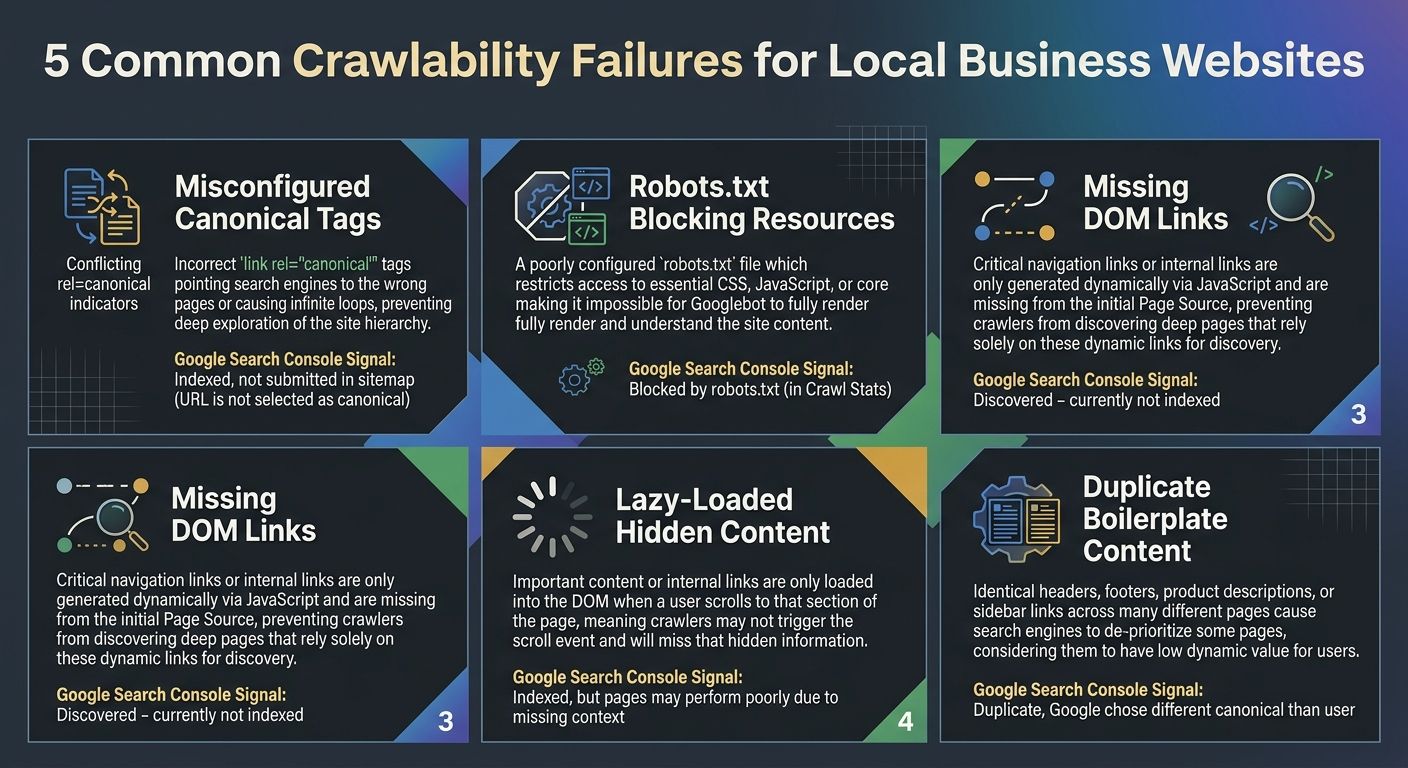
Through years of technical SEO diagnosis work on local business sites, I've found that indexing failures cluster around five specific technical problems. Every one of them is detectable through a structured crawl audit.
1. Canonical Tags Pointing to the Wrong Location Page
A multi-location business with pages for Dallas, Houston, and Austin should have each page canonicalized to itself. But template-based CMS setups frequently hardcode a single canonical URL into the page template, meaning all 30 location pages tell Google they're actually the same page. Google's Page Indexing report will flag this by showing a discrepancy between "User-declared canonical" and "Google-selected canonical." When those two values don't match across your location pages, you've found the problem.
2. Robots.txt Blocking CSS, JavaScript, or API Endpoints
If your robots.txt file blocks the JavaScript files or API endpoints that populate your location page content, Googlebot fetches the HTML shell but can't render the finished page. The content Google evaluates for indexing is whatever appears in the raw HTML source before JavaScript execution. For many modern frameworks, that's an empty div and a loading spinner.
3. Internal Links Missing from the Rendered DOM
Googlebot builds its map of your site by following links. If your location page sitemap exists only as a JavaScript-generated dropdown menu that doesn't produce crawlable anchor elements, Googlebot may never discover pages beyond your homepage and top-level navigation. Strong internal linking architecture matters enormously here, and the principles of mobile-first indexing and internal link structure apply directly to how Google discovers and prioritizes local pages.
4. Lazy Loading That Hides Critical Content
Intersection Observer-based lazy loading is common for images, but some implementations also lazy-load text content, reviews, or service descriptions. If the content Googlebot needs to assess page quality sits below a lazy-load trigger that never fires during server-side rendering, that content effectively doesn't exist for indexing purposes.
5. Identical Boilerplate Across Location Pages
This one is more content than code, but developers build the templates that create the problem. If 80% of your Dallas page and your Houston page share identical paragraph text with only the city name dynamically inserted, Google may classify the less authoritative pages as duplicates and exclude them from the index. Each location page needs genuinely distinct content about that specific location's services, team, or service area.
Reading Search Console's Page Indexing Report as a Diagnostic
Google's Crawl Stats report shows Googlebot's crawling history for your site, including when availability errors occurred and how frequently Googlebot returned. But the real diagnostic power sits in the Page Indexing report, which categorizes every known URL into specific status buckets.
The statuses that matter most for local crawlability testing:
Crawled – currently not indexed: Google found and rendered the page but decided it wasn't worth indexing. This usually signals thin content, duplicate content, or low internal link equity. For location pages, this is the most common and most frustrating status.
Discovered – currently not indexed: Google knows the URL exists but hasn't allocated crawl budget to fetch it yet. On large multi-location sites, less-linked pages often sit here for months.
Blocked by robots.txt: The page or its critical resources are disallowed. Check whether your robots.txt blocks the page itself or the JavaScript/CSS files needed to render it.
Alternate page with proper canonical tag: Google chose a different URL as the canonical version. If this appears on location pages that should be independently indexed, your canonical setup has a structural problem.
When running this diagnostic, filter the report by your location page URL pattern. If you use a consistent structure like /locations/city-name/, you can quickly see what percentage of your location pages actually made it through Google's indexing criteria versus what got stuck in earlier pipeline stages.
This kind of structured, data-driven approach aligns well with diagnosing why your site architecture fails to signal authority to Google. The symptoms show up in indexing reports, but the root causes live in your site's technical foundation.
Running the Audit: A Developer's Diagnostic Sequence
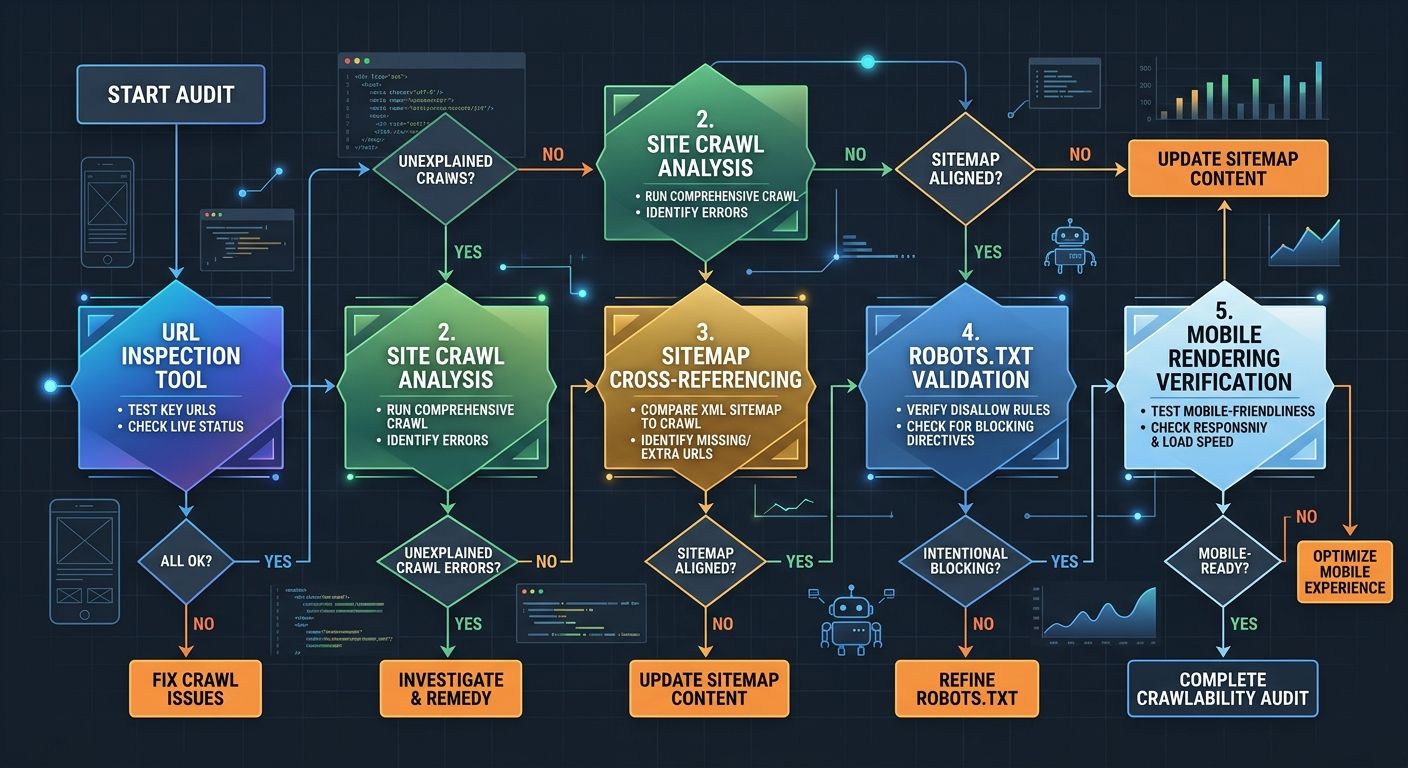
A proper technical SEO diagnosis for local crawlability follows a specific sequence. Each step builds on findings from the previous one.
Step 1: Fetch your own pages as Googlebot. Use Search Console's URL Inspection tool to request a live test of each location page template. Compare the rendered HTML screenshot against what you see in your browser. Document every difference.
Step 2: Crawl your site with a desktop tool. Screaming Frog or Sitebulb can crawl your entire site while rendering JavaScript, producing a map of what's actually linked, what returns unexpected status codes, and where canonical tags point. Run the crawl in JavaScript rendering mode, not just HTML mode.
Step 3: Cross-reference your sitemap against the Page Indexing report. Export both datasets. Every URL in your XML sitemap should appear in the Indexing report as either indexed or carrying a specific exclusion reason. URLs that appear in your sitemap but don't show up in the Indexing report at all suggest Google hasn't even discovered them yet, which points to an internal linking failure.
Step 4: Validate your robots.txt with Google's testing tool. Enter the URLs of your JavaScript bundles, CSS files, and API endpoints. If any are blocked, fix the robots.txt rules before re-requesting indexing.
Step 5: Test mobile rendering specifically. Since Google's full transition to mobile-first indexing in October 2023, only the mobile version of your pages gets crawled and indexed. If your mobile layout hides content behind tabs, accordions, or "read more" toggles that require click interaction, Googlebot may not see it. Google has stated it will index content behind these elements, but rendering failures can still prevent the content from appearing in the DOM at all.
For teams that want to build this audit into a recurring workflow, structuring it as part of a repeatable sprint system ensures crawlability checks happen monthly rather than only after a traffic drop forces investigation.
Where the Index Tier Problem Gets Uncomfortable
The multi-tier indexing system that the 2024 API leak revealed creates an awkward reality for local businesses. Getting your pages indexed is necessary, but it doesn't guarantee visibility. A location page that technically sits in Google's index but lives in the Landfills tier will rarely appear for the "plumber near me" or "dentist in [city]" queries that drive local business revenue.
The factors that push pages into higher-priority index tiers appear to include content depth, internal link strength, external backlink signals, and how frequently Google recrawls the page. For local businesses, this means the technical crawlability audit is the floor, not the ceiling. You fix the rendering issues, the canonical problems, and the robots.txt blocks so that your pages can enter the index. Then you build the content quality and link equity that determine where in the index those pages sit.
Google's own documentation acknowledges this indirectly. The Page Indexing report support page notes that if your total URL count is much smaller than your site's actual page count, Google isn't finding your pages. But it doesn't address the equally common scenario where Google finds all your pages and chooses to ignore a significant percentage of them.
What the Crawl Data Can't Tell You
The audit process described above will surface every technical barrier between your local pages and Google's index. It won't tell you whether Google considers your content valuable enough to rank.
Crawlability diagnostics reveal plumbing problems. A page blocked by robots.txt, a canonical tag pointing to the wrong URL, a JavaScript bundle that fails to render within Googlebot's timeout window: these are binary, fixable issues. The harder question comes after the plumbing works correctly and your pages still carry the "Crawled – currently not indexed" status. At that point, the problem has shifted from technical infrastructure to content quality, and the audit tools can't measure that gap with the same precision.
The data also can't predict how Google's rendering infrastructure will evolve. Googlebot's Chromium version gets updated periodically, and each update changes which JavaScript patterns render successfully and which break. A page that indexes cleanly today might fail a render pass after the next Chromium update if it depends on deprecated browser APIs or non-standard DOM manipulation.
What the numbers can tell you is where to look first. And for local businesses whose revenue depends on showing up in geographic search results, fixing the crawlability failures that prevent indexing is the prerequisite for everything else you want SEO to accomplish. The audit won't answer every question about your search visibility, but it will answer the one that matters most: can Google actually see what you built?

Sarah Chen
SEO strategist and web analytics expert with over 10 years of experience helping businesses improve their organic search visibility. Sarah covers keyword tracking, site audits, and data-driven growth strategies.
Explore more topics