
The Developer's SEO Blind Spot: How to Audit Your Site When Google Can't Crawl It
A SaaS client's site passed every automated technical SEO check I threw at it. Green scores across the board. Lighthouse loved it. The HTML was clean, the sitemaps were valid, and the canonical tags all matched. But organic traffic had cratered 40% over eight weeks, and nobody could figure out why.
The Developer's SEO Blind Spot: How to Audit Your Site When Google Can't Crawl It
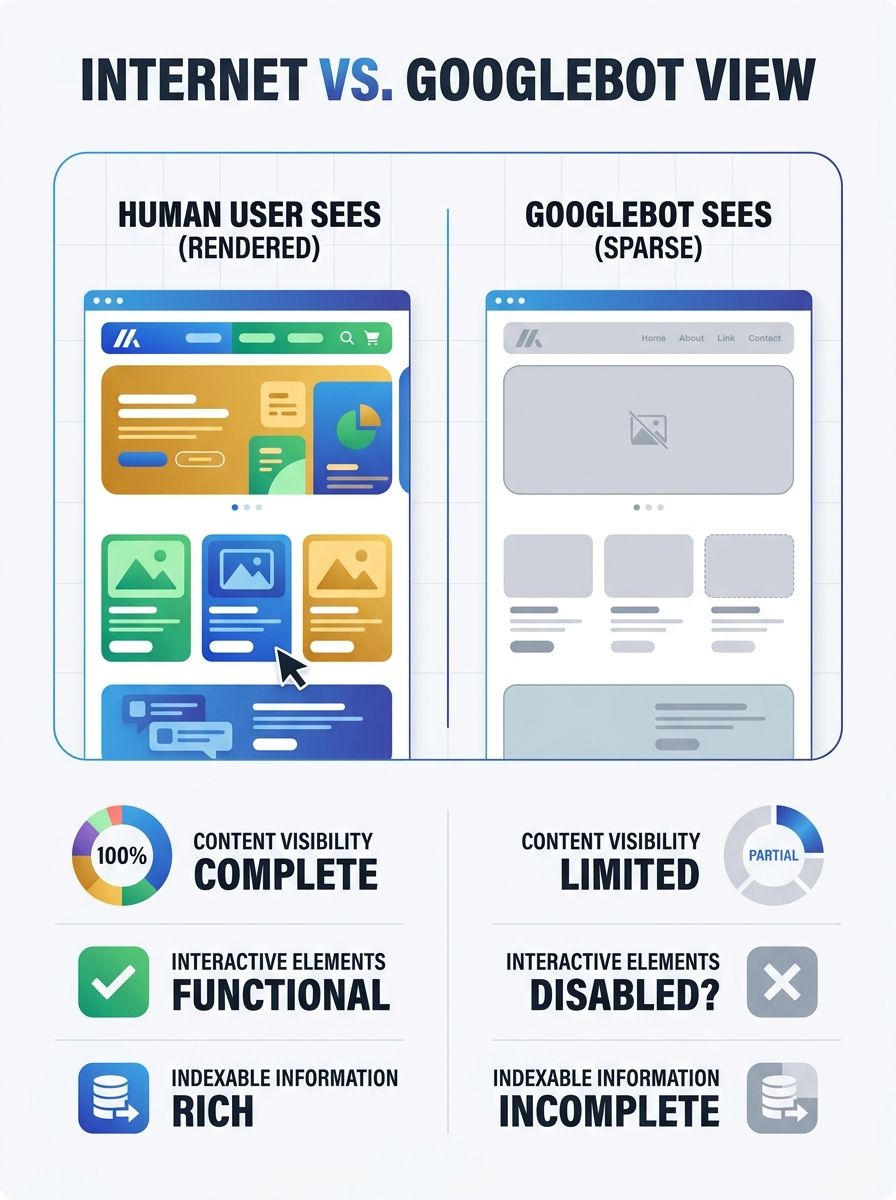
A SaaS client's site passed every automated technical SEO check I threw at it. Green scores across the board. Lighthouse loved it. The HTML was clean, the sitemaps were valid, and the canonical tags all matched. But organic traffic had cratered 40% over eight weeks, and nobody could figure out why. The answer? Google literally couldn't see 60% of the site's content. The pages were rendering beautifully in a browser, but Googlebot was getting a mostly empty page because every product description, review, and CTA was injected via client-side JavaScript that never made it into the initial HTML response.
That experience changed how I approach every developer SEO audit I run. The gap between what a browser renders and what a search engine bot receives is the single most overlooked failure point in technical SEO, and most standard audit tools don't catch it.
Why Developers and SEOs Keep Talking Past Each Other
Here's the uncomfortable truth: developers build for users, and SEOs optimize for bots. Both are right. But those two goals create a blind spot right in the middle where nobody's looking.
A developer ships a React app with beautiful client-side rendering. The site works perfectly for every human visitor. The SEO team runs their checklist, confirms the meta tags exist in the rendered DOM, and moves on. Neither team catches that Googlebot's rendering queue introduces a delay, or that a JavaScript error silently prevents content from loading for the bot.
This disconnect costs real money. Industry estimates suggest delayed technical SEO fixes cost businesses tens of millions annually in lost revenue. And 67% of SEO professionals cite competing developer priorities as the top barrier to getting these issues fixed.
The fix isn't more tools. It's a shared framework that both teams can use. That's what this guide is about.
See Your Site the Way Google Sees It
Before you can fix crawlability problems, you need to experience them firsthand. The simplest test takes about 30 seconds.
Open your site in Chrome, go to Settings, then Site Settings, then JavaScript, and disable it. Reload your homepage. Then reload your most important landing pages. If significant portions of your content disappear, you have a rendering problem that's likely affecting your search visibility.
This quick test won't catch everything, but it gives you an immediate gut check. For a deeper analysis, you need to compare your raw HTML against the fully rendered DOM.
Tools like Lumar now offer specific metrics for JavaScript SEO issues, including checks for head tags appearing in the body and mismatches between raw and rendered canonical links. These kinds of structural errors are invisible to standard crawlers but cause real indexing failures.
The Headless Browser Approach
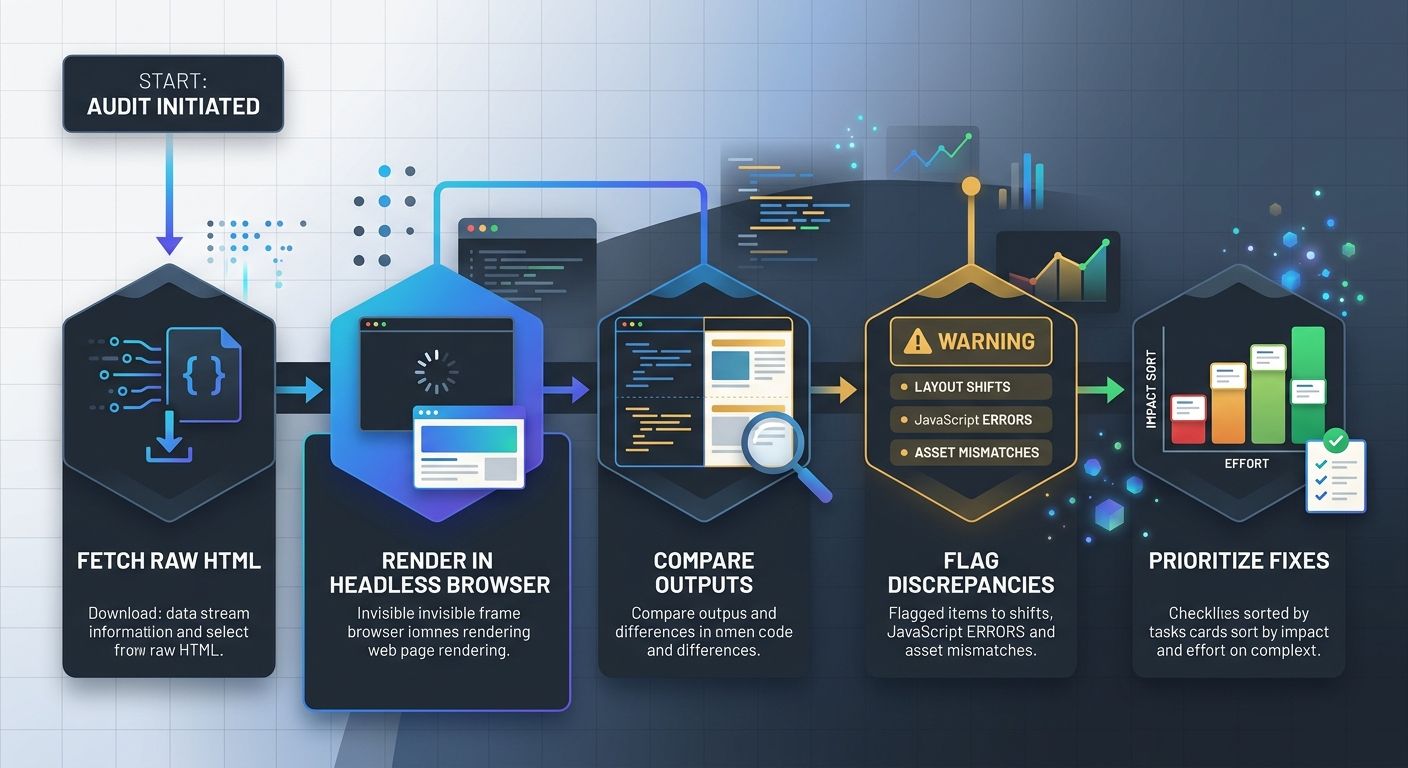
For a more thorough crawlability testing workflow, run your site through a headless browser. A headless browser is Chrome running without a graphical interface, controlled programmatically. It renders JavaScript exactly like a real browser would, letting you capture the final page output and compare it against what your server initially delivers.
Tools like Playwright and Puppeteer let you automate this at scale. The process looks like this:
Fetch the raw HTML response from your server (no JavaScript execution)
Render the same URL in a headless browser
Compare the two outputs, specifically looking for missing content, different canonical tags, altered navigation links, or absent structured data
Flag any URL where the rendered content differs significantly from the raw HTML
If you're running a site with hundreds or thousands of pages, you want to build this into your CI/CD pipeline so rendering regressions get caught before they hit production. For teams thinking about how to structure this kind of ongoing monitoring, building a technical SEO governance process is worth the upfront investment.
Audit Your Robots.txt (It's Probably Wrong)
I've reviewed hundreds of robots.txt files. At least a third of them contain mistakes that actively block Google from crawling important content.
The most common error? Incorrect or incomplete use of the "/" character, which can accidentally block entire directory trees. A misplaced slash in a Disallow rule can turn "block this one folder" into "block half the site."
Here's what to check in your robots.txt:
Staging rules that leaked to production. This is the number one killer. A developer copies the staging robots.txt (which blocks everything) during a deploy, and suddenly Google can't access the site. It happens more often than anyone wants to admit.
Overly broad Disallow rules. Blocking /search/ to prevent crawling of internal search results might also block /search-results-page/ if that's a real landing page.
Missing or incorrect Sitemap declaration. Your robots.txt should point to your XML sitemap. If it doesn't, you're relying entirely on Google Search Console and internal links for discovery.
Blocking CSS and JavaScript files. Google needs to access these to render your pages. Blocking them in robots.txt means Googlebot can't see your content, even if the HTML is technically available.
And here's something most people don't realize: a page blocked by robots.txt can still be indexed if other sites link to it. Google won't crawl the content, but it might show the URL in search results with no description. That's arguably worse than not appearing at all.
What Google Search Console Actually Reveals About Crawling
Most marketers check Google Search Console once a month, glance at the performance graph, and close the tab. That's leaving critical diagnostic data on the table.
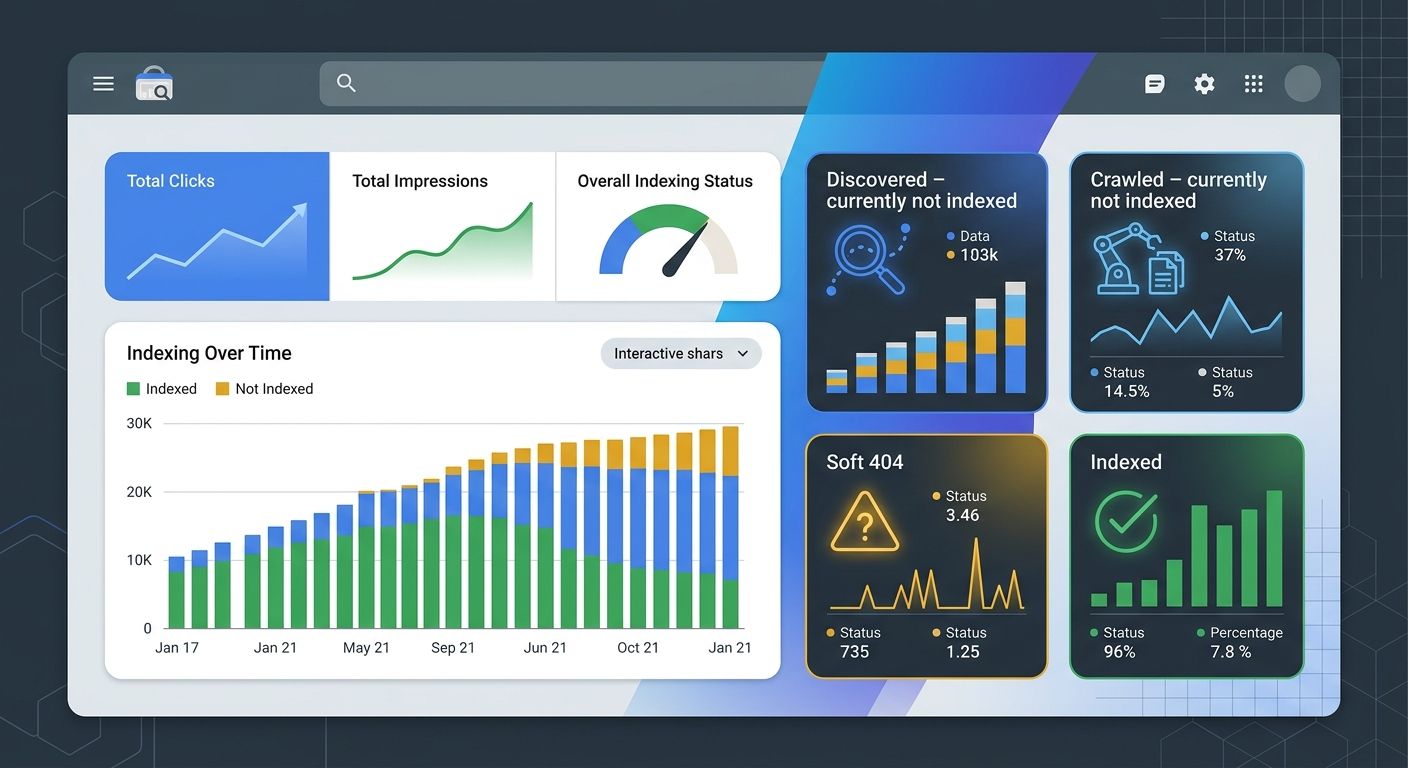
The Page Indexing report is where the real intelligence lives. Filter it by your XML sitemap to see the gap between URLs you've submitted and URLs Google has actually indexed. That gap is your problem list.
Pay special attention to these status categories:
"Discovered – currently not indexed" means Google knows the URL exists but hasn't bothered to crawl it. This usually signals a quality or priority issue.
"Crawled – currently not indexed" is more telling. Google visited the page but decided not to index it. Your content might be too thin, too similar to other pages, or returning signals that tell Google it's not worth keeping.
Soft 404s are particularly sneaky. As Google's own documentation explains, a soft 404 occurs when a URL returns a "page not found" message but also sends a 200 success status code. Your server says "everything's fine!" while the page content says "nothing here." Google sees through this, but your monitoring tools might not.
Cross-reference your non-indexed URLs with your site crawl analysis data from tools like Screaming Frog. Look for patterns. Are all the non-indexed URLs from a specific template? Do they share a common JavaScript component? Are they all behind a certain navigation depth?
When you're working through these findings, your analytics data needs to be trustworthy or you'll end up chasing ghosts.
How to Close the Rendering Gap
Once you've identified which pages Google can't properly see, you need a remediation plan. The approach depends on your tech stack and resources.
Server-Side Rendering (SSR)
This is the gold standard. Deliver fully rendered HTML from the server so that bots (and users) get complete content on the first response. No waiting for JavaScript to execute, no rendering queue, no ambiguity.
For React apps, frameworks like Next.js make this relatively straightforward. For Vue, Nuxt fills the same role. The performance benefits extend beyond SEO too. Pinterest saw a 60% rise in core engagements after moving to server-side rendering with their progressive web app, and Yelp reported a 15% increase in conversion rates after improving load times.
Hybrid Rendering
If full SSR isn't feasible, consider hybrid rendering: server-side render the critical content (headings, body text, product details, internal links) and let JavaScript handle interactive elements (filters, animations, user-specific content). This gives bots what they need while keeping your development workflow flexible.
The 200 OK Rule
Google's December 2025 rendering update now excludes pages returning non-200 HTTP status codes from the rendering pipeline entirely. This means that even if a 404 page includes helpful JavaScript-rendered content like "recommended products," Googlebot will never see it.
The practical impact: if you have product pages that go out of stock, don't return a 404. Keep them live with a 200 OK status, mark them as out of stock in both the UI and schema markup, and server-side render a "similar products" section. This preserves link equity and crawl value.
This connects to a broader shift where your technical SEO can pass every checklist and still lose rankings because of these subtle rendering and status code issues that automated tools miss.
Build Crawlability Testing Into Your Workflow
One-time audits don't work. Sites change constantly. Deploys happen weekly or daily. A developer SEO audit needs to be a continuous process, not a quarterly event.
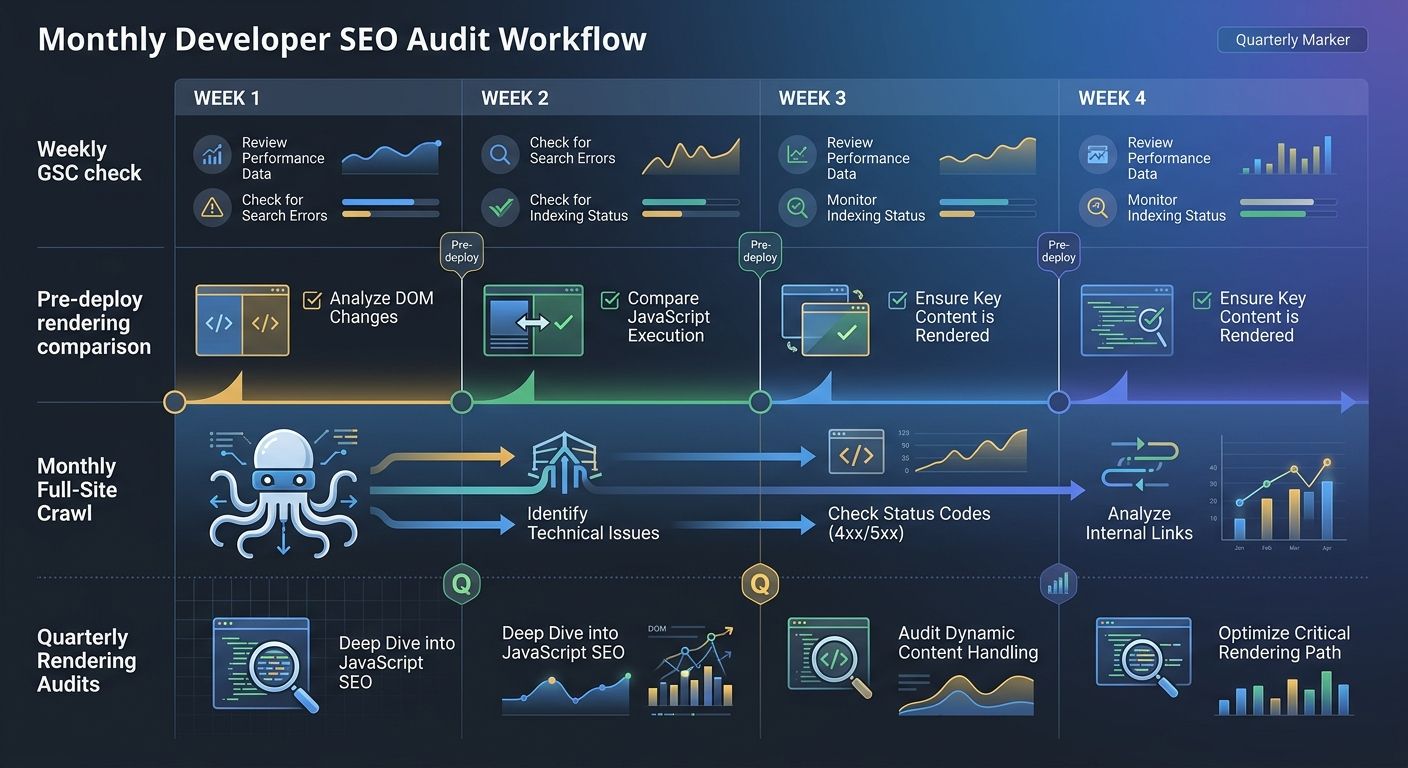
Here's the workflow I recommend:
Pre-deploy checks. Before any production deploy, run a headless browser comparison on your top 50 URLs. Compare rendered output against the previous version. Flag any content that disappeared or changed unexpectedly.
Weekly Google Search Console debugging. Check the Page Indexing report every Monday. Look for spikes in "Discovered – not indexed" or new crawl errors. Set up email alerts for coverage drops.
Monthly full-site crawl. Run Screaming Frog or a similar crawler against your entire site. Compare against the previous month's crawl. Look for new broken links, redirect chains, orphaned pages, and robots.txt changes.
Quarterly rendering audit. Do a deep comparison of raw vs. rendered HTML on a sample of URLs from every template type. This catches gradual rendering drift that weekly checks might miss.
If you're building this kind of repeatable process, having a structured audit system that scales beyond manual spreadsheets will save your team serious time.
And don't forget mobile. Despite mobile-first indexing being the standard for years, many teams still run their crawlability testing with desktop user agents. If your mobile navigation uses a hamburger menu that isn't in the DOM until a user taps it, Googlebot Smartphone can't see your site structure. Always crawl with the Googlebot Smartphone user agent.
Crawlability Is Just the Beginning
Getting Google to crawl and render your pages correctly is table stakes. With AI answer engines reshaping how people find information, your content also needs to be structured for extraction by large language models.
That means JSON-LD structured data on every key page. It means writing with a "bottom line up front" style so AI systems can easily pull your key claims. And it means paying attention to how your content appears (or doesn't appear) in AI-driven search results beyond traditional Google.
But none of that matters if Google can't see your pages in the first place.
Three Diagnostic Tests to Run This Week
Stop reading and do these three things:
Disable JavaScript in Chrome and browse your top 10 landing pages. Write down everything that disappears. That's your priority fix list.
Pull up your Google Search Console Page Indexing report. Filter by your sitemap. Calculate the gap between submitted and indexed URLs. If it's more than 20%, you have a crawlability problem.
Run a diff on your robots.txt against what's on your staging environment. If they're identical, that's a red flag. Staging should block everything. Production should block almost nothing.
These three checks take less than an hour combined, and they'll tell you more about your site's actual search visibility than any automated score ever will.

Alex Chen
Alex Chen is a digital marketing strategist with over 8 years of experience helping enterprise brands and agencies scale their online presence through data-driven campaigns. He has led marketing teams at two successful SaaS startups and specializes in conversion optimization and multi-channel attribution modeling. Alex combines technical expertise with strategic thinking to deliver actionable insights for marketing professionals looking to improve their ROI.
Explore more topics