
Mobile-First Indexing and Internal Linking: The 2026 SEO Architecture That Google Actually Crawls First
---
Mobile-First Indexing and Internal Linking: The 2026 SEO Architecture That Google Actually Crawls First
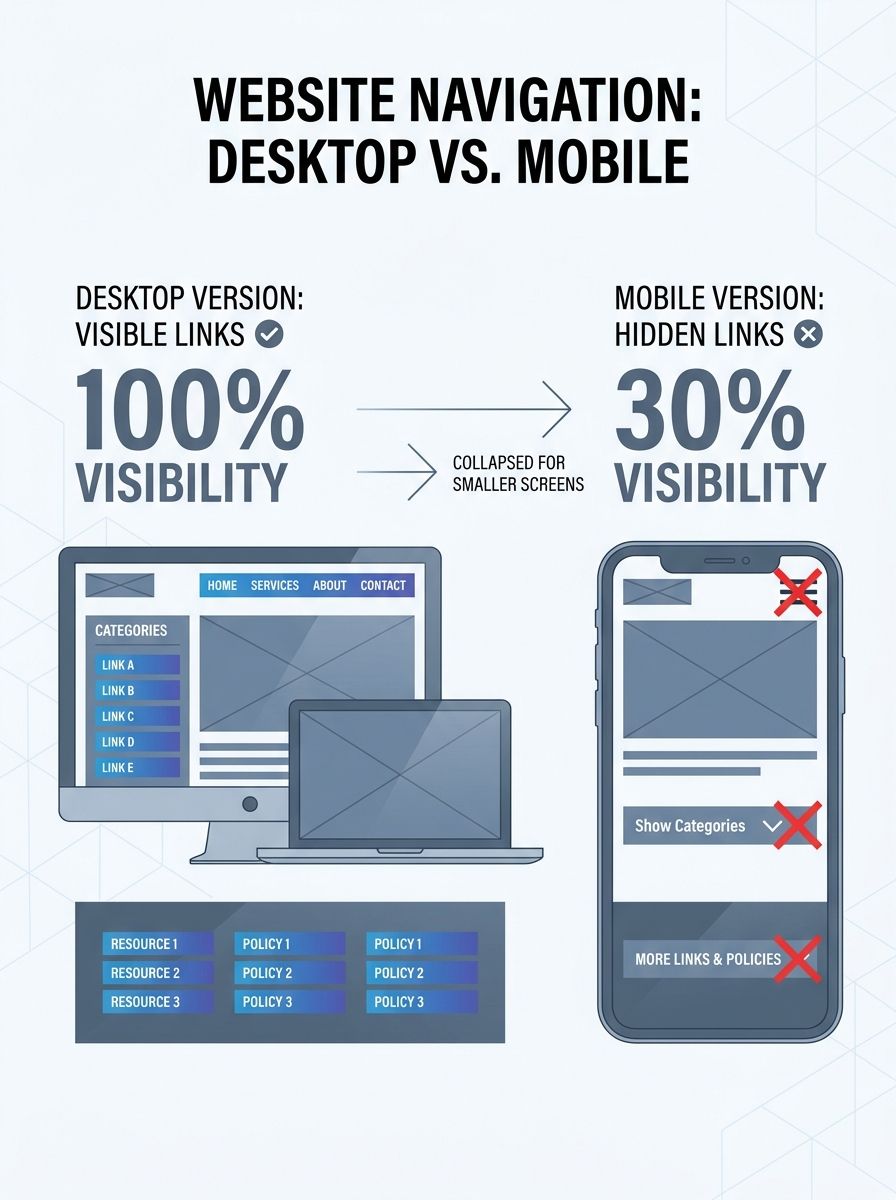
A client came to me with a puzzle: 847 internal links on their desktop site, but only 312 visible to Googlebot. The discrepancy wasn't a bug. It was a design choice nobody questioned. Their mobile navigation collapsed three tiers of category links into a hamburger menu that required JavaScript interaction to expand, and Google's smartphone crawler never bothered clicking. Overnight, 63% of their internal link topology vanished from the index. Rankings followed.
This is the reality of mobile-first indexing that most teams still don't fully grasp. Google doesn't crawl your desktop site anymore. It crawls your mobile site. And if your internal linking strategy looks different on mobile than it does on desktop, you're building an SEO architecture on a foundation Google can't see.
The Mobile Crawl Is the Only Crawl
Let's be direct about what mobile-first indexing means in practice. Google completed its transition to mobile-first crawling in mid-2024, and as John Mueller confirmed, even the small holdout of sites still crawled by desktop Googlebot were switched to mobile Googlebot. This isn't a preference. It's the default. The smartphone user agent running Chrome on Android is the only version of your site that matters for indexing.
With over 60% of global internet traffic coming from mobile devices, Google's decision makes sense. But the implications for internal linking are massive, and most SEO teams haven't caught up.
Here's what breaks:
Hamburger menus that hide category links behind JavaScript interactions
Tabbed content where internal links sit in non-default tabs
"Load more" buttons that gate contextual links below the fold
Desktop-only sidebar widgets with related post links that don't render on mobile
Footer link sections that get truncated or collapsed on smaller screens
Every internal link that exists on desktop but disappears on mobile is a link that doesn't exist to Google.
Why Internal Links Are Your Most Undervalued Ranking Asset
I've said this before and I'll keep saying it: internal links are the most controllable ranking lever you have. External backlinks require outreach, relationships, and luck. Internal links? You own every single one.
Search engine crawlers follow hyperlinks from page to page, making your site architecture SEO entirely dependent on how those links connect. According to Moz's internal linking research, revenue-driving pages should have a lower crawl depth while maintaining clear site organization. This allows link equity to flow throughout the entire site, increasing ranking potential for each page.
But here's the part most people miss: mobile crawlability determines which of those internal links actually get followed.
If you've been building your strategic link architecture for SEO and conversion based on how your desktop site looks, you need to re-audit everything through a mobile lens. The architecture Google sees might be dramatically flatter, or worse, dramatically more fragmented than you intended.
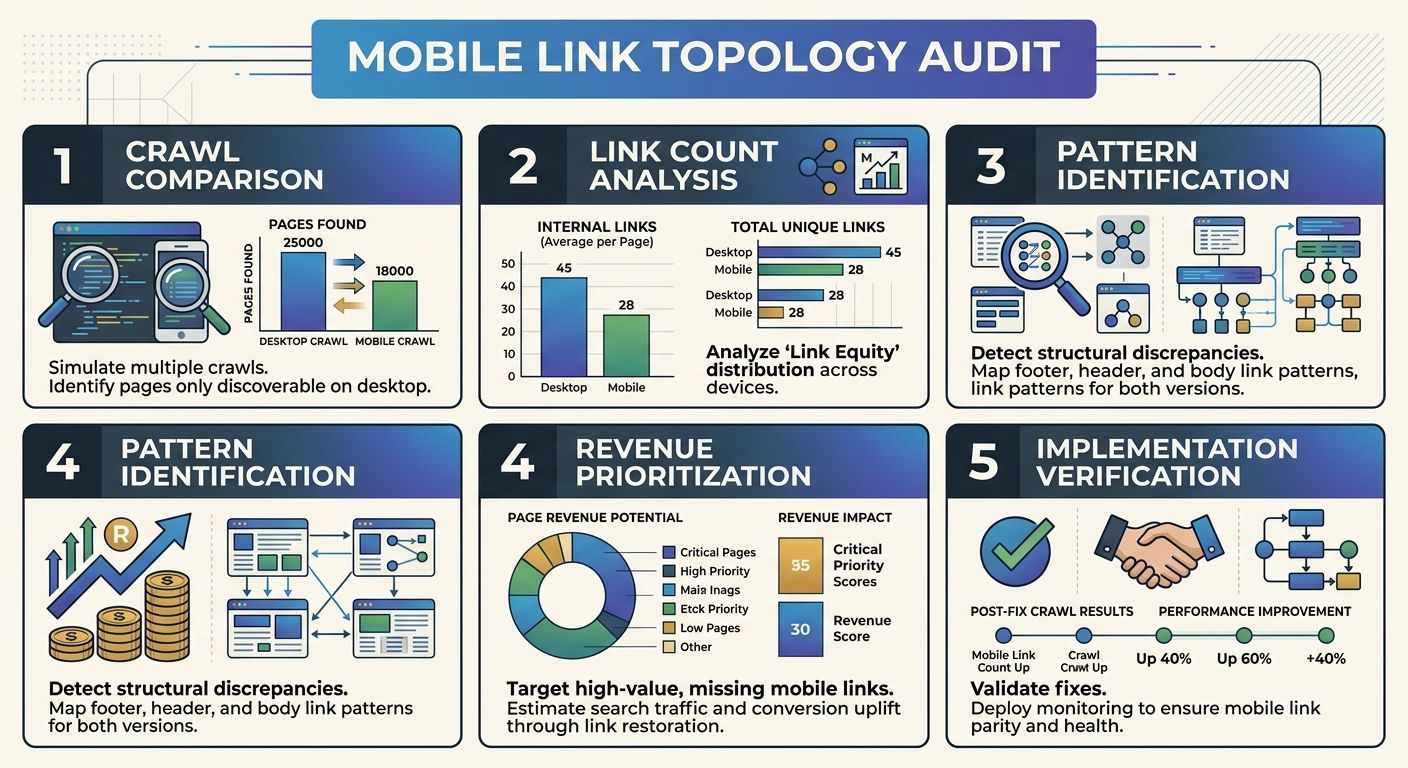
The Mobile Link Topology Audit: A Step-by-Step Process
Here's the exact process I run with clients to identify gaps between desktop and mobile internal linking. You can do this yourself with a few tools and a couple of hours.
Step 1: Crawl Both Versions Separately
Run two separate crawls of your site using Screaming Frog or Sitebulb. One with a desktop user agent, one with a smartphone user agent. Export the internal link reports from each crawl.
Step 2: Compare Link Counts Per URL
For every URL on your site, compare:
Total inbound internal links (desktop crawl)
Total inbound internal links (mobile crawl)
The delta between them
Sort by largest negative delta. These are your pages losing the most internal link support on mobile.
Step 3: Identify the Broken Patterns
Group the missing links by source type:
Navigation links hidden in collapsed menus
Sidebar/widget links that don't render on mobile
In-content links gated behind JavaScript interactions
Footer links that get truncated
Related post modules that load conditionally
Step 4: Prioritize Fixes by Revenue Impact
Cross-reference the affected pages with your analytics data. Which of these pages drive conversions? Which rank for high-value keywords? Fix those first.
Step 5: Implement and Re-crawl
Make the changes, wait for Googlebot to re-crawl, and monitor Search Console for indexing improvements.
If your technical SEO passes audit checks but rankings still drop, this mobile link discrepancy is one of the first places I'd investigate. The tools say everything's fine because they're often crawling the desktop version.
Building Mobile-Native Link Architecture
Once you've identified the gaps, the real work begins: designing an internal linking strategy that's mobile-native from the start, not adapted from desktop as an afterthought.
Flatten Your Crawl Depth on Mobile
The three-click rule gets thrown around a lot, but on mobile it's even more critical. Every page that matters should be reachable within three to four taps from the homepage. Here's how:
Use persistent breadcrumb navigation that renders fully on mobile (not truncated with ellipses)
Add contextual links within body content, not just in navigation elements. These survive every layout change because they're embedded in the content itself.
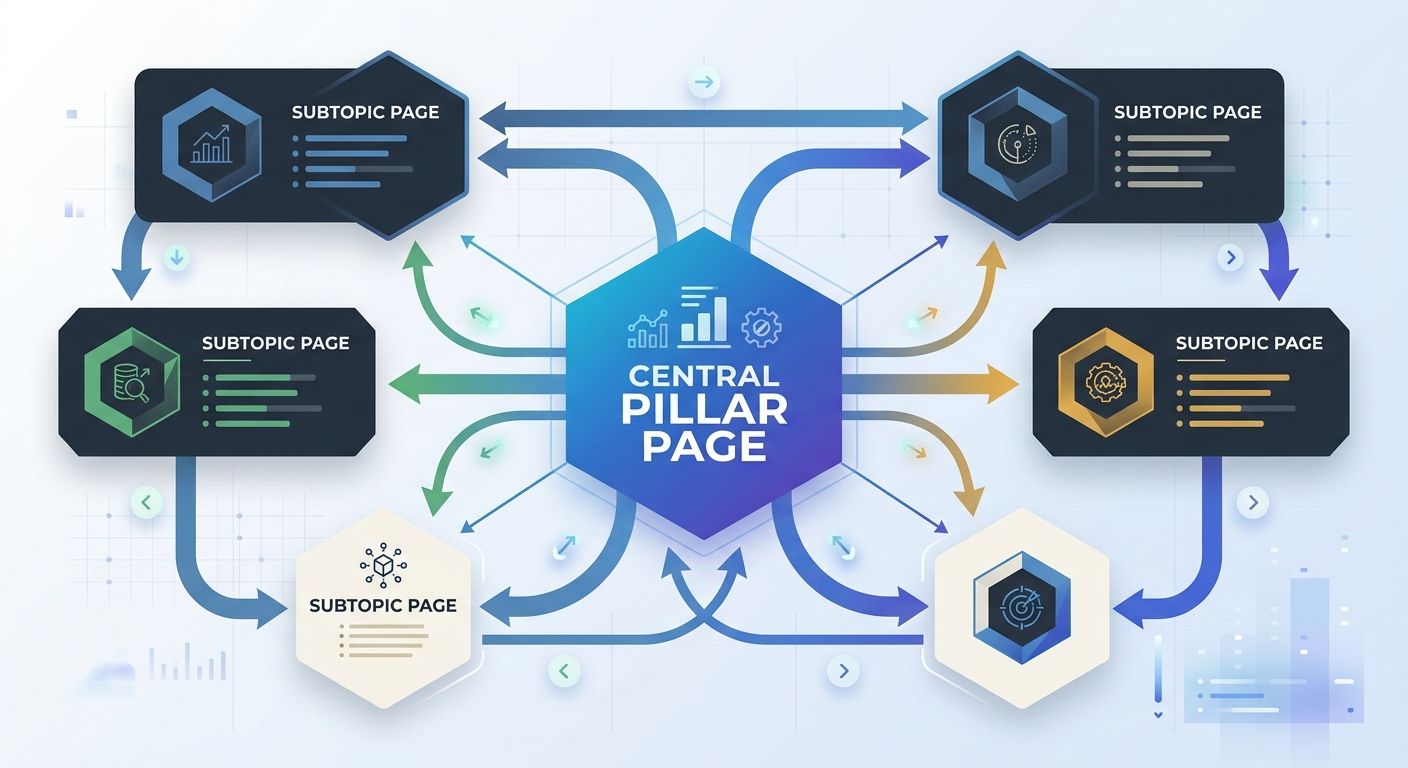
Build hub pages for each major topic cluster that link down to every subtopic page and link up to the homepage
In-content contextual links are your safest bet because they exist identically on desktop and mobile. A link embedded in a paragraph doesn't care about screen size. It renders the same way everywhere.
Design Your Content Clusters for Crawl Paths
Your link topology should create multiple pathways between related content. If Page A only links to Page B through the main navigation, and that navigation collapses on mobile, you've created a single point of failure.
Instead, build redundant crawl paths:
Pillar page links to all cluster pages (and vice versa)
Cluster pages cross-link to related cluster pages
Blog posts within a topic always link back to the relevant pillar
New content immediately gets woven into existing pages through link updates
As Yoast's research on internal linking confirms, interlinking related articles within topic clusters establishes semantic connections understood by both search algorithms and generative AI systems. This matters more than ever as AI Overviews pull from well-structured content hierarchies.
Anchor Text That Works for Mobile and Search
Assign anchor text to your pillar and cluster pages based on keyword research, but keep it natural. On mobile, overly long anchor text can wrap awkwardly and hurt readability.
Good mobile anchor text:
Descriptive enough that a user knows where they'll land
Short enough that it doesn't dominate a mobile paragraph
Varied across pages linking to the same destination
When you're planning this at scale, having an audit system that actually scales saves enormous time versus manually tracking link relationships in spreadsheets.
The Crawl Budget Connection
For sites with more than a few thousand pages, mobile crawlability directly impacts how efficiently Google spends its crawl budget on your domain. According to Google's own crawling documentation, structuring URLs logically and using sitemaps to highlight priority content are key actions for managing crawl efficiency.
But crawl budget management starts with your internal links. Pages that receive more internal links get crawled more frequently. Pages with fewer internal links get crawled less often, or not at all.
Here's a practical framework for crawl budget optimization through linking:
Tier 1 (Homepage + Money Pages): Maximum internal link support, reachable in one click from homepage
Tier 2 (Category/Pillar Pages): Strong link support from Tier 1 and cross-links from related Tier 2 pages
Tier 3 (Blog Posts/Supporting Content): Linked from relevant Tier 2 pages, cross-linked within clusters
Tier 4 (Utility Pages): Legal, privacy, about. Linked from footer, minimal SEO priority
If Google's crawling your site through a mobile bot that can't access content behind certain interactions, your carefully planned tier structure falls apart. Pages you've designated as Tier 1 might functionally behave like Tier 3 on mobile.
Measuring the Impact
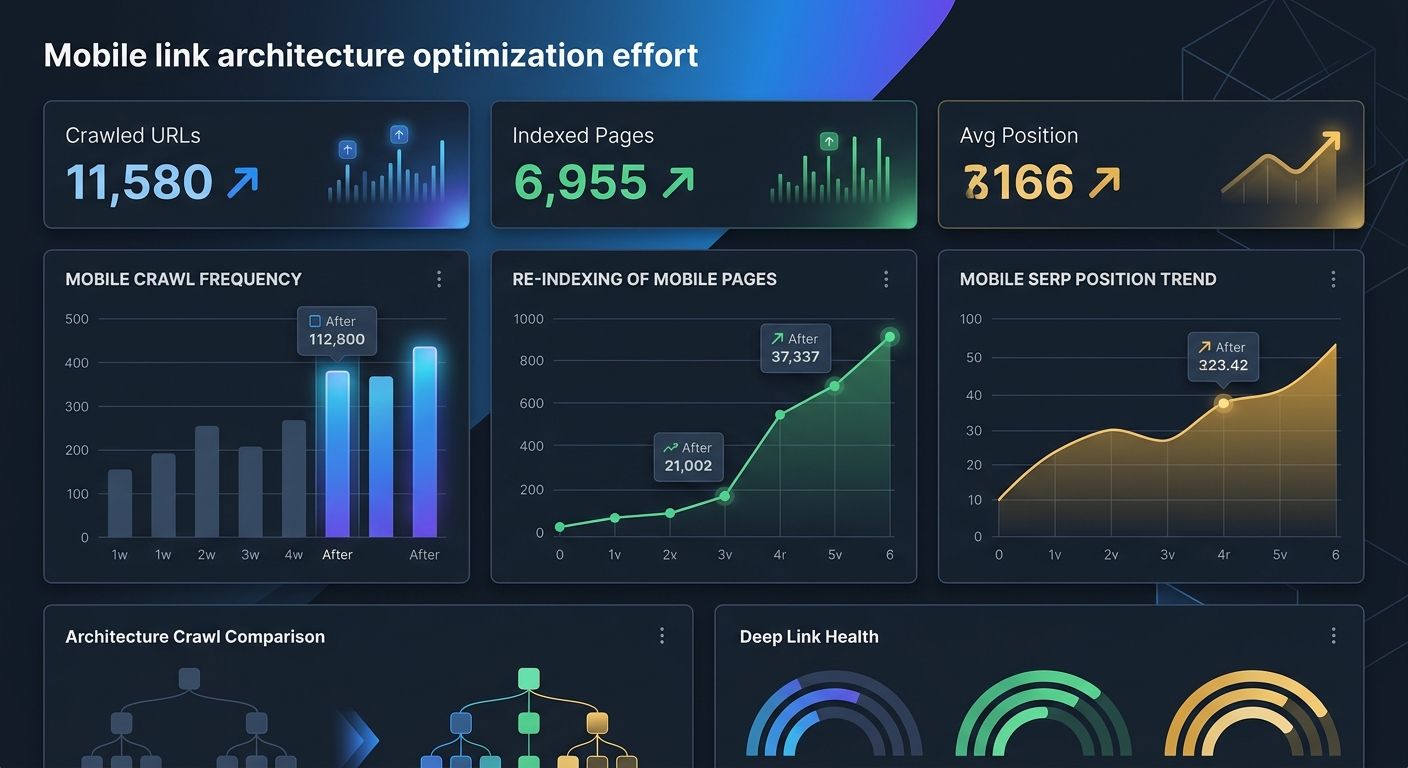
After implementing mobile-native link architecture, here's what to track:
Pages indexed in Search Console (should increase if previously orphaned pages get found)
Crawl stats in Search Console (look for increased crawl frequency on priority pages)
Internal link counts per page via your crawling tool (mobile user agent)
Average position changes for pages that gained new internal links
Click depth distribution across your site (percentage of pages at each depth level)
I typically see measurable ranking improvements within four to six weeks after fixing mobile link parity issues. The biggest wins come from pages that had strong content and decent backlinks but were structurally disadvantaged on mobile.
Three Immediate Fixes for Mobile Link Parity
Run a mobile crawl of your site today and compare the total internal links found versus a desktop crawl. If the mobile count is more than 10% lower, you have a problem worth fixing immediately. Pick your top 10 revenue-generating pages and check how many internal links point to each one on mobile — if any page has fewer than five contextual internal links visible to a mobile crawler, add them this week. Audit your navigation rendering by loading your site on an actual phone (not just a responsive preview in Chrome DevTools), tap through your navigation, and consider whether links that require a click to reveal need to exist in the initial HTML instead.
Your site architecture SEO isn't what your Figma files show. It's what Googlebot's smartphone crawler actually encounters. Until those two things match, you're optimizing for a site that doesn't exist in Google's index.

Alex Chen
Alex Chen is a digital marketing strategist with over 8 years of experience helping enterprise brands and agencies scale their online presence through data-driven campaigns. He has led marketing teams at two successful SaaS startups and specializes in conversion optimization and multi-channel attribution modeling. Alex combines technical expertise with strategic thinking to deliver actionable insights for marketing professionals looking to improve their ROI.
Explore more topics