
The Internal Linking Blueprint: How Strategic Link Architecture Boosts Both SEO and User Conversion
Pages receiving 40–44 internal links generate four times more organic traffic than pages with fewer links. Four times. That's not a marginal improvement you can shrug off. That's the difference between a page that earns revenue and a page that collects dust.
The Internal Linking Blueprint: How Strategic Link Architecture Boosts Both SEO and User Conversion
Pages receiving 40–44 internal links generate four times more organic traffic than pages with fewer links. Four times. That's not a marginal improvement you can shrug off. That's the difference between a page that earns revenue and a page that collects dust.
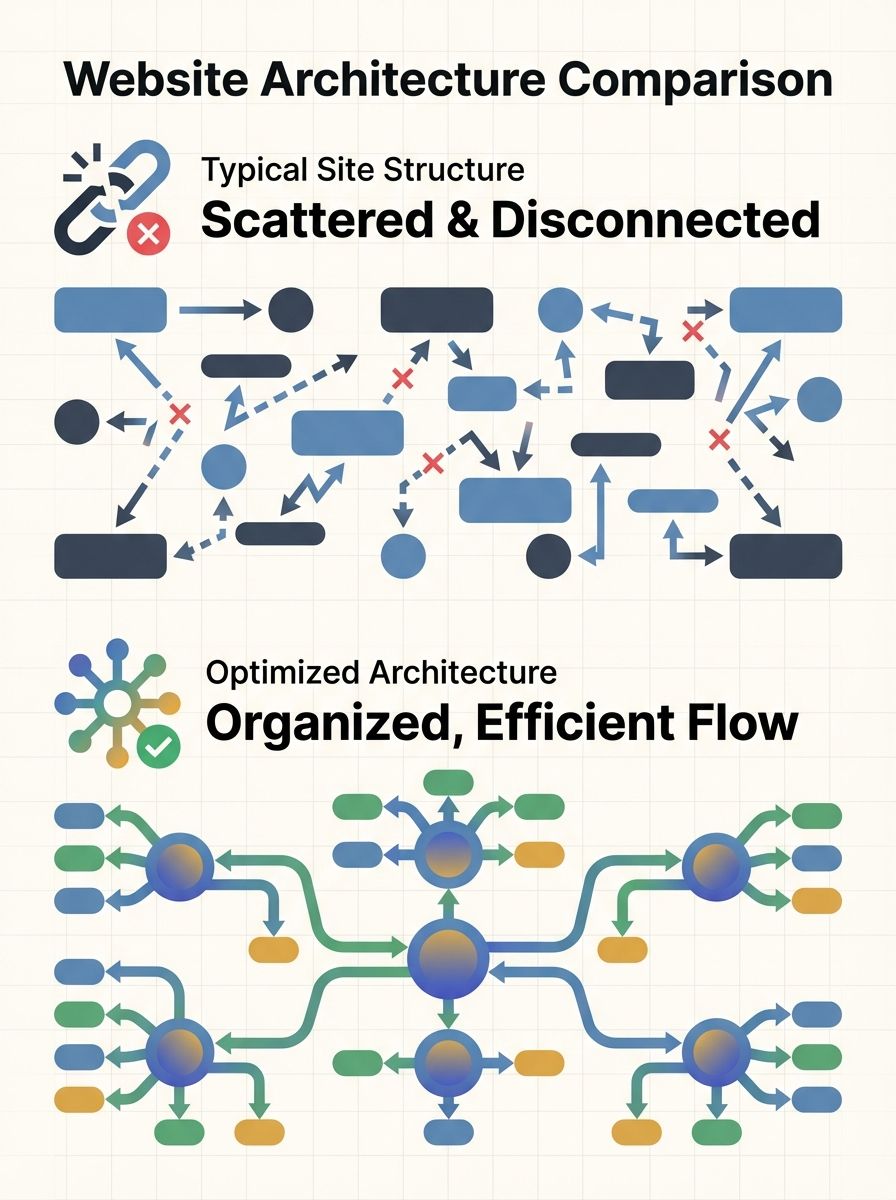
I've spent the better part of three years rebuilding internal linking strategies for B2B SaaS companies, and the pattern is always the same. The site has hundreds of published pages. Maybe 30% of them get meaningful traffic. And the root cause isn't bad content or weak backlinks. It's that nobody ever built a coherent link architecture connecting those pages together.
So let me walk you through the exact framework I use to turn a messy site into one where every page has a purpose, search engines can crawl it efficiently, and users actually convert.
Why Internal Links Matter More Than You Think
Internal links do three things simultaneously. They help search engines discover and index your pages (crawlability). They distribute authority from your strongest pages to the rest of your site. And they guide real humans from one piece of content to the next, moving them closer to a conversion event.
That first point alone should grab your attention. As ClickRank's 2026 guide notes, internal linking provides the primary pathway for crawlers to find and understand your content. Sitemaps help, but Google's crawlers follow links. If a page isn't linked from anywhere meaningful on your site, it might as well not exist.
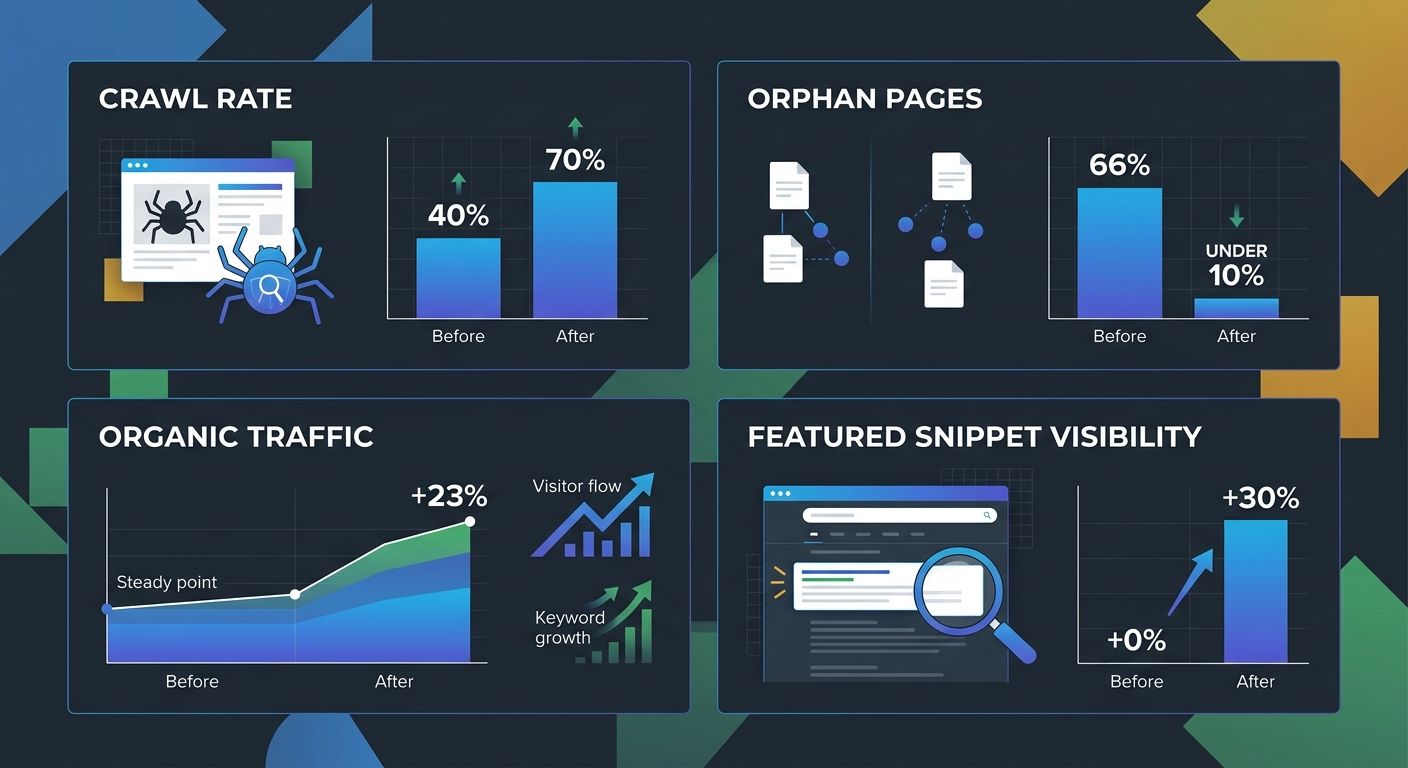
Here's a stat that illustrates the problem: 66.2% of web pages have only one or no internal links pointing to them. These orphan pages are invisible to crawlers and nearly impossible for users to stumble upon. If you've been wondering why your search rankings dropped, orphan pages and broken link paths are a surprisingly common culprit.
The Three Pillars of Strategic Link Architecture
I break every internal linking strategy into three pillars: crawlability, authority distribution, and conversion pathing. Most guides focus on the first two and ignore the third entirely. That's a mistake.
Pillar 1: Crawlability Optimization
Crawlability optimization is about making sure search engines can reach every important page on your site quickly. The rule of thumb from Moz's internal linking best practices is simple: keep important pages within three clicks of your homepage. Every additional click of depth reduces the likelihood that a crawler will reach that page.
Here's how I audit crawl depth:
Run a full site crawl using Screaming Frog or Sitebulb
Export every URL with its crawl depth level
Flag any revenue-driving page sitting at depth 4 or deeper
Identify orphan pages with zero internal links pointing to them
Create a priority list for link insertion, starting with the deepest high-value pages
The goal isn't to link everything to everything. It's to build a clear hierarchy where your most important pages are the easiest to reach. Research from JetOctopus shows that optimized internal linking structures can increase crawl rates from 40% to 70%, which directly accelerates how quickly your new and updated content gets indexed.
Pillar 2: Authority Distribution
Think of your site's authority like water flowing through pipes. Your homepage and a few high-traffic blog posts are the reservoirs. Internal links are the pipes. Without them, all that authority pools in a handful of pages while the rest of your site stays dry.
When I work with a client, I start by identifying their top 20 pages by referring domain count and organic traffic. Then I look at which pages those link to internally. Almost always, I find the same problem: high-authority pages link to other high-authority pages, creating a closed loop at the top while newer content gets nothing.
The fix is intentional. Link from your strongest pages to your strategic targets. Search Engine Land recommends starting with your top-performing content and adding links to relevant, underperforming pages to distribute authority more evenly.
Pillar 3: Conversion-Focused Linking
This is where most SEO-focused guides stop, and where the real money starts. Conversion-focused linking means designing your internal link paths to mirror your buyer's journey, not just your site's taxonomy.
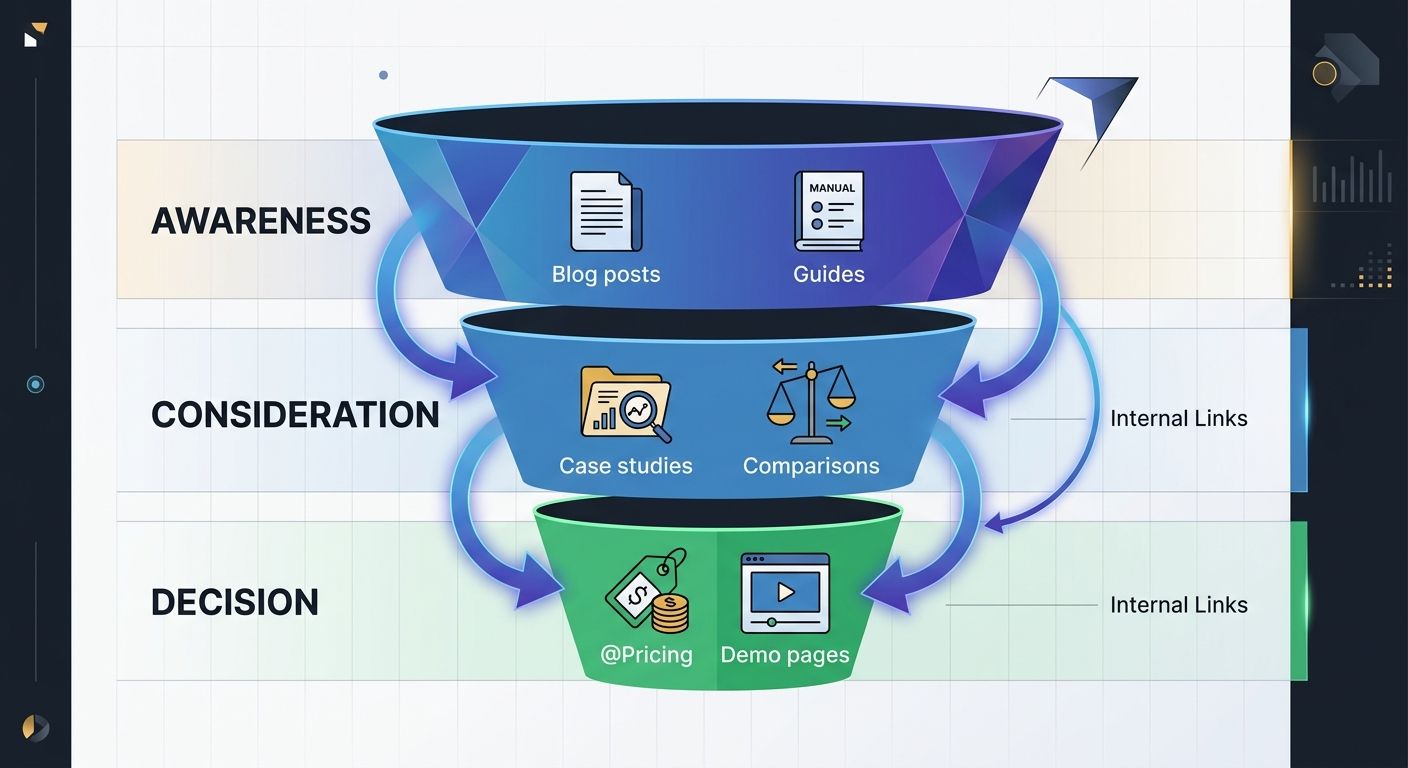
Picture a B2B prospect who lands on a blog post about marketing attribution. If the only internal links point to more blog posts, that person stays in the awareness stage forever. But if you've mapped your links to guide them from awareness content to consideration content (case studies, comparison guides) and then to decision content (pricing, demo pages), you've built a conversion funnel using nothing but internal links.
The data backs this up. Aligning internal link paths with user intent significantly enhances content funnel effectiveness for both SEO and user experience. When I implemented this approach for a SaaS client, we saw a 22% increase in demo requests within 90 days, without adding a single new page to the site.
The Content Linking Patterns That Actually Work
Not all content linking patterns are created equal. Here are the four I rely on most.
The Hub-and-Spoke Model
This is the foundation. You create a pillar page covering a broad topic, then build cluster pages addressing subtopics. Each cluster page links back to the pillar, and the pillar links out to each cluster page. Research from Hashmeta found that this topic cluster model increases featured snippet visibility by 30%.
If you've already built content hubs for lead generation, you're halfway there. The key is ensuring the links between hub and spoke pages use descriptive, keyword-rich anchor text rather than generic "click here" or "read more" phrases. According to Americaneagle's analysis, exact-match anchor text delivers 5x more organic traffic compared to generic phrasing.
The Bridge Link Pattern
Bridge links connect two separate topic clusters through a shared subtopic. For example, if you have a cluster on "content marketing" and another on "SEO strategy," a blog post about content optimization for search could naturally link to pages in both clusters. This helps search engines understand thematic relationships across your site while giving users natural pathways between related topics.
The Conversion Escalation Pattern
This is my favorite, and the one most sites completely ignore. You identify your highest-traffic informational pages and add contextual links that guide readers toward your highest-converting pages. The trick is relevance. The link has to feel like a natural next step, not a sales pitch dropped into an educational article.
The Recency Boost Pattern
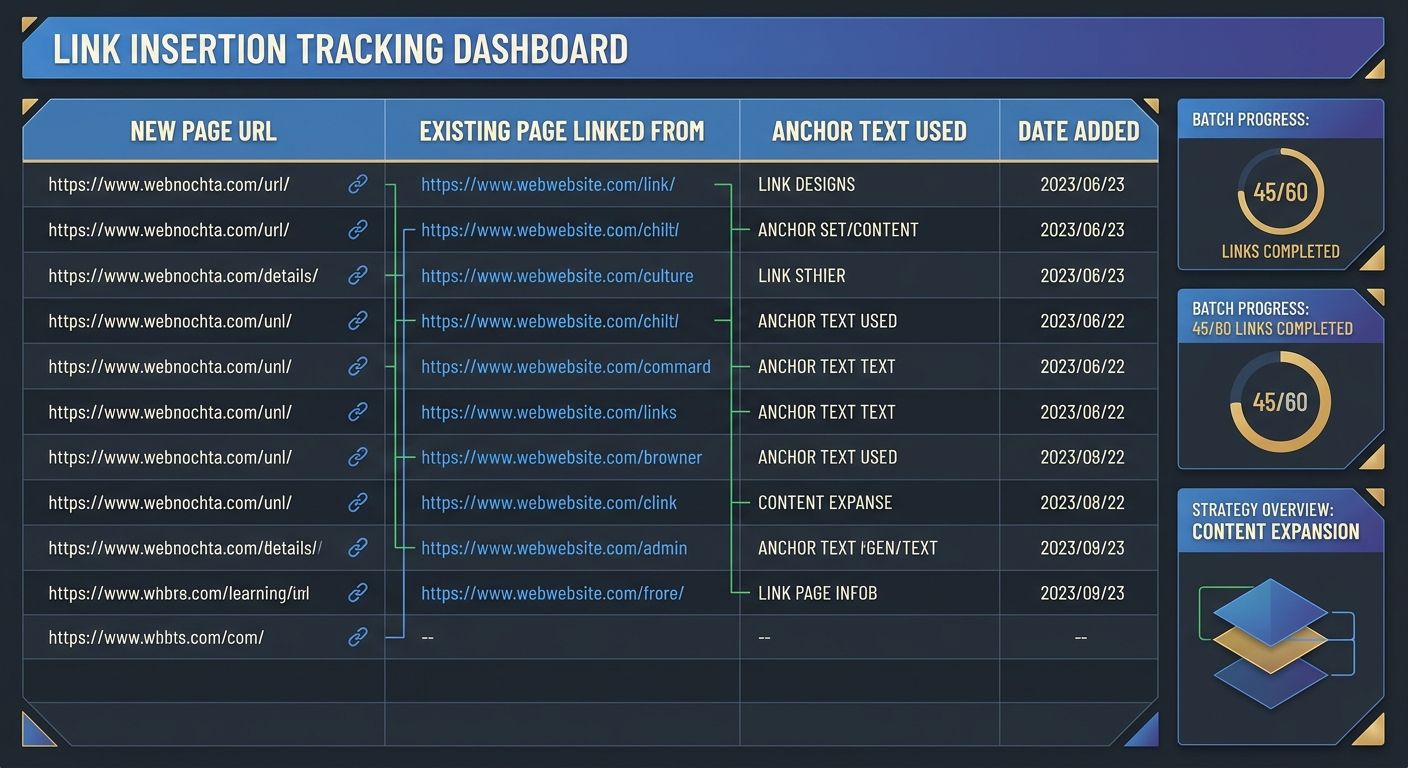
Whenever you publish new content, go back to 5–10 existing relevant pages and add links to the new piece. This is the single easiest way to get new content indexed faster and ranking sooner. I keep a spreadsheet tracking which pages I've updated with new links, which prevents me from over-linking the same pages repeatedly.
A Step-by-Step Implementation Guide
Here's the exact process I follow when building or rebuilding a site's link architecture. I've refined this over dozens of client engagements, and it works whether you have 50 pages or 5,000.
Step 1: Audit your current state. Crawl your site and export every page with its internal link count, crawl depth, and organic traffic. Flag orphan pages and pages with fewer than 3 incoming internal links.
Step 2: Categorize every page. Sort pages into three buckets: awareness content, consideration content, and decision content. If you haven't done this exercise before, our guide on auditing and reverse-engineering your content plan walks through the process.
Step 3: Identify your priority targets. These are pages targeting competitive keywords, pages that drive conversions, and pillar content. They should receive the highest volume of internal links.
Step 4: Map your link paths. For each topic cluster, draw the links between pillar and cluster pages. Then overlay conversion escalation links that connect informational content to decision content.
Step 5: Write descriptive anchor text. Every link should use anchor text that tells both users and search engines what the target page is about. "Our guide to conversion rate optimization" beats "this article" every single time.
Step 6: Implement in batches. I typically update 10–15 existing pages per week with new internal links. Rushing all changes at once makes it harder to measure what's working.
Step 7: Measure and iterate quarterly. Track crawl stats in Google Search Console, monitor ranking changes for target pages, and watch user behavior metrics like bounce rate and pages per session. If you notice your analytics aren't telling a clear story, check whether your GA4 implementation needs debugging before drawing conclusions.
How Many Internal Links Per Page?
I get asked this constantly. The answer depends on content length and page type, but here are the ranges I work with:
Blog posts (1,000–1,500 words): 5–8 contextual internal links
Long-form guides (2,000+ words): 8–15 contextual internal links
Pillar pages: 15–25 links to cluster content
Product or service pages: 3–6 links to supporting content
The research suggesting 40–44 internal links as optimal refers to total links pointing TO a page from across your site, not links placed ON a single page. That distinction matters. You want many pages linking to your priority targets, not one page with 44 links crammed into it.
Measuring the Impact
Don't just implement and hope. Track these specific metrics:
Crawl stats: Pages crawled per day and indexation rate in Google Search Console
Ranking movement: Position changes for pages that received new internal links
Organic traffic: Page-level traffic trends, comparing the 90 days before and after link updates
Engagement: Pages per session, average session duration, and bounce rate
Conversions: Goal completions and conversion rate for pages at the end of your link paths
Industry benchmarks suggest that consistent internal link optimization can drive a 23% increase in organic traffic within six months. Some sites see even larger gains, particularly those starting from a disorganized baseline.
Where to Start With Your Own Site
Run a crawl of your site and identify every orphan page and every page with fewer than 3 incoming internal links. Pick your 10 highest-priority pages based on competitive keywords, conversion value, or pillar status. Find 5 existing pages per priority target where you can add a relevant, contextual internal link with descriptive anchor text. Track the crawl stats and ranking changes for those 10 pages over the next 60 days.
That's 50 link updates total. It'll take you half a day. And if the data I've seen across dozens of implementations holds true, you'll see measurable movement in both search visibility and user engagement within two months. Internal linking isn't glamorous work. But it's the highest-ROI activity most marketing teams aren't doing well, and the sites that get their link architecture SEO right will keep pulling ahead of the ones that don't.

Alex Chen
Alex Chen is a digital marketing strategist with over 8 years of experience helping enterprise brands and agencies scale their online presence through data-driven campaigns. He has led marketing teams at two successful SaaS startups and specializes in conversion optimization and multi-channel attribution modeling. Alex combines technical expertise with strategic thinking to deliver actionable insights for marketing professionals looking to improve their ROI.
Explore more topics