
Google Brings Back Data Studio: What It Means for Your 2026 Analytics Stack Decision
Three days. That's how long it took for my inbox to fill with 47 emails from clients all asking the same question: "Wait, is it Data Studio or Looker Studio now?
Google Brings Back Data Studio: What It Means for Your 2026 Analytics Stack Decision
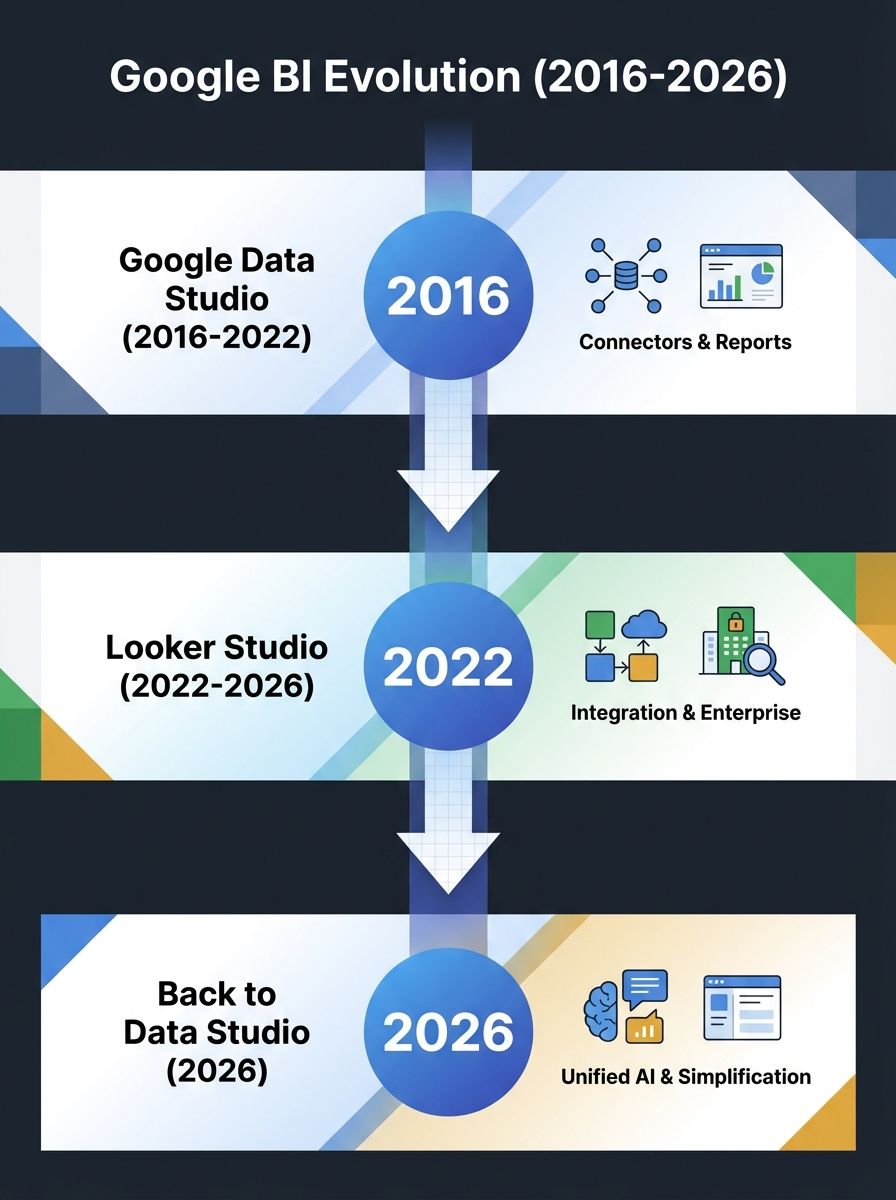
Three days. That's how long it took for my inbox to fill with 47 emails from clients all asking the same question: "Wait, is it Data Studio or Looker Studio now?" On April 11, Google officially retired the Looker Studio name and brought back "Data Studio" as the brand for its free reporting and visualization tool. After a 3.5-year experiment with the Looker branding, this reversal tells us something important about where the Google analytics ecosystem is heading and what it means for the marketing analytics platform shift many teams are navigating right now.
I've spent the weekend digging into the announcement, the strategic logic behind it, and what you should actually do about it. Here's my honest take.
What Actually Happened (And Why It Matters More Than a Name Change)
Let's get the facts straight. Google announced on April 11 that the free tool formerly known as Looker Studio is reverting to Data Studio. The paid enterprise version, previously Looker Studio Pro, becomes Data Studio Pro. The full enterprise BI platform keeps the Looker name, period.
But this isn't just a cosmetic rebrand. According to the announcement details from Google, Data Studio is evolving from a pure visualization tool into a central hub for exploring, organizing, and acting on data across Google's ecosystem. That means BigQuery, Google Sheets, Google Ads, and new AI-powered features like BigQuery conversational agents and data apps built in Colab.
The transition is automatic. All your existing reports, data sources, dashboards, and permissions carry over with zero action required. If you're worried about broken links or lost configurations, don't be.
Here's what actually changed beyond the name:
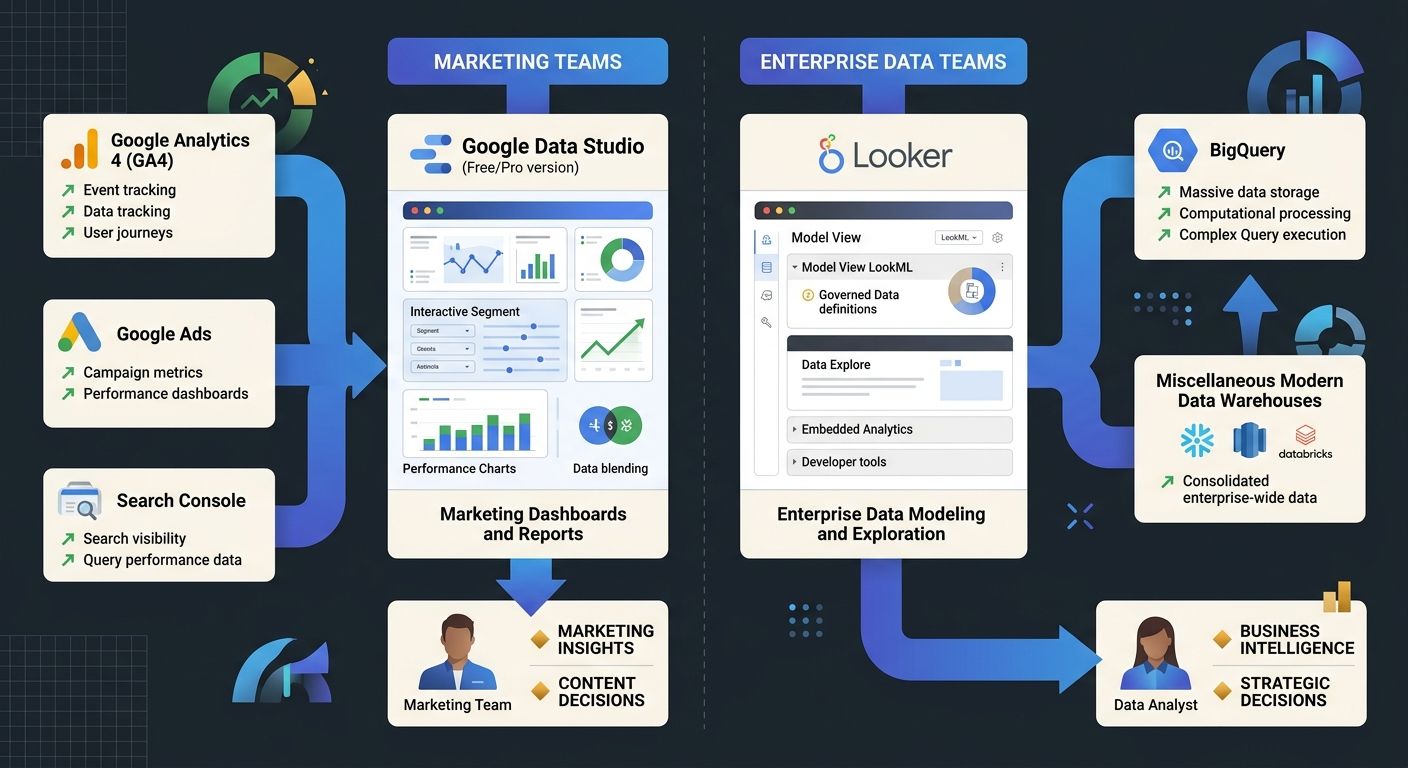
Data Studio (Free) targets individuals and small teams needing quick analysis and collaboration
Data Studio Pro serves larger organizations with enhanced security, compliance, and centralized management through Google Cloud and Workspace admin consoles
Looker remains the governed, enterprise-grade BI platform for data teams working with semantic models at scale
AI-driven exploration is now baked into Data Studio, letting users interact with data through natural language
The strategic rationale is straightforward. For 3.5 years, "Looker" meant two wildly different things: a $2.6 billion enterprise acquisition and a free drag-and-drop dashboard builder. I can't tell you how many client calls I've been on where someone says "We use Looker" and nobody in the room knows which product they mean. That confusion is now resolved.
Why This Rebrand Signals a Bigger Marketing Analytics Platform Shift
A name change by itself wouldn't warrant 1,500 words. What makes this significant is the timing and what it reveals about Google's analytics strategy.
Google just wrapped its March 2026 core update, GA4 has been introducing new audience templates like High-Value Purchasers and Disengaged Purchasers, and the entire search landscape is shifting toward AI-driven discovery. The Google Data Studio revival fits into a pattern: Google is consolidating and clarifying its data products right when marketers need that clarity most.
Think about what your typical marketing analytics stack looks like. You've got GA4 for web analytics, Google Ads for campaign data, Search Console for organic performance, and then... some visualization layer to tie it all together. For many teams I work with, that visualization layer has been a mess of spreadsheets, screenshots, and fragmented dashboards that nobody fully trusts.
If your team has been questioning whether your analytics dashboards actually reflect reality, this reorganization matters. Data Studio's expanded role as a hub (not just a chart maker) means Google is positioning it as the place where marketing, sales, and operations teams go to understand their data without needing a data engineer in the room.
Free vs. Paid Analytics Tools: Where Data Studio Fits Now
This brings us to the question I know you're actually asking: should you stick with free Data Studio, upgrade to Pro, or look at alternatives entirely?
The free vs paid analytics tools debate has shifted in 2026. Free tools like Data Studio, Power BI Desktop, and open-source options offer genuinely capable reporting for individuals and small teams. But as industry analysis confirms, free tools hit walls around customization, technical support, and integrations with third-party apps. Paid tools cost real money but deliver advanced features, dedicated support, and the kind of app integrations that enterprise teams depend on.
Here's how I'd frame the decision:
Data Studio (Free) is right for you if:
Your team is under 10 people using Google's ecosystem heavily
You need quick, shareable dashboards connected to GA4, Ads, and Sheets
Your reporting needs are standard: traffic trends, campaign performance, conversion tracking
Budget for analytics tools is minimal or nonexistent
Data Studio Pro makes sense when:
You need centralized admin controls and compliance features
Multiple departments share dashboards with different permission levels
Your organization runs on Google Workspace and wants unified management
AI-powered exploration and advanced connectors justify the cost
You should look beyond Google when:
Your data lives primarily outside Google's ecosystem (Adobe, HubSpot, Salesforce)
You need Tableau-level statistical analysis or complex data modeling
Data governance requirements exceed what Pro offers
You're building a unified tool stack without vendor lock-in
The honest truth? For most marketing teams doing SEO and content work, free Data Studio connected to GA4 and Search Console covers 80% of what you need. I've seen teams spend $500/month on Tableau licenses when their actual use case is "show me organic traffic by landing page." Don't over-engineer this.
What This Means for Your SEO Reporting Specifically
Here's where I get opinionated, because this is my lane.
The data visualization trends 2026 conversation has shifted from "which tool makes the prettiest charts" to "which tool connects to my actual data sources with the least friction." For SEO professionals, that means your reporting stack needs to pull from GA4, Search Console, rank tracking tools, and ideally your CRM to show the full picture from ranking to revenue.
Data Studio's expanded connector ecosystem makes it easier to build that unified view. Combined with GA4's new audience segmentation features and the platform's AI-driven query capabilities, you can now ask questions of your data in plain English and get visualizations back. That's a meaningful shift from the old workflow of manually building every chart.
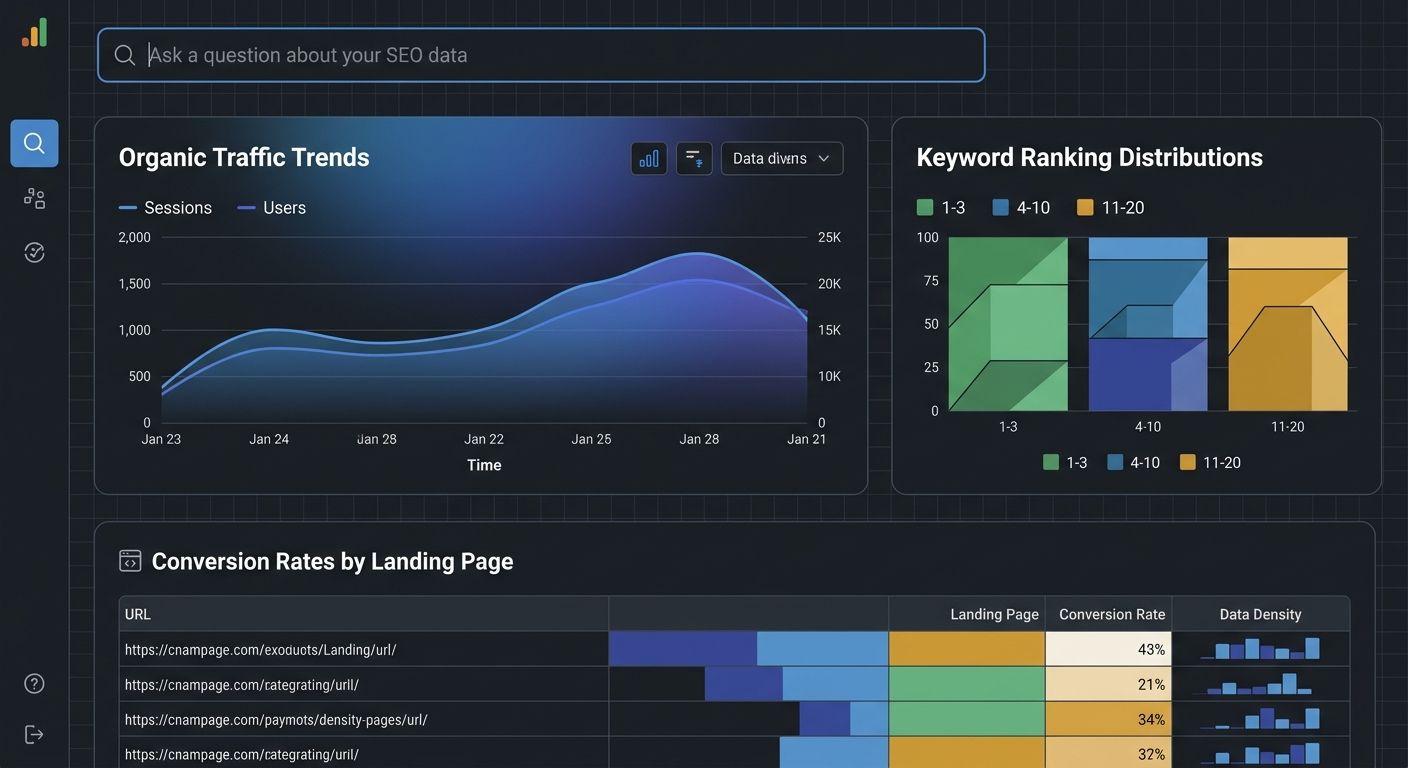
But here's the catch that most coverage of this announcement misses: the visualization layer is only as good as the data feeding it. I've written extensively about debugging your GA4 implementation because I keep seeing teams build gorgeous dashboards on top of broken event tracking. If your GA4 setup has misconfigured conversions or consent mode issues, Data Studio will just visualize garbage more attractively.
So my recommendation is the same as it's always been: fix your data foundation first, then worry about visualization. Clean events, intentional conversion definitions, correct consent mode implementation, and proper Google Ads integration. Then build your Data Studio dashboards. The new AI exploration features will actually have something trustworthy to work with.
Your Action Plan for the Next 30 Days
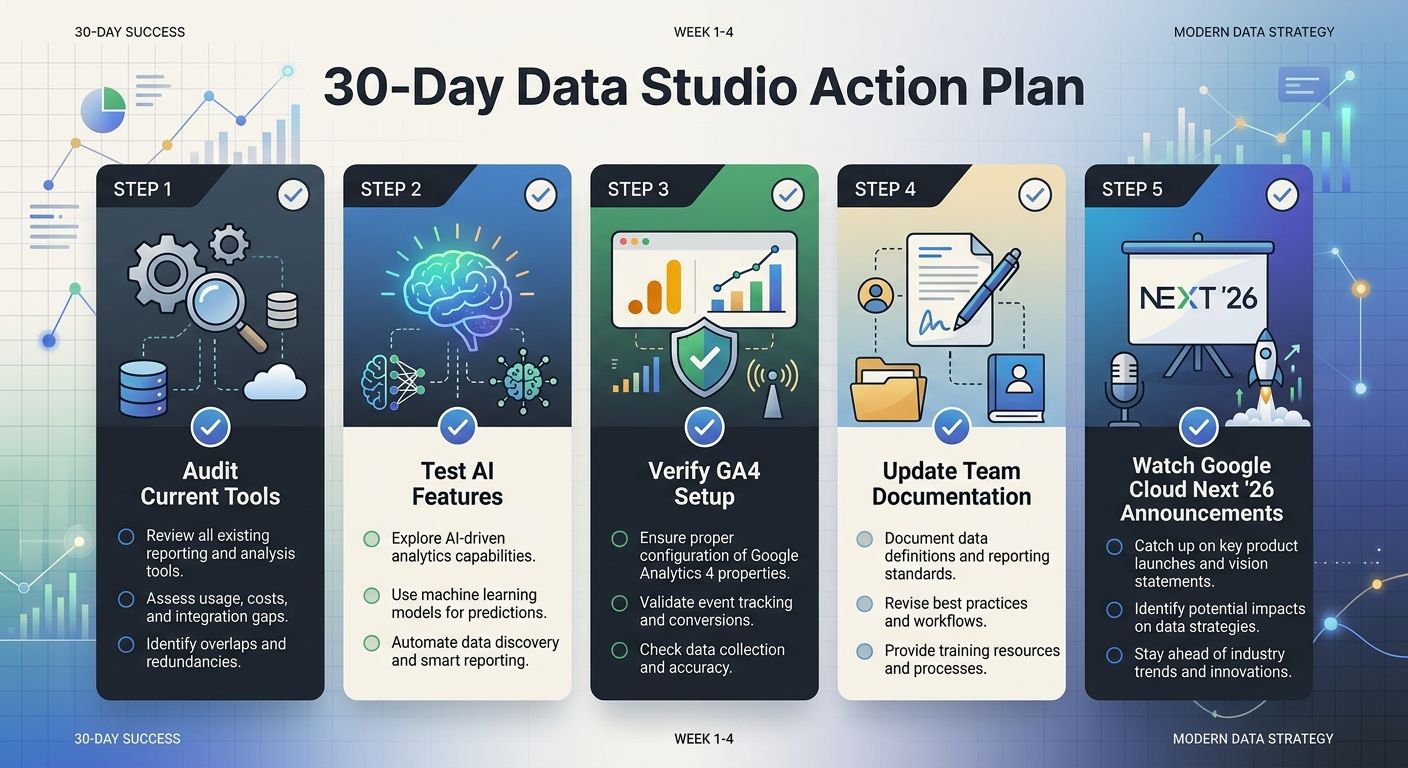
This announcement dropped three days ago, and Google Cloud Next '26 is happening later this month with more details about Data Studio's roadmap. Here's what I'd do right now:
Don't panic or rush to change anything. The transition is automatic. Your existing reports are safe. Bookmark the new URL if Google provides one, and update any internal documentation that references "Looker Studio."
Audit your current reporting stack. How many tools are you paying for that duplicate what Data Studio does natively? I worked with a mid-market SaaS company that was spending $1,200/month on a third-party dashboard tool while barely using their existing Looker Studio (now Data Studio) setup. They consolidated and redirected that budget toward better rank tracking tools instead.
Test the AI exploration features. If you haven't tried conversational analytics in Data Studio yet, now's the time. The "Show reasoning" feature launched in March 2026 gives transparency into how AI interprets your natural language queries. It's not perfect, but it's surprisingly useful for quick ad-hoc analysis.
Revisit your GA4 configuration. Use this moment of platform transition as an excuse to audit your data for hidden errors. Check your event parameters, verify your conversion definitions match actual business outcomes, and confirm consent mode is working correctly.
Watch Google Cloud Next '26. Google has promised more details about Data Studio's expanded capabilities and the broader Data Cloud strategy. If you're making a major analytics stack decision this quarter, wait for that information before committing budget.
My Bottom Line Take
The Google Data Studio revival isn't just nostalgia marketing. It's Google admitting that the Looker branding experiment created real confusion and that clarity in product positioning matters, especially when you're trying to serve both free-tier marketers and enterprise data teams.
For SEO and marketing professionals, this is good news. You get a clearer product that's explicitly built for your use case, with AI capabilities that are actually useful for the kind of questions you ask daily. The enterprise folks get Looker, purpose-built for their needs. Everyone wins when products have clear boundaries.
But don't let a rebrand distract you from what actually drives results. The tool doesn't matter if your content doesn't convert. The dashboard doesn't matter if the data underneath it is wrong. Spend 80% of your energy on data quality and strategic decision-making, and 20% on which tool renders the chart. That ratio has never changed, and a name swap doesn't change it either.

Sarah Chen
SEO strategist and web analytics expert with over 10 years of experience helping businesses improve their organic search visibility. Sarah covers keyword tracking, site audits, and data-driven growth strategies.
Explore more topics