
WordPress Performance Guide Addresses Live Chat Widget Implementation Without Core Web Vitals Degradation
Premio.

WordPress Performance Guide Addresses Live Chat Widget Implementation Without Core Web Vitals Degradation
Premio.io published implementation guidance on August 27, 2026 for adding WordPress live chat widgets while maintaining Core Web Vitals thresholds, according to a technical guide addressing a documented tension between real-time support tools and page performance metrics that affect both search rankings and user experience.
Baseline Performance Testing Required Before Plugin Installation
The guidance framework instructs site operators to measure current performance across homepage, product pages, blog posts, and checkout flows before enabling any chat plugin, according to the published methodology. The pre-installation audit must capture Largest Contentful Paint (how quickly main content appears), Interaction to Next Paint (page response speed), Cumulative Layout Shift (unexpected content movement), total blocking time, and mobile usability metrics through PageSpeed Insights, Lighthouse, or Chrome DevTools.
Premio.io's methodology cites Google's third-party JavaScript performance documentation, which identifies external scripts as a source of increased network requests that compete with resources needed to display page content. The guide notes that live chat tools typically require third-party JavaScript, external server connections, downloaded scripts, widget initialization, and additional resources including icons, avatars, and messaging interfaces.
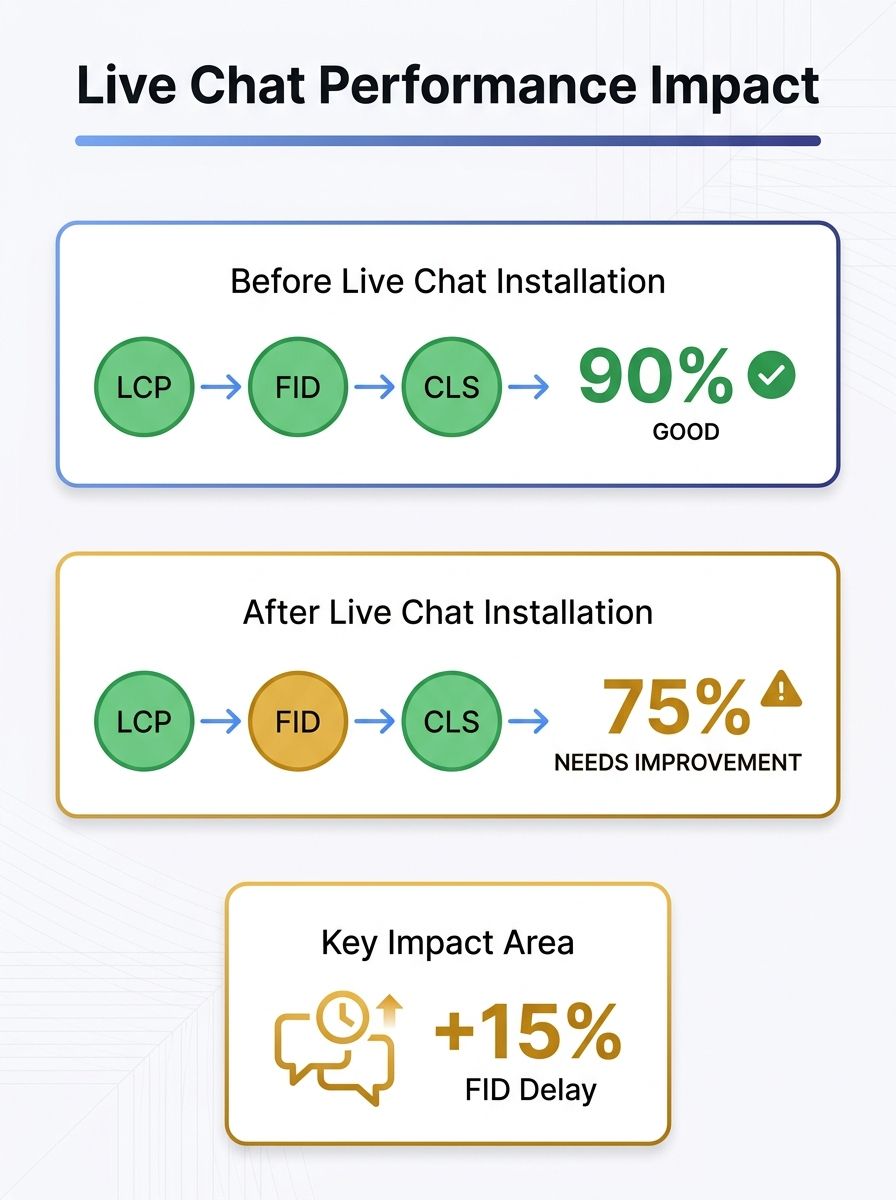
The framework identifies five high-risk configurations: multiple overlapping chat, social, notification, and analytics scripts loading simultaneously; site-wide widget deployment when only specific pages require support; widgets injecting visible content without reserving layout space; large custom images or animated backgrounds; and caching plugin conflicts that alter script behavior. "The goal is not to remove every interactive feature. The goal is to make every widget earn its place on the page," the guide states.
Selective Page Targeting Reduces JavaScript Load Across Site
The implementation protocol specifies limiting chat widget visibility to pages where visitors are statistically likely to need assistance rather than deploying site-wide. The guidance recommends restricting widgets to product comparison pages, checkout flows, pricing sections, and contact pages while excluding blog posts, informational content, and pages with low support request frequency.
The framework warns against stacking separate floating widgets for live chat, WhatsApp buttons, social sharing, cookie banners, popups, accessibility tools, notification bars, and analytics. The guide references existing WordPress plugin overlap analysis showing that redundant floating elements create both performance penalties and user experience friction on mobile devices, though the page load speed conversion research documents a seven-fold conversion rate difference between one-second and five-second loading pages.
Premio.io identifies plugin selection criteria including simple floating button implementation, browser or mobile app response capability, offline message support, appearance and placement controls, page-specific or time-based display rules, multi-channel support, conversation measurement, and caching compatibility. The guide cites Chatway Live Chat as meeting the specified criteria through its WordPress.org plugin implementation, noting features including live chat, FAQ support, team agents, file sharing, notifications, mobile apps, and communication channel integrations.
Post-Installation Validation Protocol Measures Real-User Impact
The verification framework requires re-testing the same page set after chat widget activation, comparing Core Web Vitals measurements against baseline data to quantify performance impact. The guide instructs operators to check mobile usability specifically, verifying that chat buttons do not overlap navigation controls, form fields, or checkout elements.
The protocol addresses caching plugin compatibility as a required validation step, noting that optimization tools may modify how chat scripts load or execute. The guidance recommends testing chat functionality with caching enabled to confirm message delivery, notification behavior, and widget responsiveness remain intact after optimization layer interference.
Premio.io's methodology references web.dev's Web Vitals documentation recommendation to evaluate performance across real user conditions rather than single desktop tests. The guide states that chat widgets are "not automatically a performance problem" but that risk emerges from configuration decisions rather than the technology itself.
Why This Matters Now
Live chat adoption accelerated through 2025 and 2026 as conversion optimization teams sought to reduce checkout abandonment and product comparison friction, creating pressure to deploy real-time support tools across WordPress installations. However, Google's March 2024 Page Experience update and subsequent Core Web Vitals emphasis in ranking algorithms created a documented performance ceiling for sites adding third-party JavaScript without systematic testing protocols.
The Premio.io framework arrives as WordPress operators face measurement requirements for both conversion assistance tools and search visibility preservation. Sites adding chat widgets without baseline performance audits risk degrading Core Web Vitals measurements that affect organic traffic while simultaneously attempting to improve conversion rates through better support availability.
The guidance provides implementation steps that separate chat tool selection from deployment configuration, allowing operators to test multiple plugins against established performance thresholds before committing to site-wide rollout. The selective targeting methodology directly addresses the documented trade-off between feature availability and page weight, providing a testing framework rather than a binary enable-or-disable recommendation.

Alex Chen
Alex Chen is a digital marketing strategist with over 8 years of experience helping enterprise brands and agencies scale their online presence through data-driven campaigns. He has led marketing teams at two successful SaaS startups and specializes in conversion optimization and multi-channel attribution modeling. Alex combines technical expertise with strategic thinking to deliver actionable insights for marketing professionals looking to improve their ROI.
Related Articles

Content Management Systems Create Measurable Search Performance Gaps Through Technical SEO Implementation Barriers
A technical SEO guide published by asclique.com on September 20 identifies specific platform architecture differences that determine whether websites can implement Core Web Vitals optimization, schema markup, and crawl efficiency controls without requiring developer intervention for each change.

Website Performance Analysis Shows 7x Conversion Gap Between One-Second and Five-Second Page Loads
A statistical compilation published August 24, 2026 quantifies the revenue cost of slow-loading websites, showing pages that load in one second convert at 3.05% while five-second pages convert at just 0.41%, according to data published by Mean CEO.

Google Tightens Core Web Vitals LCP Threshold to 2.0 Seconds, Only 33% of Mobile Sites Pass
Google tightened its Largest Contentful Paint threshold from 2.5 seconds to 2.0 seconds in a March 2026 Core Web Vitals update, forcing website operators to reevaluate optimization strategies that previously passed the performance benchmark, according to a June 5, 2026 analysis published by The Visu
Explore more topics