
The On-Page SEO Stack: Mastering Titles, Meta Descriptions, and Schema Markup Without Bloat
Google rewrites between 60% and 70% of meta descriptions in search results when they're missing, duplicated, or mismatched to the searcher's intent.
The On-Page SEO Stack: Mastering Titles, Meta Descriptions, and Schema Markup Without Bloat
Google rewrites between 60% and 70% of meta descriptions in search results when they're missing, duplicated, or mismatched to the searcher's intent. That rewrite rate matters for paid media teams because the same landing pages feeding your Google Ads campaigns carry those weak metadata signals into Quality Score calculations, inflating your cost-per-click while depressing conversion rates.
The connection between on-page SEO optimization and paid media performance is tighter than most ad managers realize. Quality Score depends on three factors: expected click-through rate, ad relevance, and landing page experience. Two of those three are directly shaped by the title tags, meta descriptions, and structured data sitting on your landing pages. Fix those elements, and you're lowering CPCs and improving ROAS across your entire paid portfolio.
This article breaks down each layer of the on-page stack, shows where the paid and organic signals overlap, and gives you a concrete SEO elements checklist to audit your landing pages without adding unnecessary code weight.
Title Tags: The Quality Score Lever You're Ignoring
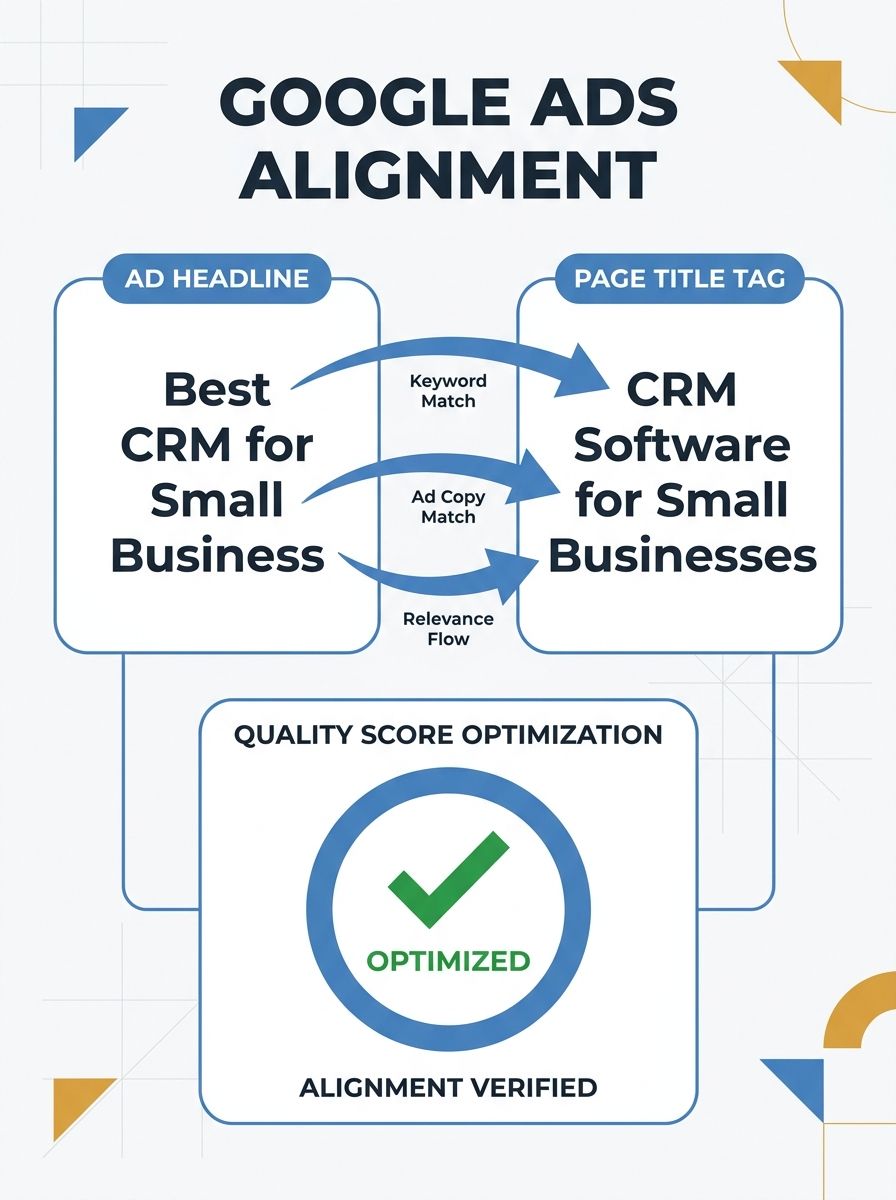
Title tags are still one of the strongest on-page relevance signals Google considers for both organic and paid evaluations. When a user clicks your ad and lands on a page whose H1 and title tag contradict the ad copy, Google's landing page experience score drops. I've seen accounts where fixing title-to-ad alignment alone moved Quality Scores from 5 to 7, cutting average CPCs by 15-20%.
Here's what works:
Front-load the primary keyword. Place the main topic within the first 45 characters. Research consistently shows keywords at the start correlate with better CTR, and for paid landing pages, that alignment between the search query, ad headline, and page title creates a consistency signal Google rewards.
Stay within 50-60 characters. Mobile SERPs truncate aggressively around the 50-character mark. If your title gets cut, the relevance signal weakens.
Use outcome-driven modifiers. Adding specifics like "2026 Guide," "For B2B Teams," or "With Benchmarks" improves both organic CTR and the perceived relevance of your landing page for paid visitors.
Kill duplicate titles across your site. Duplicate titles trigger Google rewrites and confuse Quality Score signals when multiple landing pages compete for the same keywords in your ad groups.
The biggest mistake I see from paid teams: they obsess over ad headline copy in Google Ads but never touch the title tags on the pages those ads point to. The ad and the landing page are one unit in Google's Quality Score evaluation. Treat them that way.
Meta Descriptions That Pre-Qualify Paid Traffic
Meta descriptions don't directly affect rankings. Google has said this repeatedly, and Google's own documentation on meta descriptions confirms the distinction. But they affect CTR when they do appear, and custom descriptions that actually show up increase click-through rates by roughly 5.8% compared to Google-generated snippets.
For paid media strategists, meta descriptions serve a different purpose: they pre-qualify traffic arriving through organic listings that sit alongside your ads. When your organic listing carries a clear, intent-matched description, it attracts the right visitors and filters out the wrong ones. That same filtering logic applies to any page you use as a paid landing destination.
The meta descriptions best practices that actually move metrics:
Target 120-155 characters. Mobile truncates around 120; desktop allows up to 158. Write for the mobile cutoff first, then extend if the desktop version adds value.
Structure in three beats. Confirm the intent (what this page covers), state the value (what the reader gains), and close with a soft call-to-action ("See how," "Compare options," "Get the framework").
Include your target keyword naturally. Google bolds matching terms in the SERP, which draws the eye. Stuffing keywords destroys readability, but a natural placement increases visual prominence.
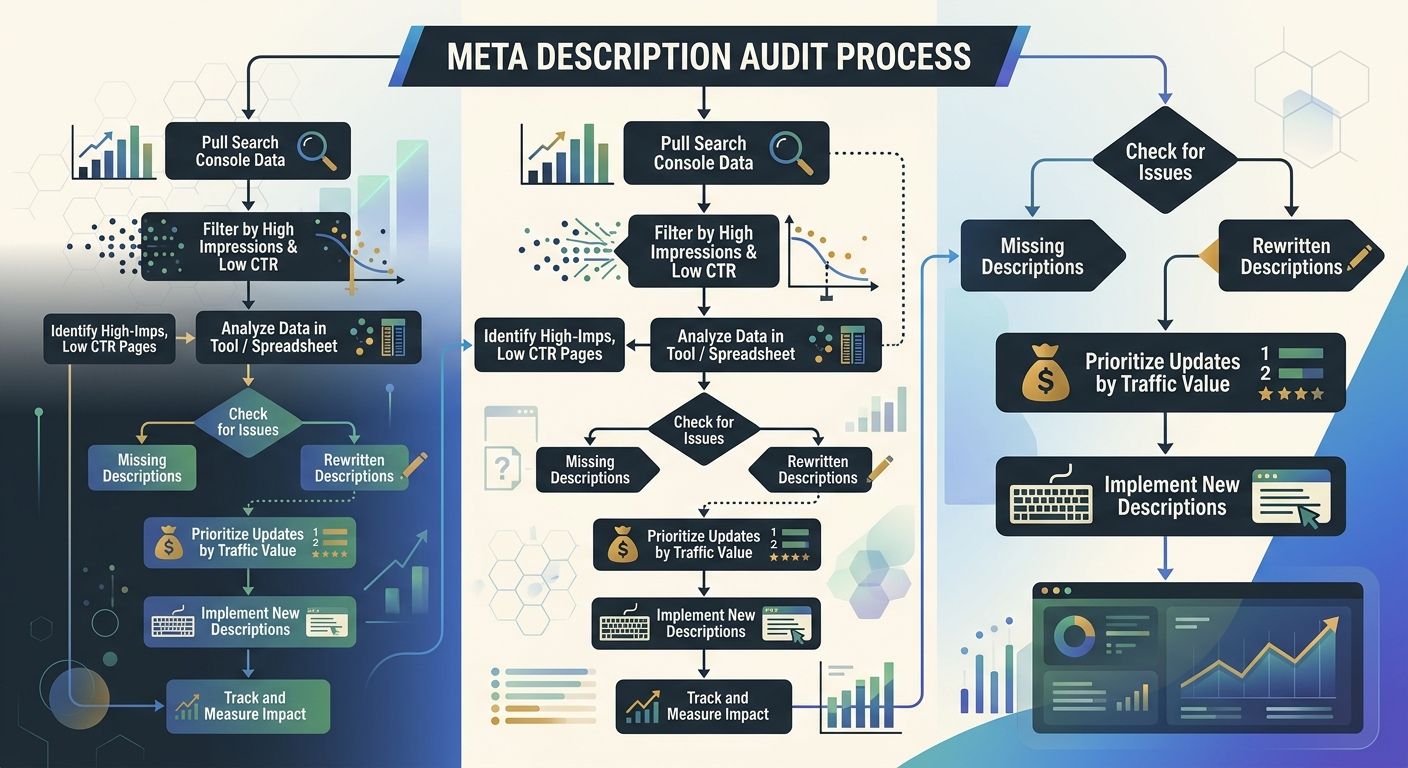
Prioritize your highest-impression, lowest-CTR pages first. Pull a Google Search Console report sorted by impressions descending and CTR ascending. Those pages represent the biggest opportunity with high visibility and low engagement.
When your organic SERP listing carries a strong meta description alongside your paid ad for the same query, you create what I call "double reinforcement." The searcher sees your brand twice, with consistent messaging, and that familiarity increases the likelihood they click your ad or your organic listing. Either way, you win.
Schema Markup Implementation for Paid Landing Pages
Schema markup communicates the meaning of your content to search engines at a semantic level, defining entities, relationships, and intent beyond what the raw text conveys. Google's structured data documentation explains how the search engine uses this markup to understand page content and display rich results like star ratings, FAQ dropdowns, product prices, and event dates.
For paid media teams, schema markup implementation serves two purposes. First, it enables rich snippets on your organic listings, which increases the visual footprint of your SERP presence alongside your ads. Second, structured data helps AI-driven search systems extract and surface your content accurately, which matters as platforms like Google's AI Mode increasingly pull from structured content to generate answers.
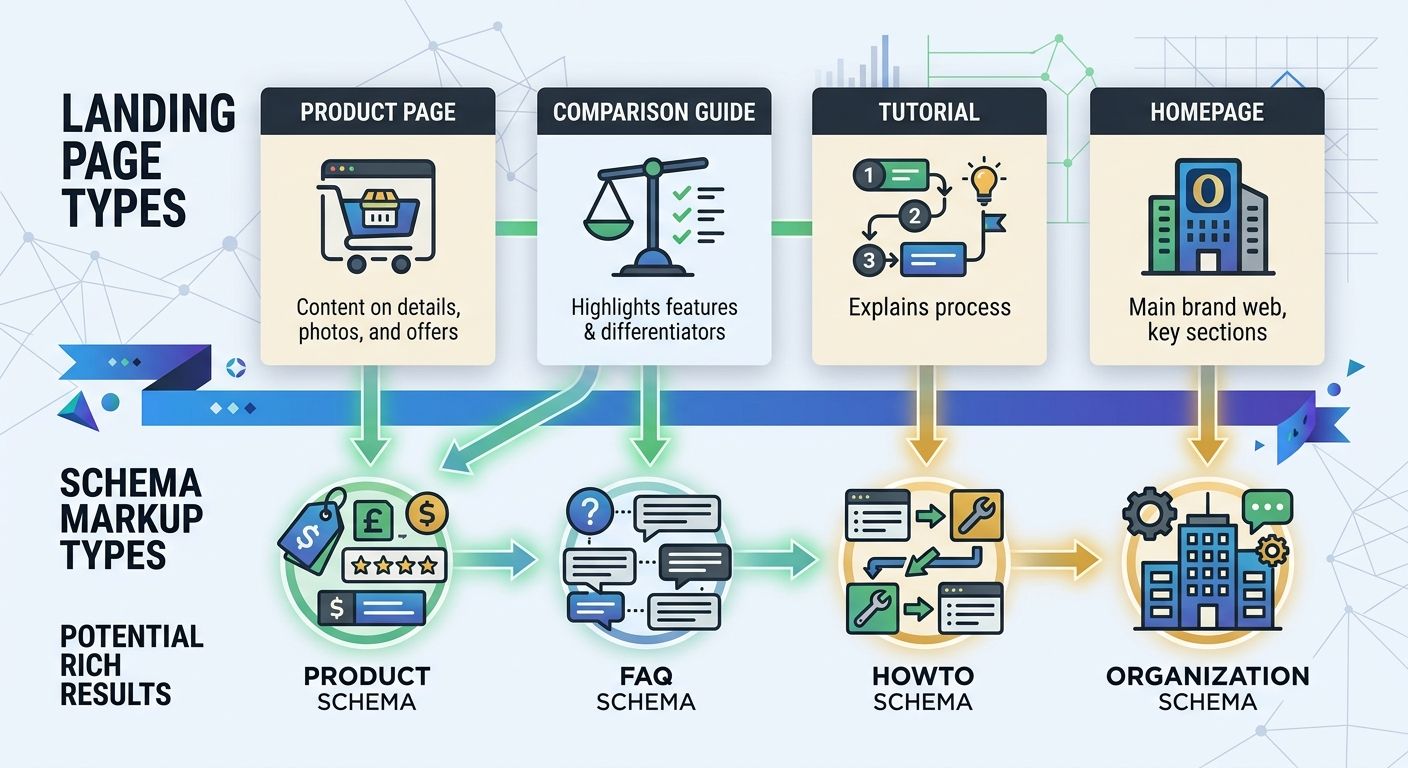
The schema types worth implementing on paid landing pages:
Product schema for e-commerce landing pages (price, availability, review ratings)
FAQ schema for informational or comparison landing pages
Organization schema on your homepage and about page (brand signals)
Review/AggregateRating schema wherever you have genuine customer reviews
HowTo schema for tutorial or process-oriented content
JSON-LD is the implementation format Google prefers. It sits in your page's head or body as a self-contained block, separate from your visible HTML. This means you can add structured data without touching your page layout or loading additional render-blocking resources.
But here's where teams go wrong: they add schema to every page regardless of relevance. Product schema on a blog post confuses Google. FAQ schema on a checkout page adds no value. Match the schema type to the page's actual content and purpose. If you're running a paid campaign to a product page, Product and AggregateRating schema make sense. If you're driving traffic to a comparison guide, FAQ or Article schema is the right call.
Cutting the Bloat From Your SEO Plugin Stack
Every WordPress SEO plugin adds overhead. Script injections, database queries, admin panel UI that slows your dashboard — these accumulate fast. For paid media landing pages, page load speed directly affects both Quality Score and conversion rates. Google has confirmed that landing page experience includes speed signals, and every 100ms of additional load time costs you conversions downstream.
Some popular SEO plugins inject 15-20 additional database queries per page load. If you're running WordPress, choosing a lightweight theme and a focused SEO plugin matters more than most teams realize. Frameworks like The SEO Framework advertise zero tracking, no ads, and automated meta tag generation without the bloat that comes with full-suite SEO plugins. The Hide SEO Bloat plugin exists specifically to clean up the admin clutter that SEO tools create.
A practical approach to keeping your on-page stack lean:
Audit your active plugins quarterly. Deactivate anything that duplicates functionality. Two SEO plugins running simultaneously creates conflicting meta tags and doubles the overhead.
Use a lightweight base theme. Hello Elementor, GeneratePress, or Astra's base version all keep initial page weight under 50KB.
Implement schema through Google Tag Manager or a dedicated plugin, not your all-in-one SEO tool. This gives you control over exactly which pages get which markup without blanket site-wide injections.
Test your paid landing pages separately. Run PageSpeed Insights on your top 10 paid landing pages specifically, not just your homepage. Landing page speed varies wildly across a site.
When you're spending $50,000+ per month on Google Ads, a 0.3-second improvement in landing page load time can shift your Quality Score enough to save thousands in monthly CPC costs. The on-page SEO optimization work pays for itself through the paid channel.
The Cross-Channel Audit: An SEO Elements Checklist for Paid Teams
I've built this checklist from auditing dozens of accounts where paid and organic teams operated in silos. The pattern was consistent: ad teams optimized headlines and bidding strategies while ignoring the landing pages underneath. Organic teams optimized content without considering which pages received paid traffic. The result was wasted spend on both sides.
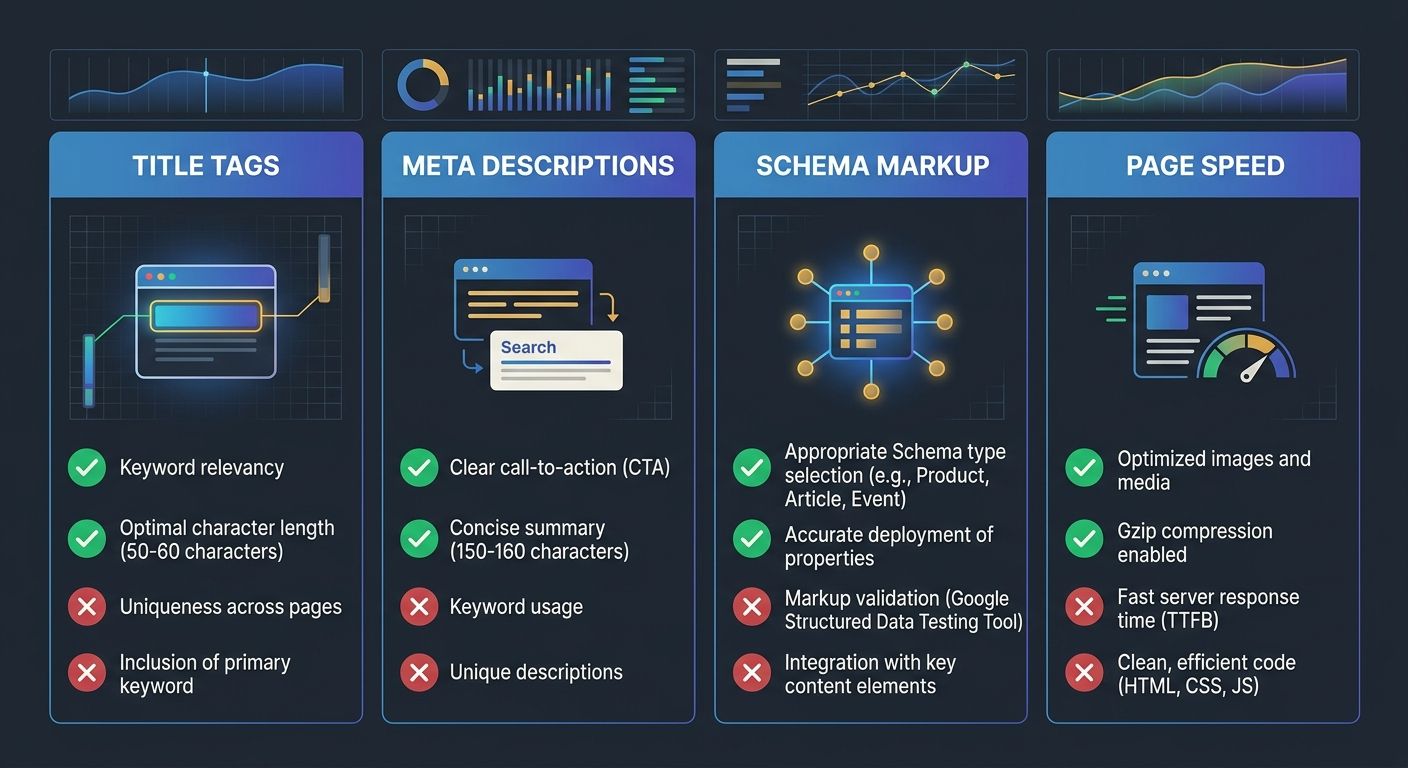
This SEO elements checklist bridges that gap. Run it against any landing page receiving paid traffic:
Title Tag Alignment
Does the title tag contain the primary keyword from your ad group?
Is the title under 60 characters?
Does the title match the ad headline's promise?
Is the title unique across your site (no duplicates)?
Meta Description Quality
Is a custom meta description present (not auto-generated)?
Is it under 155 characters?
Does it include a value statement and soft CTA?
Does it contain the primary keyword naturally?
Schema Markup Relevance
Is the correct schema type implemented for the page type?
Is the schema valid (test with Google's Rich Results Test)?
Does the schema reflect current pricing, availability, or ratings?
Is the JSON-LD clean and free of deprecated properties?
Page Weight and Speed
Does the landing page load in under 2.5 seconds on mobile?
Are there conflicting SEO plugins injecting duplicate meta tags?
Is the theme lightweight enough for Core Web Vitals compliance?
This is the kind of cross-functional work that scales when paid and SEO teams share a single source of truth for landing page quality.
How Intent Mismatch Inflates Your Ad Spend
The 80/20 rule in on-page SEO shows up clearly in paid accounts: fixing intent mismatch between search queries and landing page metadata delivers the majority of performance gains. When a searcher clicks your ad expecting a comparison guide but lands on a product page with a transactional title tag, they bounce. You pay for that click. Your Quality Score drops. Your next click costs more.
Long-tail keywords make this dynamic more pronounced in both directions. As Wincher's on-page SEO analysis notes, long-tail queries carry more specific intent, which means the gap between what a user expects and what your page delivers becomes sharper. But that specificity also means you can match intent more precisely through your title tags and meta descriptions when you get them right.
If you're running campaigns alongside zero-click search results, the on-page signals on your landing pages become even more important. When Google serves an AI-generated answer at the top of the SERP, the users who still click through to your page have already filtered themselves by intent. Your landing page metadata needs to confirm that intent immediately, in the title, in the meta description, and in the structured data that tells Google what kind of content you're serving.
The teams I've worked with that see the best paid performance treat their content and search intent as a unified problem, coordinating organic and paid workstreams around the same landing page strategy rather than letting each team optimize in isolation.
The Open Threads
Google has never published exact Quality Score weightings for title tag alignment, meta description presence, or schema markup. We know landing page experience matters. We know relevance matters. But the precise contribution of each on-page element to your paid performance score remains opaque.
Schema markup's impact on AI-driven search is similarly uncertain. Structured data clearly helps Google extract information for rich results, but how much weight AI answer engines give to schema versus raw page content versus domain authority is still being worked out in real time. As AI Mode and competitor platforms evolve, the rules for visibility keep shifting.
What we do know: teams that treat on-page SEO as a paid performance lever consistently outperform teams that keep these disciplines siloed. Testing title variations against Quality Score changes, measuring CTR lifts from meta description updates, tracking CPC reductions after schema implementation — these are the feedback loops that compound over time. The data doesn't answer every question about exactly how each element contributes. But the aggregate signal is clear enough to act on, and the cost of ignoring it shows up in every inflated CPC your account generates.

Alex Chen
Alex Chen is a digital marketing strategist with over 8 years of experience helping enterprise brands and agencies scale their online presence through data-driven campaigns. He has led marketing teams at two successful SaaS startups and specializes in conversion optimization and multi-channel attribution modeling. Alex combines technical expertise with strategic thinking to deliver actionable insights for marketing professionals looking to improve their ROI.
Explore more topics