
The Crawl Budget Recovery Protocol: Diagnosing Why Your Best Content Isn't Getting Indexed
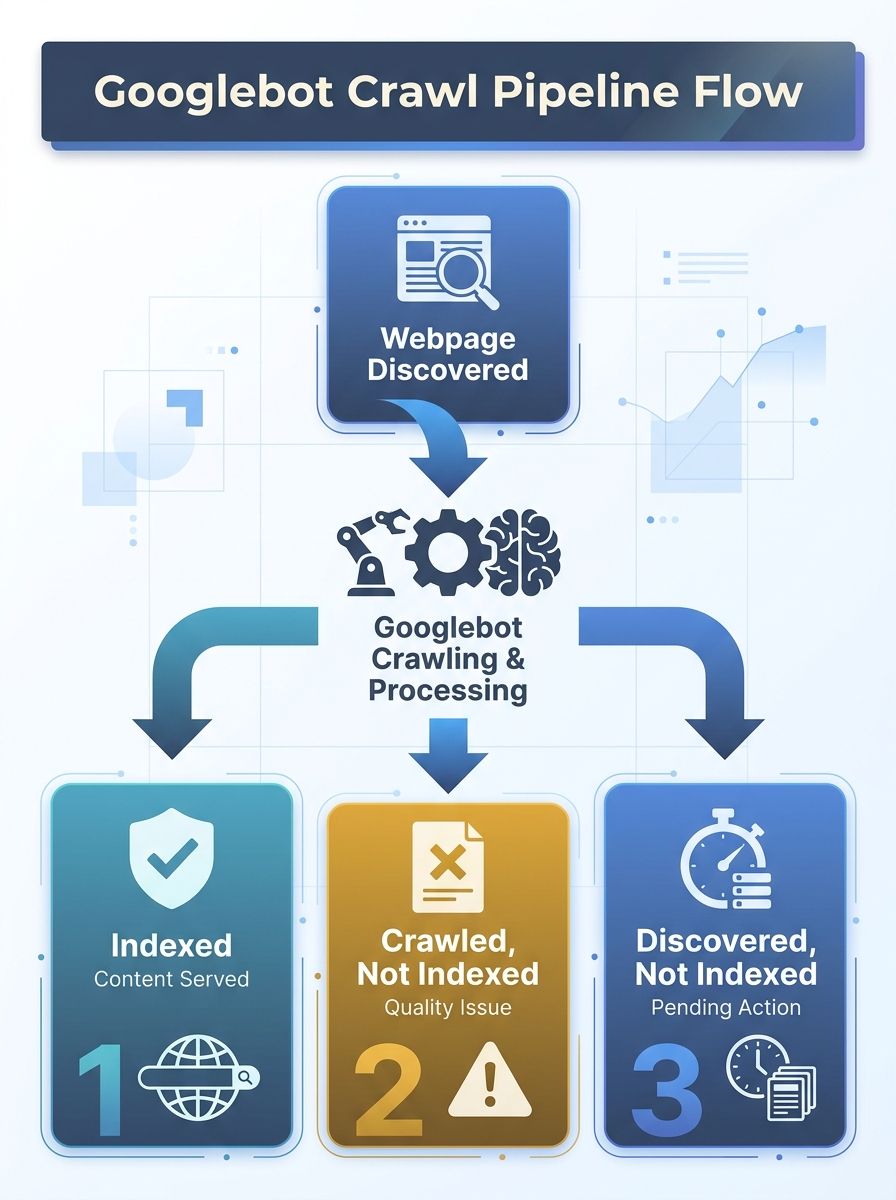
Content problems are the primary driver behind Google Search Console's "Crawled – currently not indexed" status, according to analysis by Onely. Googlebot visited your page, evaluated it, and deliberately chose not to add it to the index.

The Crawl Budget Recovery Protocol: Diagnosing Why Your Best Content Isn't Getting Indexed
Content problems are the primary driver behind Google Search Console's "Crawled – currently not indexed" status, according to analysis by Onely. Googlebot visited your page, evaluated it, and deliberately chose not to add it to the index.
The shift toward crawl budget optimization as an industry priority tracks with a broader pattern: as Google's index becomes more selective and AI-driven search engines grow pickier about which sources to cite, the old assumption that publishing equals indexing no longer holds. Google's John Mueller has stated publicly that it's normal for 20% of a website's pages to remain unindexed, according to The HOTH's analysis of common indexing issues. For large sites, that percentage can climb much higher when technical debt accumulates. The question isn't whether some pages will miss the index. The question is whether your best pages are among the casualties.
How Google Calculates Crawl Budget Per Hostname
Google defines crawl budget as the intersection of two variables: crawl capacity and crawl demand. Crawl capacity is the maximum number of simultaneous parallel connections Googlebot will open to your server, adjusted dynamically based on server health and error rates. Crawl demand reflects how much Google wants to crawl your site, driven by popularity, link signals, and content freshness. The budget applies per hostname, according to Google's crawl budget documentation.
This distinction matters because you can't directly increase your crawl budget allocation. You can only influence the two underlying variables. A server that returns 500 errors on 8% of requests will see its crawl capacity throttled within hours. A site publishing thin, duplicated content across thousands of URLs will see crawl demand drop as Google learns there's less worth fetching.
For sites under 10,000 unique URLs with fast servers and clean sitemaps, crawl budget rarely becomes a bottleneck. The protocol below targets sites where the budget constraint is actively preventing important content from reaching the index.
Diagnosing "Crawled – Currently Not Indexed"
Why does this specific status appear more often than any other indexing problem? Because content quality and content inflation are the two most common root causes, according to Entail AI's analysis of the status. Googlebot spent resources fetching your page, processed the HTML response, and then made a judgment call: this page doesn't add enough unique value to justify an index slot.
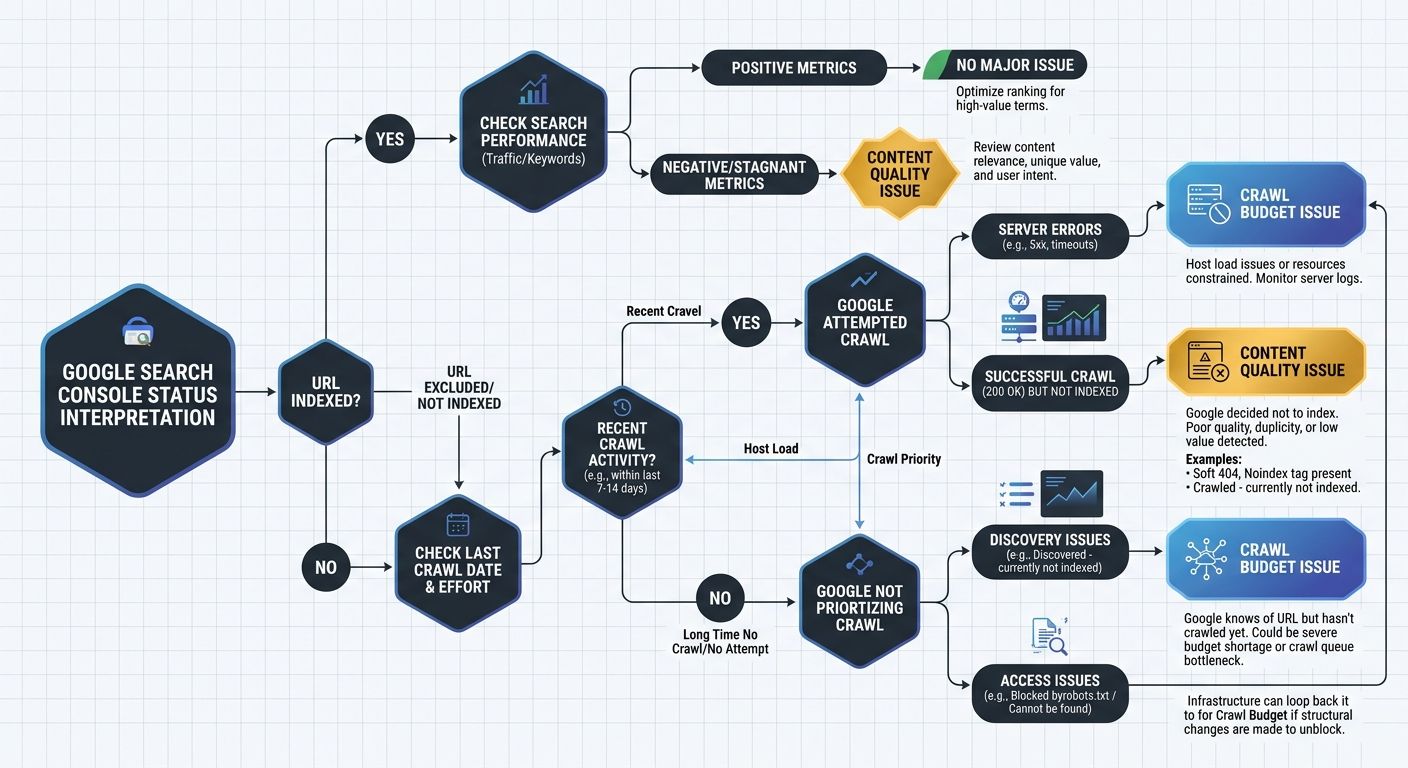
The URL Inspection tool in Google Search Console is your first diagnostic step. Check the last crawl date for any specific page you're concerned about. If the page was crawled within the last 30 days and still carries the "Crawled – currently not indexed" status, the problem is almost certainly content quality or duplicate signals. If the page hasn't been crawled in 60+ days, you're dealing with a crawl budget allocation problem.
That distinction changes your entire content indexation troubleshooting path. Conflating these two root causes wastes weeks of effort on the wrong fix.
The Four-Layer SRDC Recovery Framework
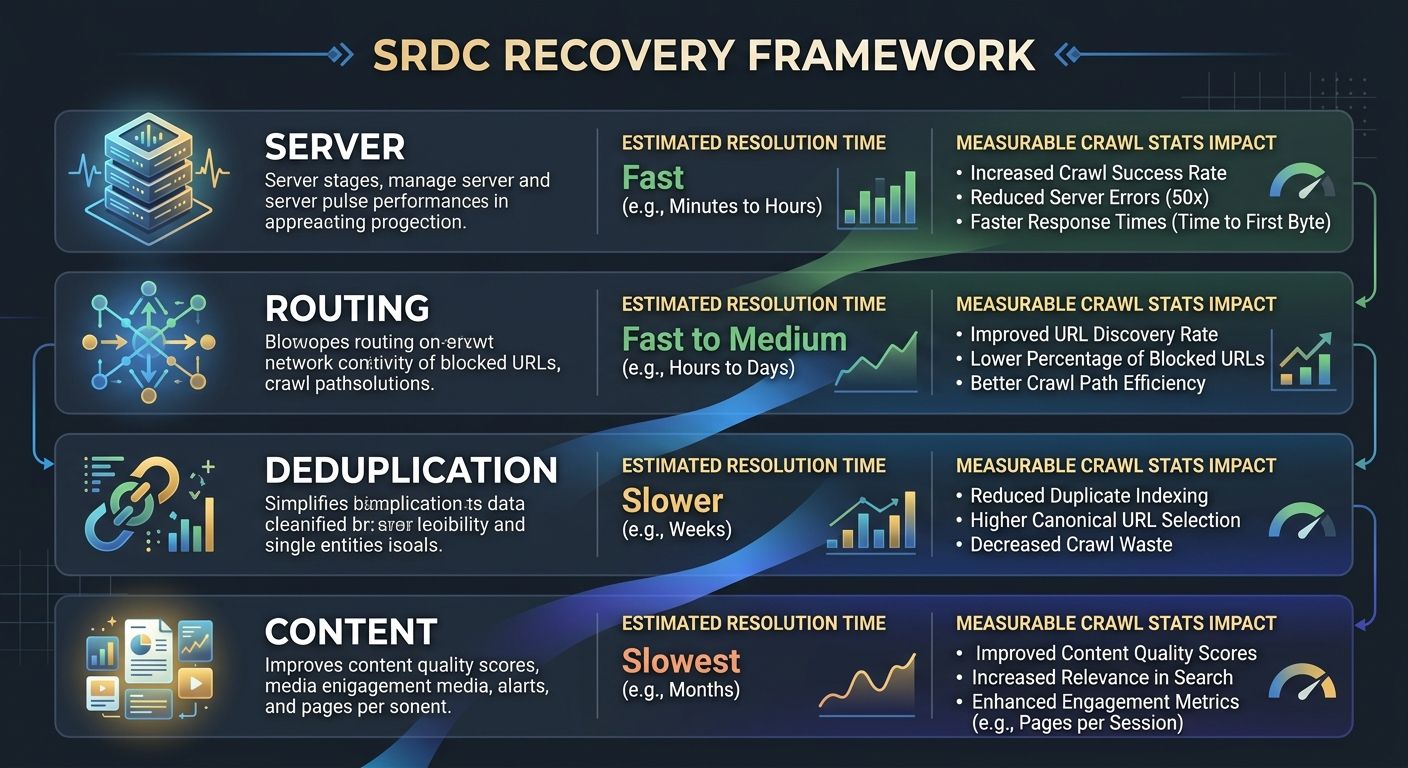
I've used a four-layer diagnostic sequence on enterprise sites for years, and the order matters. Fixing layer three before layer one is like optimizing ad copy when your landing page doesn't load. The framework follows what I call the SRDC sequence (Server, Routing, Deduplication, Content):
Layer | Focus Area | Key Metric | Target |
|---|---|---|---|
1. Server | Response time and error rates | TTFB per Googlebot request | Under 500ms |
2. Routing | robots.txt and URL parameter handling | % of crawl budget on low-value URLs | Under 15% |
3. Deduplication | Canonical tags and URL consolidation | Duplicate URL clusters in crawl report | Zero unresolved clusters |
4. Content | Quality signals and thin page identification | Pages with "Crawled – not indexed" status | Under 10% of total pages |
Working through these layers in order ensures you don't waste effort optimizing content that Googlebot can't even reach efficiently.
Server Response Time Sets the Ceiling
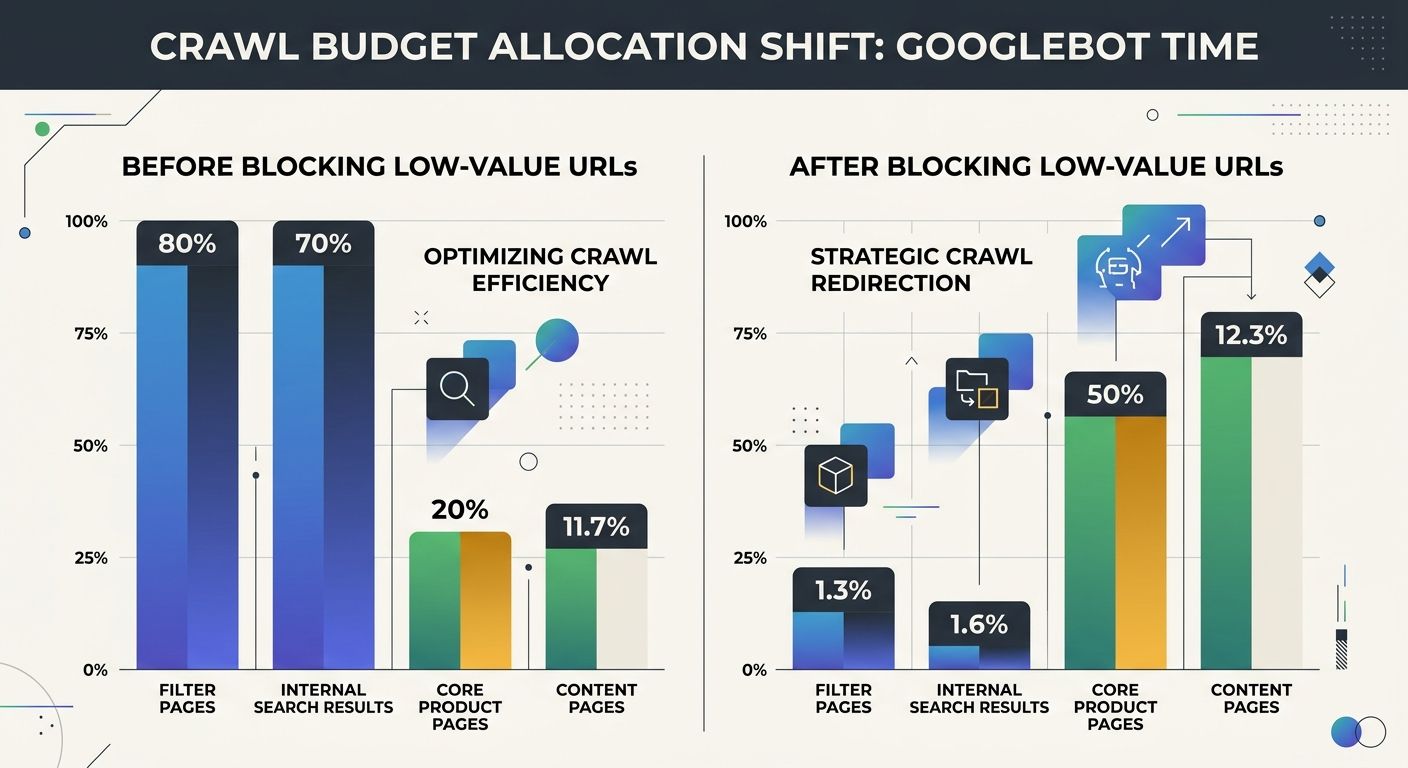
Faster server responses allow Googlebot to crawl more pages per session. The target is under 500ms TTFB for Googlebot requests specifically, which you can verify in Search Console's Crawl Stats report. One documented case study showed a 73% reduction in crawl waste and a 30% increase in organic traffic after rerouting crawl budget away from slow-responding URL patterns toward core content pages.
If your site runs on shared hosting with 1.2-second average response times, no amount of sitemap optimization will compensate. Google's crawlers calculate a crawl capacity limit based on what your server can handle without degradation, and slow responses shrink that limit directly.
Routing Crawl Demand Away from Low-Value URLs
This is where most site crawlability audit work begins. Faceted navigation, internal search result pages, session-ID parameters, and admin areas all consume crawl budget without contributing indexable content. Block these categories via robots.txt to redirect Googlebot's attention toward pages that actually deserve index slots.
A critical mistake here: using noindex tags instead of robots.txt to manage these pages. Google's own documentation warns against this approach. Googlebot will still request pages with noindex tags, process the HTML response, and only then discover the noindex directive, wasting crawling time on every single request. If you want Google to never fetch a URL category, robots.txt is the correct tool. Noindex is appropriate only when you need a page crawled but not indexed, which is rare.
For sites that have already run a site architecture and crawl budget audit, this layer is often partially resolved. The remaining work usually involves parameter handling for e-commerce filters, pagination chains that create thousands of near-duplicate URLs, and legacy URL patterns that redirect through multiple hops before reaching a live page.
Deduplication Through Canonical Tags
Duplicate and near-duplicate pages are crawl budget poison. Every URL variant that serves substantially similar content splits crawl demand across pages that should be consolidated. The fix is canonical tag implementation, but the implementation details matter more than most guides acknowledge.
Self-referencing canonicals (where every page points to itself) don't solve the problem. You need cross-URL canonicals that explicitly tell Google which version of similar content should receive the index slot. Audit your canonical tags by crawling your site with any standard crawler and exporting the canonical URL column. Any page where the canonical points to a different URL than itself is a consolidation signal you've already set. Any page where the canonical is missing or self-referencing but near-duplicate content exists elsewhere on the site is an unresolved cluster waiting to drain your budget.
If you're working through a broader technical SEO triage, duplicate content consolidation typically falls into the P0 or P1 priority tier because its impact compounds across every other layer of Google crawl efficiency.
Content Quality as the Final Gate
After layers 1-3 are addressed, pages still stuck in "Crawled – currently not indexed" have a content quality problem. Google's systems evaluated the page and decided it doesn't merit inclusion. Onely's research confirms that content problems are the main cause behind this specific status report.
Common content-quality triggers for non-indexation include:
Thin pages with fewer than 300 words of unique body content
Templated pages where 80%+ of the visible content is shared boilerplate
Outdated pages that haven't been updated in 18+ months on time-sensitive topics
Cannibalized pages where multiple URLs target the same keyword cluster
Each requires a different intervention. Thin pages need expansion or consolidation. Templated pages need unique introductions and section-specific content. Outdated pages need the kind of systematic content refresh process that keeps information current. And cannibalized pages need a single winner chosen, with other variants redirected or de-indexed.
Mobile-Specific Crawl Efficiency Gaps
Google's mobile-first indexing means Googlebot primarily crawls the mobile version of your site. Resources blocked by robots.txt on mobile, heavy images that slow mobile page speed, and JavaScript-rendered content that requires additional fetch cycles all degrade Google crawl efficiency on the version of your site that matters most for indexing decisions.
Check whether your mobile pages load resources from different hostnames than your desktop pages. If your mobile site pulls fonts from a CDN subdomain that's blocked in robots.txt, Googlebot can't fully render the page. These mobile-specific errors are invisible in standard desktop audits, which is why a site crawlability audit should run in mobile user-agent mode to catch them.
As noted in Verkeer's crawl budget analysis, optimizing mobile page speed and fixing mobile-specific errors directly increases the volume of pages Googlebot processes per crawl session. The downstream effect on indexation rates becomes measurable within 2-4 weeks for sites above 10,000 URLs.
Where This Connects to AI Search Visibility
Sites that struggle with basic indexation face a compounding problem: if Google doesn't index your content, AI answer engines that pull from Google's index won't cite it either. The crawl budget recovery protocol feeds directly into broader visibility across traditional search and AI answer engines. Fixing the crawl layer is prerequisite work before any AI search optimization effort can succeed.
Google's June 2026 spam update also tightened quality thresholds for indexation, meaning pages that were borderline-indexed before are now falling into the "Crawled – currently not indexed" bucket. If you've noticed a spike in that status since late June, the spam update's expanded targeting of low-quality content is a likely contributing factor worth investigating in your root-cause diagnosis workflow.
The Open Threads
Several aspects of crawl budget recovery remain genuinely unsettled. Google has never disclosed the exact thresholds that trigger crawl capacity adjustments, making server-side optimization partly a guessing game below the 500ms target. The relationship between crawl demand and external link signals is acknowledged but unquantified in any public documentation. And the interaction between Google's helpful content systems and per-page indexation decisions is still being tested through successive core updates.
What's clear is the direction: Google is crawling more selectively, indexing more conservatively, and deprioritizing sites that waste Googlebot's time on low-value URLs. For sites with large page counts, treating crawl budget as a technical afterthought grows increasingly expensive each quarter. The SRDC sequence gives you a repeatable diagnostic path, but the underlying systems will keep shifting. Monitor your Crawl Stats report monthly, re-audit after every core update, and expect that the bar for indexation will continue rising through the rest of 2026 and well beyond.

Sarah Chen
SEO strategist and web analytics expert with over 10 years of experience helping businesses improve their organic search visibility. Sarah covers keyword tracking, site audits, and data-driven growth strategies.
Related Articles

The Technical SEO Triage Framework: When Your Site Has Multiple Issues, What to Fix First
Canonical tag errors across a single page template can cascade into 8,000 indexing failures, yet standard audit tools flag each duplicate URL as a separate issue with identical severity. The fix order matters more than the fix count.

The SEO Mistake Triage System: Diagnosing Root Causes Instead of Treating Symptoms
Automated SEO audit tools flag hundreds of issues per crawl but assign equal visual severity to missing alt text and accidental noindex tags on revenue pages.

Beyond Crawlability: Why Google Understands Your Pages But Refuses to Rank Them in 2026
Crawlability has been a solved problem on most commercial websites for years, and yet Google's March 2026 core update still hit 55% of tracked sites with traffic drops averaging 20 to 35 percent. The pages affected were already indexed, already rendering, already discoverable.
Explore more topics