
The Crawl Budget Hemorrhage: Why Your Site Architecture Is Wasting 40% of Google's Crawling Resources
Poor site architecture forces Google to spend crawl budget on pages that generate zero local visibility.

The Crawl Budget Hemorrhage: Why Your Site Architecture Is Wasting 40% of Google's Crawling Resources
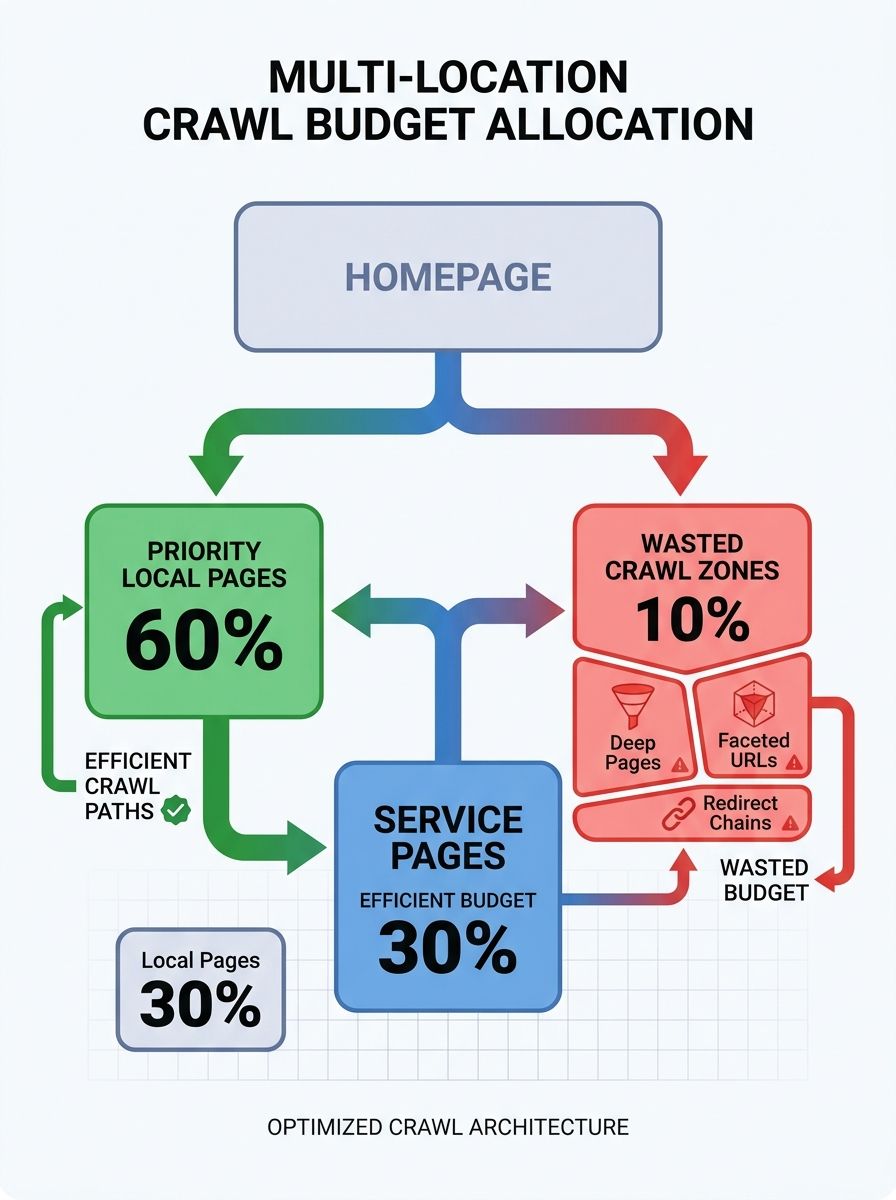
Poor site architecture forces Google to spend crawl budget on pages that generate zero local visibility. Deep page hierarchies, unchecked faceted navigation, orphaned URLs, and redirect chains are the primary offenders, and multi-location service businesses suffer disproportionately because their URL counts scale multiplicatively across every location-service combination.
Google's own documentation defines crawl budget as crawl rate limit multiplied by crawl demand. For a 50-location HVAC company with 12 service categories, that means 600+ unique location-service URLs before blog posts, team bios, testimonial pages, and filtered views enter the picture. Google prioritizes pages based on importance, freshness, popularity, uniqueness, and perceived revisit value, which means your "Drain Cleaning in Peoria" page competes for crawl attention against every other URL on your domain. When architectural waste consumes 40% of available crawl slots, those deep local pages get discovered weeks late — or never.
I've audited multi-location sites where Google Search Console's Crawl Stats showed 38-45% of total crawl requests going to parameter-laden filter URLs, paginated review pages, and 301 redirect chains from a rebrand completed two years prior. The fix is structural, and these six rules address the root causes directly.
Flatten every location page to three clicks from the homepage
Site depth and crawlability have a direct, measurable relationship. Seobility's crawl budget analysis found that all subpages should be no more than 4 to 5 clicks from the homepage, but for local businesses competing in map packs and local intent queries, even 4 clicks is too deep. Your location pages need to sit at depth 2 or 3 to receive adequate crawl frequency.
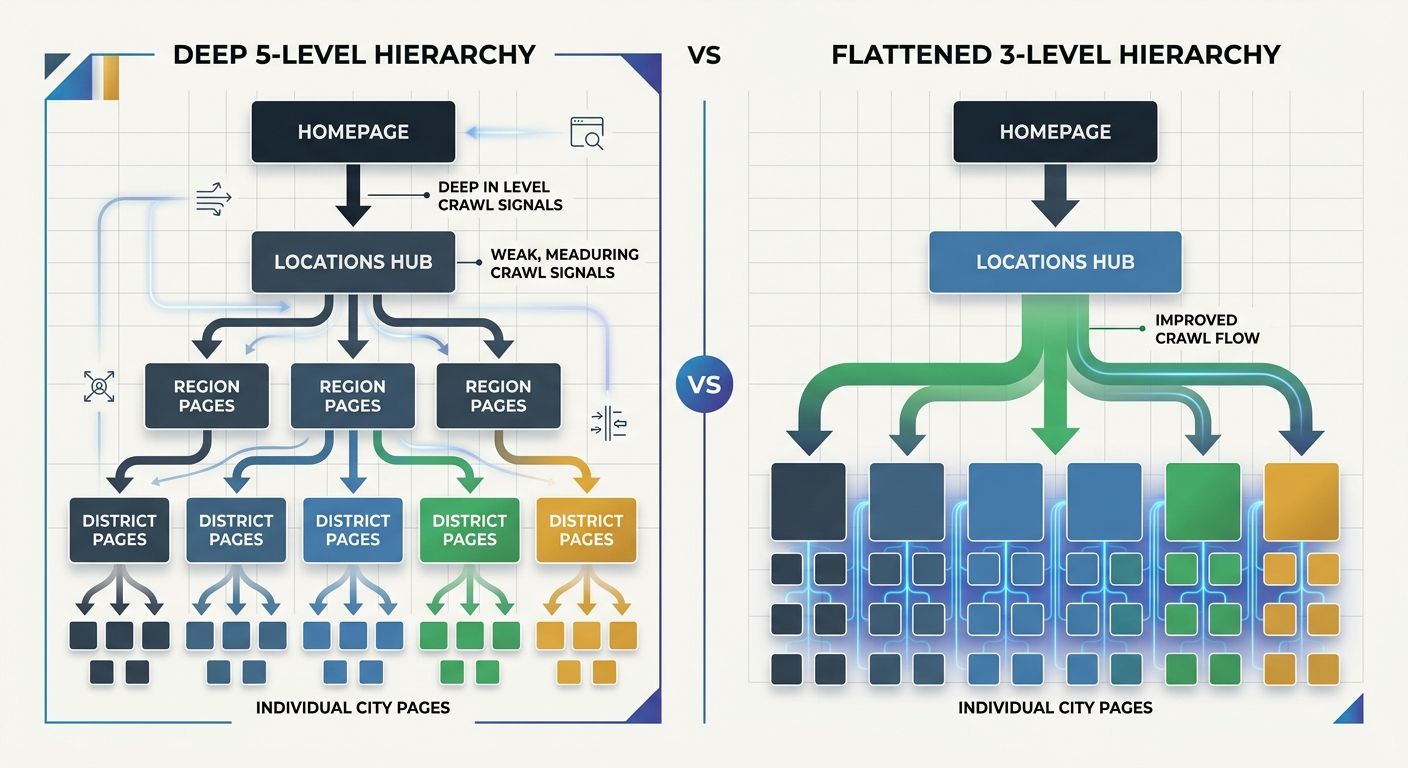
The typical mistake plays out like this: Homepage → Services → Service Category → City → Specific Location Page. That's depth 5. Googlebot allocates crawl resources proportional to perceived importance, and crawl depth research from BrandStory confirms that burying important content five or more clicks from the homepage makes discovery difficult for search engines. A page at depth 5 receives a fraction of the crawl attention a depth-2 page gets.
The fix: create a dedicated locations hub linked from your primary navigation. Every individual location page links directly from that hub. Homepage → Locations → City Name. Depth 3. If you operate in fewer than 20 locations, link the top-performing city pages directly from the homepage footer or a prominent navigation section, bringing them to depth 2. This structural change alone often recovers 15-25% of wasted crawl budget for multi-location local businesses.
Block faceted navigation from generating crawlable URLs
Faceted navigation is the single largest crawl budget killer for local service sites that let users filter by service type, neighborhood, insurance accepted, or appointment availability. A 30-location dental practice with 8 filterable attributes can generate thousands of parameter URLs that Googlebot will attempt to crawl, each one returning content nearly identical to the canonical page.
Use robots.txt to permanently block filter parameters, session IDs, and sort-order URLs. Google's documentation is explicit on this point: robots.txt should block URLs you never want crawled at all. For temporary crawl management, canonical tags work better. But faceted navigation on local sites produces URLs that carry no unique value, making a permanent robots.txt block the right approach. One documented case study showed a 35% decrease in crawl rate for redundant URLs after canonicalizing duplicate URLs, with a 12% traffic increase to canonical pages.
Direct internal links toward pages that generate local revenue
Internal linking crawl flow determines which pages Googlebot treats as priorities. Research from Netwave Interactive found that effective internal linking ensures crawlers focus on the most important pages first, maximizing crawl efficiency. For local businesses, those important pages are location landing pages, service-area pages, and conversion-focused content.
The failure pattern I encounter repeatedly: blog posts link exclusively to other blog posts, location pages link only back to the homepage, and service pages contain zero contextual links to the specific cities where that service is offered. The blog accumulates most of the internal link equity while revenue-generating local pages sit in a linking dead zone. I wrote about this broader dynamic in how poor site structure silently kills internal linking strategy, and the damage compounds significantly for multi-location businesses where hundreds of local pages compete for limited crawl attention.
Every blog post should link to at least one relevant location page. Every service page should link to the top 3-5 cities where that service is offered. Every location page should cross-link to adjacent location pages and to every service available at that location. Strategic internal linking from already-indexed pages helps new location content get discovered within hours or days rather than weeks, according to ClickRank's 2026 internal linking guide.
Purge soft 404s from closed locations and expired service offerings
Why do soft 404s drain crawl budget so effectively? Because they return a 200 status code while displaying "location closed," "service no longer available," or an empty template. Googlebot sees the 200 response, assumes the page is healthy, and returns to recrawl it on schedule. Each visit consumes a crawl slot that could have gone to an active location page generating real local search traffic.
Multi-location businesses accumulate soft 404s every time they close a location, discontinue a service in a specific market, or let a seasonal landing page expire without proper redirects. I audited a 150-location retail chain where 23% of all crawled URLs in a 30-day Search Console window were soft 404s from 40+ locations closed over three years. Those URLs generated zero traffic but consumed nearly a quarter of all crawl activity.
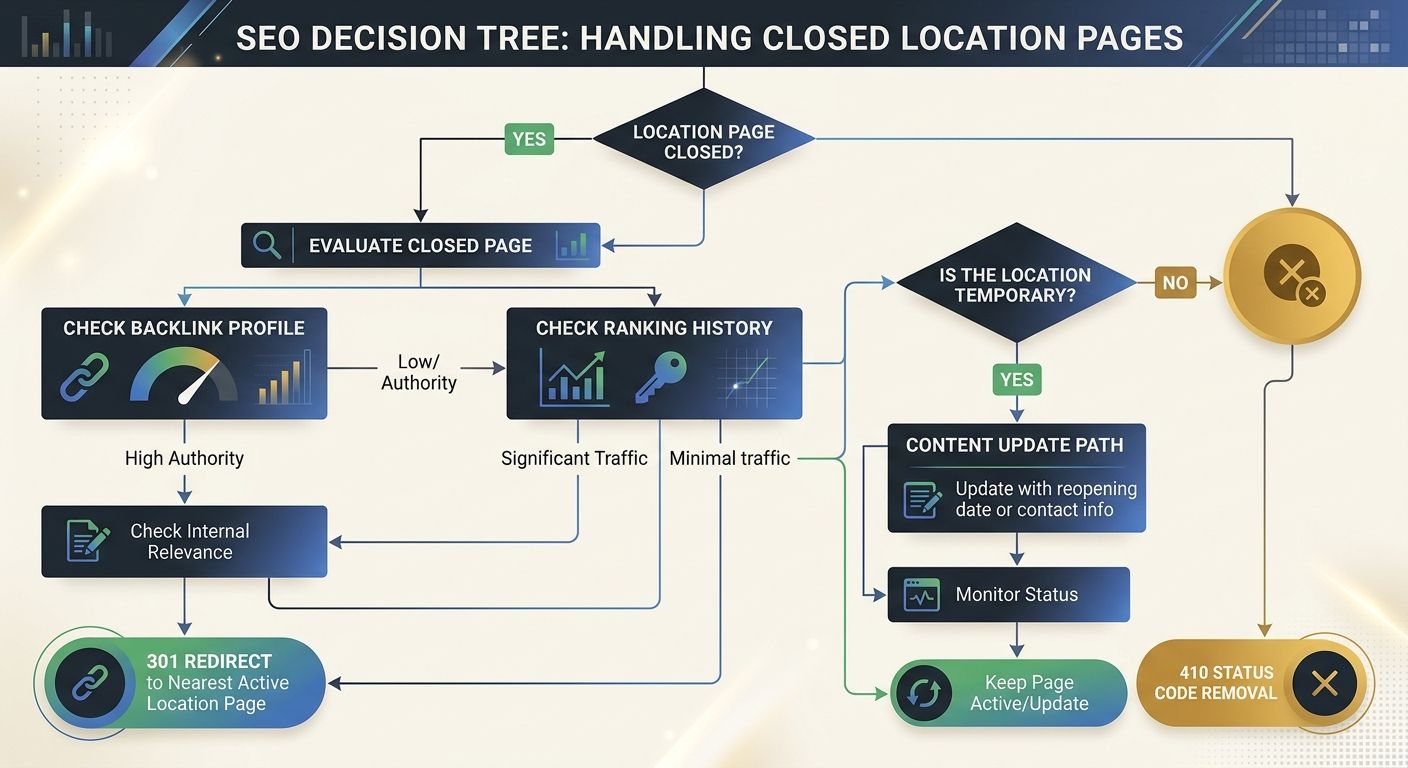
The fix depends on the page's history. If the closed location page has accumulated backlinks and historical rankings, 301 redirect it to the nearest active location page. Understanding how authority moves through your site architecture matters here because a properly implemented redirect preserves 90-99% of accumulated link equity. If the page has no backlinks and no ranking history, return a proper 410 (Gone) status code so Googlebot removes it from its crawl queue permanently.
Submit segmented XML sitemaps for each content type
A single sitemap.xml containing every URL on a 500-location franchise site tells Google nothing useful about indexing priority signals or content structure. Segmenting sitemaps by content type gives you granular control over crawl priority and makes server log analysis dramatically more productive.
Create separate files: sitemap-locations.xml, sitemap-services.xml, sitemap-blog.xml. Include only canonical, indexable, 200-status URLs. If you've been following the previous rules, your soft 404s are gone and your faceted URLs are blocked, so these sitemaps should contain exclusively pages you genuinely want indexed. I covered the full strategy behind using sitemaps to signal topic authority and crawl priority in a previous piece, and the approach applies with particular force to multi-location architectures where Google needs explicit guidance about which location pages carry the most weight.
One enterprise case study reported a 73% reduction in crawl waste after blocking low-value URL patterns and cleaning sitemaps, leading to a 733% ROI in organic revenue within 90 days. Those numbers come from large-scale implementations, but the directional impact holds for 20-location service businesses with far smaller URL inventories.
Collapse redirect chains from past domain migrations and rebrands
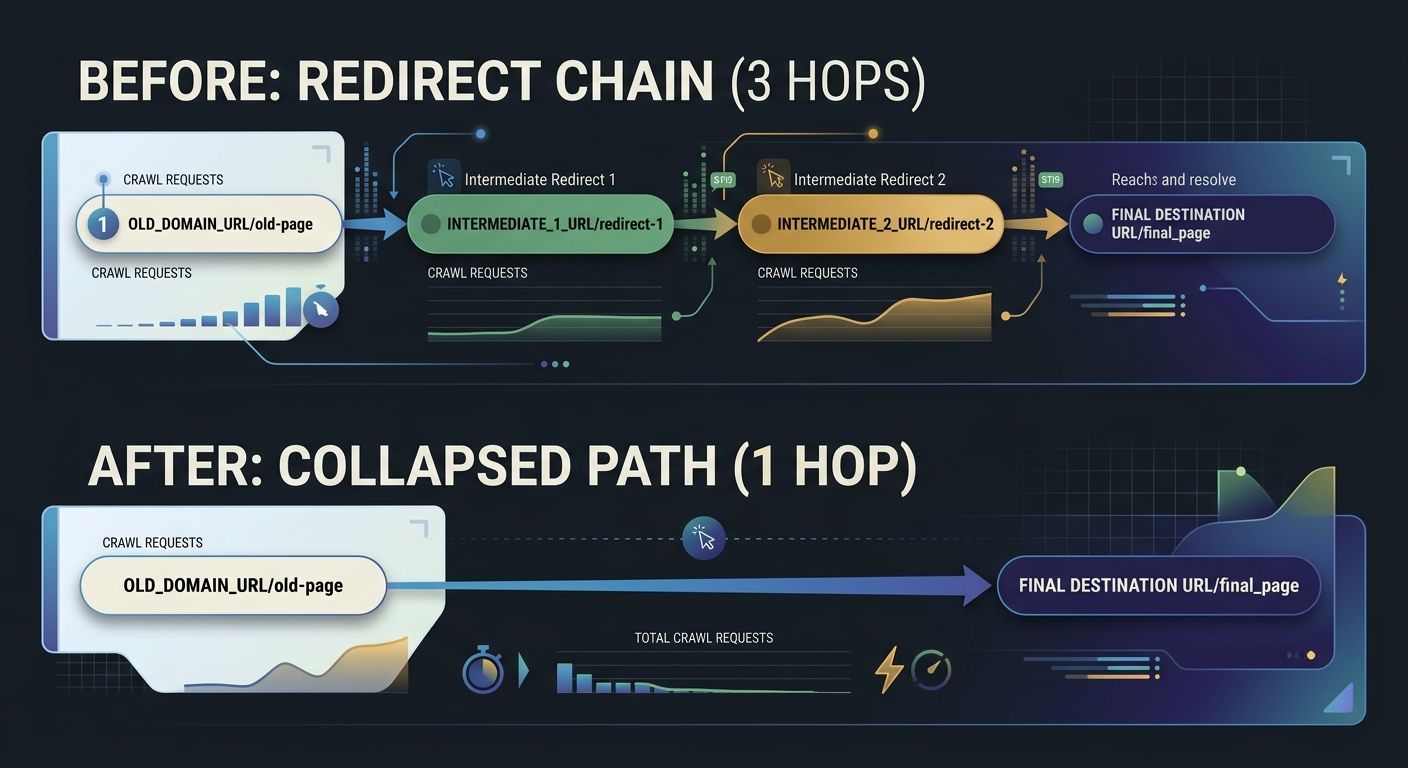
Every hop in a redirect chain consumes a separate crawl request. Google follows up to five chained redirects, but chains of three or more create real risk that Googlebot abandons the crawl path entirely. Local businesses that have rebranded, merged with another practice, or migrated domains frequently carry redirect chains they don't know about.
The typical scenario: a plumbing company migrated from oldbrand.com to newbrand.com in 2023, then consolidated location pages in a site redesign in 2025. A backlink pointing to oldbrand.com/plumbing-austin now redirects to newbrand.com/plumbing-austin, which redirects to newbrand.com/services/plumbing/austin-tx. That three-hop chain burns three crawl requests for what should be one page load. If you've gone through a domain migration and are diagnosing ongoing ranking loss, stale redirect chains are frequently a contributing factor that gets overlooked in post-migration audits.
Crawl your full redirect inventory with Screaming Frog. Identify every chain with two or more hops. Update the origin of each chain to point directly to the final destination URL. For a 100-location business with redirect chains averaging 2.5 hops, collapsing those chains can recover 8-15% of total crawl budget, which translates directly to faster discovery and indexing of your active location pages.
When These Rules Conflict
These six rules occasionally pull in opposite directions, and recognizing those tensions prevents overcorrection. Flattening your hierarchy to three clicks works cleanly for 50 locations, but a 2,000-location franchise physically cannot link every city page from a single hub without creating a page with 2,000 outgoing links, which creates its own crawl and user experience problems. At that scale, regional intermediary pages (Homepage → States → Cities → Locations) become necessary, accepting depth 4 as the practical minimum while applying site architecture principles that support rankings at scale.
The rule about directing internal links toward revenue pages also has natural limits during a major content marketing push where new blog posts need quick indexing. During those periods, temporarily increasing cross-linking between new posts and already-indexed content makes sense, as long as you maintain strong links back to location pages from every post you publish.
The underlying principle across all six rules stays consistent: Google's crawl budget is finite, and every URL that consumes a crawl slot without producing local visibility is a direct cost. Monitor Search Console's Crawl Stats monthly. Track the ratio of crawl requests hitting indexable, revenue-generating pages versus everything else. When that ratio improves, your architecture is doing its job. And when you find yourself trying to understand why Google crawls pages but won't rank them, verify whether those pages actually receive adequate crawl frequency before looking for other explanations, because pages Googlebot visits once a quarter will never outperform pages it returns to weekly.

Sarah Chen
SEO strategist and web analytics expert with over 10 years of experience helping businesses improve their organic search visibility. Sarah covers keyword tracking, site audits, and data-driven growth strategies.
Related Articles

The Site Architecture Crawl Priority Map: Using XML Sitemaps and Internal Linking to Win in the AI Search Era
Flat site architecture, segmented XML sitemaps, and deliberate internal linking form the crawl priority map that determines whether AI answer engines can find, index, and cite your local business pages. Without all three working together, your location pages sit invisible to both Google and ChatGPT.

Site Architecture for SEO: How to Structure Your Website for Maximum Rankings
PageRank flows downhill through your site's link graph, losing equity at every click away from the homepage.

The Crawlability-to-Rankings Gap: Why Google Understands Your Pages But Won't Rank Them
Google Search Console's page indexing report marks a URL as "Submitted and indexed," and most site owners interpret that green status as mission accomplished.
Explore more topics